If your De’Longhi Magnifica Evo or similar espresso machine keeps showing the descale light even after descaling, it can be frustrating. This guide provides clear, safe instructions to troubleshoot and resolve the issue, ensuring your coffee maker functions perfectly again.

Get home appliances delivered free with Prime
- Fast, free delivery on millions of items
- Prime Video, Amazon Music and more included
- Member-only deals all year
Regular descaling is key to maintaining optimal performance, but sometimes the machine’s sensor or software needs a manual reset. Follow these steps carefully to get your machine back to brewing without the persistent descale warning.
Key Takeaways
| Understand the descale light | It signals the need for descaling or a reset. |
| Perform a manual reset | Resetting can clear the stuck warning. |
| Ensure proper descaling process | Use recommended descalers and follow instructions. |
| Check for sensors or software issues | Sensor malfunction may cause false alerts. |
Step 1: Confirm the Need for Descaling
Ensure your machine actually needs descaling. If the descaling process was recently completed, the light may still be stuck due to a reset issue. Refer to your user manual for specific descaling instructions.
Step 2: Run a Manual Descaling Cycle
- Fill the water tank with fresh, filtered water and add the recommended descaling solution (such as De’Longhi EcoDecalk).
- Follow the machine’s descaling procedure as outlined in your manual.
- Ensure the machine completes the cycle and rinse thoroughly afterward.
Step 3: Reset the Descale Indicator
- Turn the machine off and unplug it for a few minutes.
- Plug it back in and turn it on.
- Press and hold the ‘Descale’ or ‘Maintenance’ button (or follow your specific model’s reset instructions) until the indicator light resets.
Step 4: Check for Sensor or Software Issues
If the light remains on, inspect the water level and sensor area for any debris or buildup. Clean sensors carefully with a soft cloth. If issues persist, consider contacting De’Longhi support or a qualified technician.
Tips and Warnings
- Use only recommended descalers: Avoid citric acid or unapproved solutions that may damage your machine.
- Follow the descaling schedule: Regular descaling prevents buildup and sensor errors.
- Unplug before cleaning: Always safety precautions when opening or cleaning internal parts.
- Contact support if needed: If the issue persists after following these steps, professional assistance is advised.
The Products in This Guide
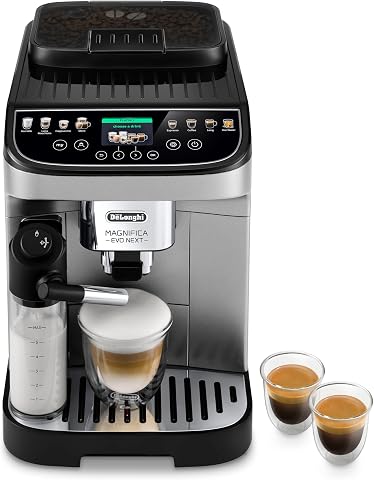
De’Longhi Magnifica Evo Next Fully Automatic Espresso Ma
- ✔ Water Capacity: 1.8 liters
- ✔ Grind Settings: 13
- ✔ Dimensions: 12 x 16 x 14 inches
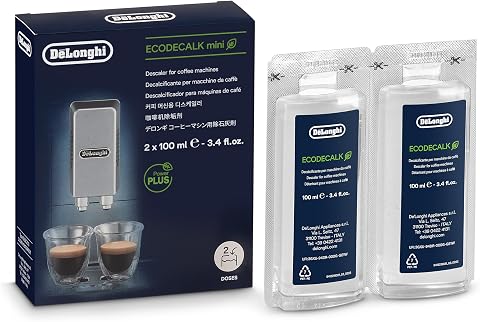
De’Longhi EcoDecalk Descaler
- ✔ Ingredients: Plant-based lactic acid
- ✔ Bottles: 2 x 100ml
- ✔ Suitable For: Most espresso machines
De’Longhi Magnifica Evo Next Fully Automatic Espresso Ma
The De’Longhi Magnifica Evo Next Fully Automatic Espresso Machine offers versatile brewing options, a built-in grinder, and milk frother, making it a top choice for coffee enthusiasts. Its automatic features simplify the process, but occasional descaling issues can occur.
Pros:
- Easy one-touch recipes
- Built-in grinder with 13 settings
- Automatic milk frother
- Programmble for personalized drinks
Cons:
- Descaling light may get stuck
- Requires regular maintenance
- Can be complex to troubleshoot
Best for: Home baristas seeking convenience and quality
Not ideal for: Users uncomfortable with manual maintenance
Bottom line: A highly capable espresso machine with some maintenance quirks.
De’Longhi EcoDecalk Descaler
The De’Longhi EcoDecalk Descaler is a natural, plant-based solution that gently removes limescale, extending your machine’s lifespan and maintaining optimal performance. It’s easy to use and compatible with many models.
Pros:
- Eco-friendly ingredients
- Safe for machine components
- Effective at descaling
- Prevents buildup
Cons:
- Requires regular application
- Single-use bottles
- May need multiple treatments for heavy buildup
Best for: Routine descaling and maintenance
Not ideal for: Heavy limescale buildup requiring stronger solutions
Bottom line: A gentle yet effective descaler that prolongs your machine’s life.
Frequently Asked Questions
Why is the descale light stuck on even after descaling?
The sensor may be dirty or malfunctioning, or the machine’s software needs a reset. Follow the reset steps to clear the warning.
How often should I descale my De’Longhi espresso machine?
Typically every 2-3 months, depending on usage and water hardness. Using a water filter can reduce descaling frequency.
Can I use vinegar instead of descaler?
It’s not recommended as vinegar can damage internal components. Use a manufacturer-approved descaler like De’Longhi EcoDecalk for safety and effectiveness.
What should I do if the descaling light keeps coming on?
Repeat the descaling process, clean sensors, and reset the machine. If the problem persists, contact De’Longhi support for assistance.
Keep Your Coffee Fresh and Your Machine Functional
Regular maintenance and correct descaling procedures are essential to keep your De’Longhi espresso machine running smoothly. If the descale light gets stuck, following these steps can help you troubleshoot and resolve the issue safely. Proper care ensures your machine continues to produce delicious coffee for years to come.
Affiliate disclosure: As an Amazon Associate we earn from qualifying purchases. Prices and availability are accurate as of the time of publishing.
Fall yard work Picks
leaf blowers
As an affiliate, we earn on qualifying purchases.