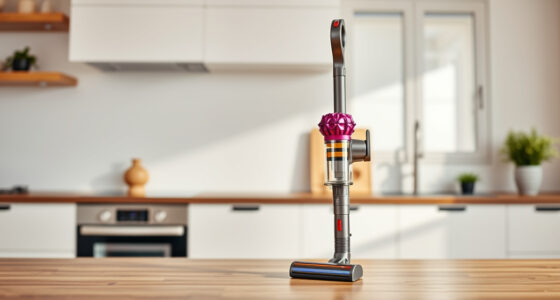
Getting your new Dyson V15 Detect™ Origin Cordless Vacuum ready for use is straightforward when you follow these clear, step-by-step instructions. Proper setup ensures you maximize its powerful features and maintain its longevity. Below, you’ll find practical guidance to assemble, install accessories, and perform initial maintenance.

Get home appliances delivered free with Prime
- Fast, free delivery on millions of items
- Prime Video, Amazon Music and more included
- Member-only deals all year
Whether you’re a first-time Dyson user or upgrading from an older model, this guide will help you start cleaning efficiently and safely right out of the box.
Key Takeaways
| Powerful cleaning with intelligent features | The V15 Detect™ offers 100% more power and adaptive cleaning modes. |
| Easy assembly process | Simple steps to assemble the vacuum and install accessories. |
| Initial maintenance tips | Replace filters and pre-filters for peak performance. |
| Safety first | Ensure proper handling during setup to prevent damage. |
Unboxing and Initial Inspection
- Carefully unpack all components from the box, including the main vacuum unit, cleaner heads, crevice tool, filters, and accessories.
- Check that all parts listed are present and undamaged. Refer to the product manual for a full parts list.
Assembling the Vacuum
- Attach the desired cleaner head (either Fluffy Optic or Digital Motorbar) to the main wand by aligning the connector and pressing until it clicks securely.
- Ensure the power trigger is accessible and functional once assembled.
Installing the Filters
- Remove the pre-filter and main filter from the vacuum as indicated in the manual.
- Rinse the filters under water, gently wring out excess water, and let them dry completely (at least 24 hours) before reinstalling.
- Reinstall the filters securely into the designated slots to ensure optimal filtration and suction performance.
Charging and Powering Up
- Connect the charging dock to a power outlet and place the vacuum on the dock, ensuring proper contact points.
- Charge the vacuum fully until the LCD screen indicates a full battery. This may take several hours initially.
Starting Your First Cleaning Session
Once charged and assembled, turn on the vacuum using the power trigger. Select the appropriate power mode based on your cleaning needs. Use the LCD screen to monitor debris collection and battery status, ensuring optimal performance.
The Products in This Guide

Dyson V15 Detect™ Origin Cordless Vacuum
- ✔ Charge Time: 3.5 hours
- ✔ Dust Detection: Yes
- ✔ Filter Type: Pre and post-filters

LANMU Crevice Tool Vacuum Attachments Compatible
- ✔ Nozzle Width: Narrow
- ✔ Material: Plastic
- ✔ Compatibility: Most Dyson cordless models
Dyson V15 Detect™ Origin Cordless Vacuum
The Dyson V15 Detect™ Origin offers powerful suction, intelligent debris detection, and versatile cleaning options. Proper setup maximizes its features for a thorough clean, whether on hard floors or carpets.
Pros:
- Powerful and adaptive cleaning modes
- Long battery life (60 mins)
- LCD screen for real-time info
- Includes advanced cleaner heads
Cons:
- May require regular filter maintenance
- Heavier than some cordless models
- Initial setup involves multiple steps
Best for: Whole-home cleaning, pet hair removal, detailed dust detection
Not ideal for: Light or quick cleanups, ultra-lightweight preferences
Bottom line: A highly capable cordless vacuum for comprehensive home cleaning.
LANMU Crevice Tool Vacuum Attachments Compatible
The LANMU Crevice Tool attachment is perfect for reaching tight spaces, corners, and car interiors, complementing your Dyson vacuum’s versatility.
Pros:
- Narrow nozzle easily reaches tight spots
- Compatible with multiple Dyson models
- Flexible and slim design
- Helps remove hidden dust and debris
Cons:
- May be less effective on large debris
- Requires manual attachment removal
- Design may be too slim for heavy debris
Best for: Detail cleaning around edges, car interiors, and small crevices
Not ideal for: Heavy debris removal or large-area cleaning
Bottom line: A must-have attachment for precision cleaning.
Frequently Asked Questions
How often should I replace the filters?
It is recommended to replace or clean the filters every 2-3 months for optimal performance, depending on usage. Rinse the filters with water and let them dry completely before reinstalling.
Can I use any attachments with my Dyson V15?
Yes, compatible attachments like the LANMU crevice tool can be used, but always verify compatibility with your specific Dyson model.
What should I do if the vacuum won’t turn on?
Ensure the vacuum is fully charged, the filters are properly installed, and the power trigger is engaged. If problems persist, perform a reset or contact Dyson support.
How do I maximize battery life during cleaning?
Use the power trigger only when necessary and select the appropriate power mode. The LCD screen helps monitor remaining run time to avoid sudden shutdowns.
Your Complete Dyson Setup Guide
With proper assembly, filter maintenance, and initial charging, your Dyson V15 Detect™ Origin Cordless Vacuum is ready to deliver deep, intelligent cleaning across your entire home. Regular upkeep and using the right accessories will ensure your vacuum stays in peak condition for years to come. Enjoy effortless cleaning and the convenience of Dyson’s innovative features!
Affiliate disclosure: As an Amazon Associate we earn from qualifying purchases. Prices and availability are accurate as of the time of publishing.
NFL season / tailgating Picks
team gear
As an affiliate, we earn on qualifying purchases.