TL;DR

Get home appliances delivered free with Prime
- Fast, free delivery on millions of items
- Prime Video, Amazon Music and more included
- Member-only deals all year
Smart home security cameras let you monitor your home remotely, with features like high-res video, night vision, and alerts. Choosing the right one depends on placement, connectivity, privacy, and budget. They’re a powerful part of modern home security, but require thoughtful setup and ongoing care.
Imagine being able to check your front door from your phone, no matter where you are. Or catching a package thief red-handed, thanks to a clear, high-resolution camera. Smart home security cameras have become more than just fancy gadgets — they’re essential tools that blend safety, convenience, and peace of mind.
In this guide, you’ll learn what to look for when choosing a camera, how different features impact your security, and practical tips to get the most out of your setup. Whether you want an indoor camera to watch your kids or a weatherproof outdoor model guarding your driveway, understanding your options makes all the difference.
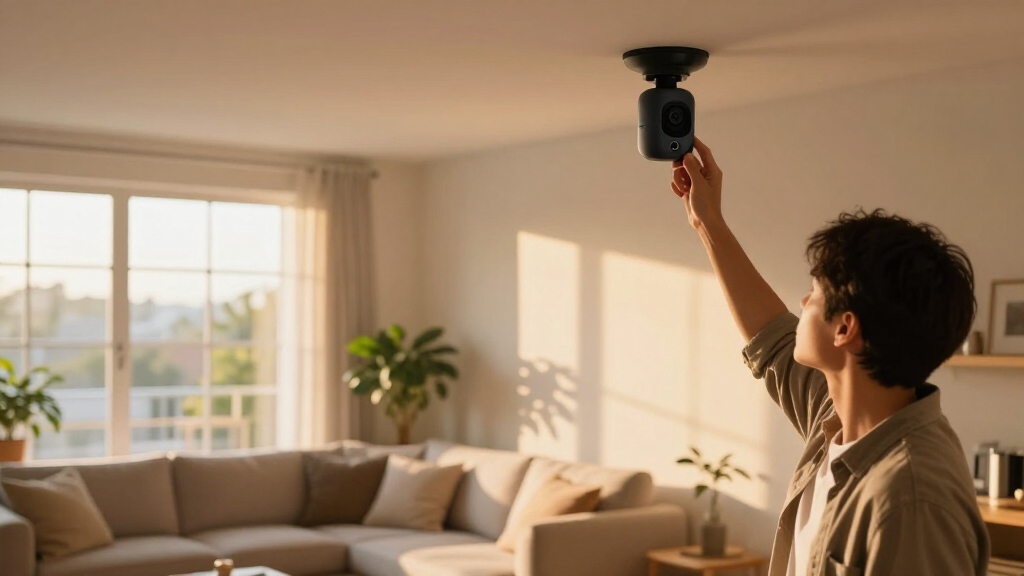
Prioritize placement to maximize coverage and minimize tampering risk.
High-resolution, night vision, and AI detection improve reliability but check compatibility and storage costs.
Balance wired and wireless options based on your home’s layout and maintenance willingness.
Use layered security: strong passwords, 2FA, and firmware updates to protect your footage.
Stay current with trends like AI recognition and local processing for smarter, more efficient security.
What Makes a Smart Security Camera Really Work for You?
Smart security cameras aren’t just about sharp images; they’re about how well they fit into your life. Think of them as your digital guard dogs, alerting you to activity, recording evidence, and sometimes even talking back. The key is balancing quality, reliability, and privacy.
For example, a camera with 4K resolution may sound impressive, but if its lens isn’t sharp or it’s poorly placed, you’ll miss details. Conversely, a camera with excellent night vision and motion detection can help catch a prowler lurking after sunset. The best cameras integrate seamlessly into your smart home ecosystem, allowing voice commands and routines.
How to Pick the Perfect Spot for Your Cameras
- Identify vulnerable areas: entrances, driveways, backyards.
- Mount cameras high enough to avoid tampering but low enough to capture faces and license plates.
- Avoid pointing directly into neighbors’ private spaces or areas where privacy matters.
- Consider lighting: cameras with night vision work best in shadows or darkness, but placement near bright lights can wash out details.
- Test the field of view to make sure it covers the desired area without blind spots.
For example, a neighbor installed a camera overlooking their driveway and noticed a suspicious figure lurking at night, thanks to the infrared night vision. Placement is everything.
Comparing Camera Types: Indoor, Outdoor, and Doorbell Cameras
| Feature | Indoor Cameras | Outdoor Cameras | Doorbell Cameras |
|---|---|---|---|
| Weather Resistance | Not rated | Weatherproof, rated for rain and dust | Weather-resistant, designed for door use |
| Placement | Inside, near windows or entrances | Outside, mounted on walls or eaves | At front door or porch |
| Field of View | Typically narrow or fixed | Wide-angle, often adjustable | Focused on doorstep, wide enough for packages and visitors |
| Power Source | Plug-in or battery | Wired or battery | Hardwired or battery |
Choose indoor cameras for inside monitoring, outdoor models for perimeter security, and doorbell cameras for visitor alerts. Each type has unique features tailored to its environment.
Understanding Video Quality and Night Vision — Why It Matters
Resolution is only one part of useful video. A higher pixel count can preserve detail when you zoom in, but lens quality, distance, motion blur, and lighting all affect whether you can actually recognize a face or read a plate. Higher resolution also creates larger files, which can use more bandwidth and fill storage sooner; check that your Wi-Fi and recording plan can handle it.
Infrared night vision illuminates a scene without visible light and typically produces black-and-white footage. It can show movement in darkness, though reflective surfaces such as glass may cause glare, and detail falls off with distance. Color night vision can make clothing or vehicle color easier to distinguish, but usually needs ambient light or a spotlight. That extra light may improve identification while making the camera more noticeable.
Think of video quality as a chain: resolution, lens, lighting, placement, and recording settings all have to work together. A well-placed 1080p camera covering a nearby doorway may capture more useful evidence than a 4K camera aimed across a dark, distant yard. Choose for the scene you need to identify, then check sample footage at night and during movement.
How Detection and Alerts Keep You Safer
Smart cameras use motion detection, AI-powered person or vehicle recognition, and activity zones to filter what triggers alerts. Instead of getting notified every time a branch moves, you can set it to alert only when a person appears in your driveway.
Imagine receiving a push notification seconds after a package delivery — that’s the power of smart detection. But performance varies: shadows, weather, and placement can cause false alarms.
For example, some cameras let you draw activity zones on the live feed. You block out busy street traffic, so alerts focus on your porch, reducing noise and frustration.
Live Viewing and Recording — What Options Are Actually Useful?
Some cameras only stream live video, while others record clips or continuous footage. Recording often depends on a cloud subscription, local storage, or both. The choice impacts how much footage you can review later and how long it stays stored.
For example, a homeowner with a cloud plan can review past events for up to 30 days, while a local storage camera might overwrite older clips after a week. Consider your needs: do you want instant access or long-term records?
Popular options include SD cards, network video recorders, or cloud services like Amazon Ring or Google Nest. Be aware of costs; cloud subscriptions can add $3-$10 per month per camera.
Connectivity and Power — How Do These Cameras Stay Alive?
Most smart cameras rely on Wi-Fi, but some use wired Ethernet or a dedicated hub for better stability. Indoor cameras usually plug into an outlet, while outdoor models often run on batteries or solar power.
Battery-powered cameras offer flexible placement but need regular charging — say every few months. For instance, a driveway camera with a 3,000 mAh battery might last 3-6 months depending on activity levels.
Wired cameras provide constant power but limit placement options. Weatherproof models rated IP66 or higher withstand rain, snow, and dust, ensuring reliable operation year-round.
Think of it like a smartphone: wired cameras are always on, while battery models are like a phone that needs charging — handy but requires upkeep.
Smart Home Compatibility — Making Your Cameras Play Nice
Most cameras work with voice assistants like Alexa, Google Assistant, or Siri, and integrate into ecosystems like Apple HomeKit or Google Home. Compatibility varies: some models support routines, voice commands, and automations easily, others require extra hubs or apps.
For example, a camera that integrates with Alexa can turn on a porch light when it detects motion. But if it doesn’t support Matter (the new standard), it might not work seamlessly with all devices.
Check the list of supported platforms before buying. Compatibility matters because it simplifies your smart home setup and reduces frustration when devices don’t talk to each other.
Privacy and Security — How to Keep Your Data Safe
Security features like two-factor authentication, encryption, and regular software updates help protect your footage and account. Be cautious about sharing access, and disable cameras when not needed to protect your privacy.
For instance, a homeowner who enabled 2FA on their account prevented unauthorized access even if their password was compromised. Also, avoid placing cameras where they might record private conversations or sensitive areas.
Remember, your camera’s security is only as good as your account protections. Regularly update passwords and firmware to stay ahead of vulnerabilities.
Making Smart Choices: What Really Matters When Buying
When choosing a camera, consider placement, resolution, night vision, detection features, storage options, power source, and compatibility. The cheapest model might lack crucial features, while the most expensive isn’t always best for your needs.
For example, if you want to monitor a large backyard, a camera with wide-angle lens and good night vision is essential. If you live in a snowy region, weatherproofing becomes critical. Focus on features that address your specific security concerns.
Also, compare subscription plans and total costs, including replacement batteries or optional hubs. A balanced choice saves money and delivers peace of mind.
Emerging Trends That Will Shape Your Next Camera
Newer models include AI-powered person and object recognition, local processing to reduce cloud dependence, dual-band Wi-Fi, and integrated spotlights. These features make cameras smarter and more adaptable.
For example, some cameras now distinguish between a falling branch and a person, reducing false alerts. Others combine with doorbells and alarms for a more integrated security system.
While Matter promises easier interoperability, buyers should verify which features and integrations are actually supported. Staying informed helps you future-proof your investment.
Frequently Asked Questions
Do smart cameras require a subscription?
Not always. Some cameras offer free live view and basic alerts, but cloud storage, longer recording history, and advanced detection usually require a subscription. Local storage options can help you avoid ongoing fees.
Can a camera record without Wi-Fi or internet?
Some models can store footage locally during outages, but remote viewing and cloud backup need an internet connection. Always check if your preferred camera supports local recording options.
Are local storage options safer than cloud storage?
Local storage gives you direct control but can be stolen or damaged. Cloud storage keeps footage off-site, protecting it from physical threats, but depends on the provider’s security. Use strong passwords and enable two-factor authentication regardless.
Can smart cameras be hacked?
Yes, any device connected to the internet carries risks. Protect yourself by using unique passwords, keeping firmware updated, and securing your Wi-Fi network. Regularly review device access permissions.
Do cameras work in complete darkness?
Most use infrared night vision to see in darkness, producing black-and-white images. Some models with color night vision need ambient light or spotlights, but image detail diminishes over distance.
Conclusion
Smart home security cameras are powerful tools, but they’re only as good as how you set them up and maintain them. Think beyond specs — focus on placement, security, and integration to truly protect your home.
Imagine your home as a fortress, quietly watching, alerting, and recording. When used wisely, these cameras turn technology into a trusted guardian, giving you peace of mind in a busy world.
Fall Picks
fall essentials
As an affiliate, we earn on qualifying purchases.