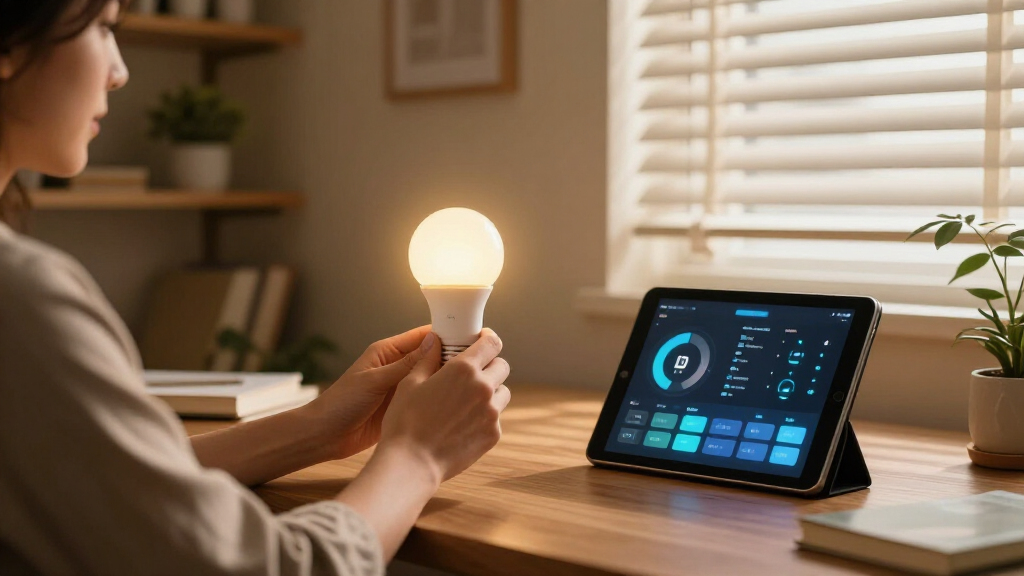
Smart home study lighting has moved well beyond a simple bulb on a stick — today’s desk lamps offer app and voice control, tunable color temperature, auto-dimming, and eye-care optics designed for long reading and study sessions. After comparing 11 popular options, the Micomlan LED Desk Lamp with Clamp stands out as the best overall pick thanks to its auto-dimming sensor and 24W output that can light an entire desk surface. The Hifree Smart Table Lamp is the strongest choice if voice assistants and RGB ambiance matter most, while the Lepro 9.5W Touch Desk Lamp wins on value for students on a budget. The main tradeoff in this category is between true smart-home integration and pure lighting performance: app-connected lamps often sacrifice brightness, while powerful architect-style lamps usually skip Wi-Fi entirely. Read on for the full breakdown, including clamp vs. freestanding designs and which lamps actually reduce eye strain.

Get home appliances delivered free with Prime
- Fast, free delivery on millions of items
- Prime Video, Amazon Music and more included
- Member-only deals all year
Complete the kit



Key Takeaways
- Only one product in the lineup (the Hifree Smart Table Lamp) offers genuine app and voice control — most ‘smart’ study lamps are actually touch or remote-controlled, so buyers wanting Alexa or Google Home integration have a narrow path here.
- Clamp-mounted architect lamps (Micomlan, Pzloz, and both Motumen models) dominated on brightness and desk coverage, with 24W models delivering roughly triple the usable light of freestanding alternatives.
- Auto-dimming was the single feature that separated the top pick from the rest — the Micomlan’s ambient light sensor adjusts brightness to the room, which no other lamp in this comparison does.
- Sub-$30 options like the Lepro and the LED Desk Lamp with Clock are adequate for single-book or laptop tasks, but all of them struggled with wide desks and dual-monitor setups where clamp lamps pulled ahead.
- USB charging ports and built-in timers appeared on the mid-range picks (Lampat, White Crown) and proved more practical day-to-day than RGB color effects for actual study use.




| smart home study lighting | Lighting Modes |
|---|---|
| Motumen LED Desk Lamp for Home | — |
| Hifree Smart Table Lamp | — |
| LED Desk Lamp for Home Office | 10 temperatures × 10 brightness levels |
| White Crown LED Desk Lamp with | 5 |
| Motumen LED Desk Lamp for Home | — |
| Lepro LED Desk Lamp for Home O | 5 |
| LEPOWER Desk Lamp | — |
| Micomlan LED Desk Lamp with Cl | — |
| Lampat Dimmable LED Desk Lamp | Reading, Studying, Relaxation, Bedtime |
| Pzloz LED Desk Lamp for Office | Night light, reading, drafting, crafting |
| LED Desk Lamp with Clock | 3 (cool white, warm white, daylight) |
More Details on Our Top Picks
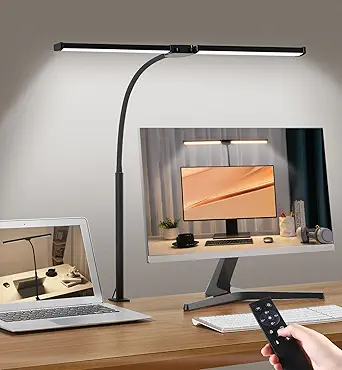
Motumen LED Desk Lamp for Home Office, Eye-Care Desk Light Clamp, Black
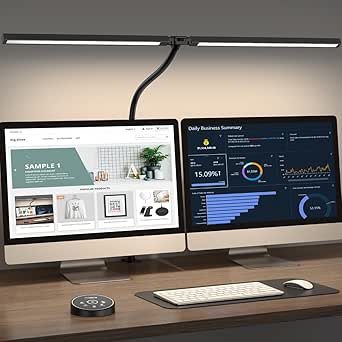
Balanced features at a budget price make this Motumen the smart entry point into clamp-style study lighting. Its 3000K-6500K color range matches the more expensive architect lamp below (B0F8HM1Z99), though with fewer granular presets — 20%-100% dimming rather than ten discrete brightness steps. Compared with the White Crown, it wins on desk coverage: the dual-head design spans a wide work surface where a single-bar lamp leaves dark corners. The 10-meter remote range is genuinely useful for adjusting light from a reading chair, and the one-hour timer suits fixed study blocks. The tradeoff is fitting — the clamp accommodates standard desks but struggles with thick tabletops or lip-edge designs, so measure before buying.
Pros:- Wide dual-head coverage for full desk workspaces
- Full 3000K-6500K color temperature range at a low price
- Long-range 32.8 ft remote with timer
- Flicker-free light that holds up during long study sessions
Cons:- Clamp fit is limited on thicker or unusual desk edges
- No smart home integration — no app, Alexa, or Google support
Best for: Students and remote workers with standard-thickness desks who want wide, adjustable task lighting without paying premium architect-lamp prices
Not ideal for: Anyone with thick or irregular desk edges, or those wanting a lamp that also serves as primary room lighting
- Color Temperature:3000K-6500K
- Brightness Range:20%-100% dimmable
- Light Beads:168
- Remote Range:32.8 ft / 10 m
- Control:Remote and button
- Timer:1 hour
- Mounting:Desk clamp
Our verdict“The most sensible pick if you want clamp-on coverage and color tuning without the premium price of a full architect lamp.”
Hifree Smart Table Lamp, Dimmable Desk Lamp with App/Voice Control, RGB Color Changing Touch Lamp
This is the only lamp in the lineup that actually lives up to the smart home part of the category. Alexa and Google Assistant voice control plus app scheduling mean you can shift from study-white to ambient RGB without leaving your chair — something none of the clamp lamps here can do. Its 8 scene modes work well for winding down after work sessions. The catch: it’s an accent-and-ambient light first. Unlike the Motumen clamp lamp, it won’t blanket a desk in bright task light, and the lack of white light customization means color accuracy suffers for detailed work. Treat it as a smart ecosystem companion beside a task lamp, not a replacement for one.
Pros:- True smart home integration with Alexa and Google Assistant
- App control with 8 customizable scene modes
- Flicker-free, eye-friendly light safe for children’s rooms
- 10,000+ hour LED lifespan
Cons:- Requires constant Wi-Fi for app and voice features to work
- RGB-focused with no tunable white light for task work
Best for: Smart home owners with Alexa or Google setups who want voice-controlled ambient and mood lighting around a study space
Not ideal for: Anyone whose primary need is bright, color-accurate task lighting for reading or detailed desk work
- Control Modes:Voice, app, touch
- Color Options:RGB, color changing
- Compatibility:Alexa, Google Assistant
- Scene Modes:8 built-in, customizable
- LED Lifespan:Over 10,000 hours
- Material:ABS and PC
Our verdict“Buy it to smarten up your study’s atmosphere — pair it with a task lamp rather than expecting it to do both jobs.”
LED Desk Lamp for Home Office with Clamp, Adjustable Brightness and Color Temperature, Eye-Care Architect Light with Remote Control
This architect lamp earns the top spot on raw capability: 24W of output producing 1800 lumens is roughly double what standard desk lamps like the Lepro 9.5W deliver, enough to light an entire L-shaped workspace. The CRI above 90 matters more than it sounds — colors render accurately, which helps with design work, crafting, and reading fine print. Where the cheaper Motumen offers basic dimming, this one layers 10 color temperatures × 10 brightness levels, a memory function, and longer 1/2/4-hour timers. The honest tradeoffs: it costs more than every basic lamp here, it needs a wall adapter rather than USB power, and the sheer number of adjustment options can overwhelm someone who just wants a light that turns on.
Pros:- 1800 lumens of output covers large desks in a single lamp
- CRI above 90 for accurate color rendering
- 10×10 temperature and brightness combinations with memory function
- 360° rotation and foldable bar for precise positioning
Cons:- Highest price in the lineup
- Requires a wall power adapter — no USB option
- Feature-dense controls have a learning curve
Best for: Serious home-office workers, crafters, and students with large desks who need maximum output and fine-grained control
- Power:24W
- Brightness:1800 lumens
- Color Temperature:3000K-6500K, 10 presets
- Lighting Modes:10 temperatures × 10 brightness levels
- Adjustability:360° rotation, 180° gooseneck, foldable bar
- CRI:>90
- Timer:1/2/4 hours
- Clamp Capacity:Up to 1.7 inches
- Power Source:External AC adapter
Our verdict“If your study is your workplace and your desk is large, this is the lamp that makes every other pick here feel like a compromise.”
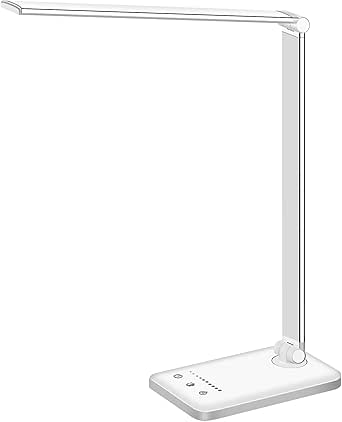
White Crown LED Desk Lamp with Dimmable Lighting, USB Charging, and Timer
Simplicity is the product here. Where the architect lamp (B0F8HM1Z99) demands setup decisions, the White Crown works out of the box: touch controls, 5 modes, 5 brightness levels, done. Its standout trick is the built-in USB charging port, which frees up a wall outlet for your phone — a small convenience that no clamp lamp in this roundup offers. The 50,000-hour LED rating also outlasts the Hifree’s 10,000-hour claim by a wide margin. The weakness is lighting flexibility: there’s no color temperature adjustment, so you can’t shift from cool study light to warm evening light the way you can with either Motumen. Fine for casual use, limiting for long varied sessions.
Pros:- Dead-simple touch operation with no setup required
- Built-in USB port charges phones without extra outlets
- 50,000-hour LED lifespan
- 30/60-minute auto-off timer for bedtime reading
Cons:- No adjustable color temperature at all
- Only 5 lighting modes limits versatility
- Requires external 5V/2A power — no battery
Best for: First-time desk lamp buyers and casual users who want affordable, plug-in-and-go lighting with a phone-charging bonus
Not ideal for: Users who tune color temperature throughout the day or need wide coverage across a large desk
- Lighting Modes:5
- Brightness Levels:5
- USB Charging Port:Yes
- Timer:30/60 minutes
- LED Lifespan:50,000 hours
- Power:5V/2A adapter
Our verdict“The right first lamp if you value simplicity and a charging port over tunability — just don’t expect it to grow with your needs.”
Motumen LED Desk Lamp for Home Office, Eye-Care Clamp Light
Sibling to the Motumen B0D4DG2CG2, this version trades that lamp’s continuous 20%-100% dimming for a simpler 5-mode, 5-brightness structure — fewer decisions, slightly less precision, usually a lower price. What it retains is the core strength: 168 lamp beads spread across dual heads for even, shadow-free coverage that single-bar lamps like the LEPOWER can’t match. The memory function is a quiet win, restoring your last settings every time you power on, which the White Crown lacks. One quirk worth knowing: the remote needs line of sight to the lamp, so it won’t work reliably from another room or behind obstacles. It’s desk-and-table use only, same as its sibling.
Pros:- Dual-head design spreads light evenly across wide desks
- Memory function restores preferred settings automatically
- Full 3000K-6500K color range in a compact footprint
- Remote with timer for convenience during study blocks
Cons:- Remote requires line of sight to the lamp head
- Only 5 fixed brightness modes versus continuous dimming
- Limited to desk or table mounting
Best for: Budget-conscious buyers who want dual-head coverage and preset simplicity rather than fine-grained dimming control
Not ideal for: Anyone wanting to control the lamp from outside the room, or needing full-room illumination
- Brightness Modes:5
- Color Temperature:3000K-6500K
- Dimming Range:20%-100%
- Remote Range:32.8 ft / 10 m (line of sight)
- Lamp Beads:168
- Mounting:Desk clamp
Our verdict“A streamlined alternative to its sibling for buyers who prefer presets over precision and want to save a few dollars doing it.”
Lepro LED Desk Lamp for Home Office, 9.5W 750LM Touch Desk Light, Black
This option makes the most sense for buyers who want reliable, no-frills illumination without a clamp, remote, or app to manage. With 5 lighting modes and 5 brightness levels, it covers the everyday study routine simply and affordably. Compared with the Micomlan architect lamp, it sacrifices reach and power, but its compact footprint means it sits happily on a crowded student desk where a clamped 24W unit would be overkill. The diffused eye-care panel is a genuine plus at this price, softening light in a way cheap bedside lamps rarely manage. The tradeoff is clear: there is no smart control, no USB charging, and no timer, so anyone who wants automation or device charging should look at the Lampat instead.
Pros:- Five lighting modes and five brightness levels for solid everyday customization
- Diffused eye-care lighting that reduces strain during long study sessions
- Compact, minimalist design that fits crowded desks
- Energy-efficient with no heat emission
Cons:- No smart features, app control, or USB charging
- Limited brightness ceiling at 750 lumens compared to 24W architect lamps
Best for: Students and remote workers who want a simple, affordable desk lamp for everyday study sessions
Not ideal for: Tech enthusiasts wanting app control, voice commands, or USB charging, since this lamp has none of those features
- Wattage:9.5W
- Brightness:750 lumens
- Lighting Modes:5
- Brightness Levels:5
- Control Type:Touch
- Color:Black
Our verdict“A sensible, budget-friendly choice for anyone who just needs consistent, eye-friendly desk light with zero setup complexity.”
LEPOWER Desk Lamp, 800LM LED for Home Office, Eye-Caring
What separates this model from the Lepro is the 360-degree gooseneck: instead of a few preset angles, you can bend the light exactly where a textbook, sewing project, or keyboard needs it. The RG0 certification for blue light safety is a differentiator too, making it a stronger pick for readers who log long hours and worry about eye fatigue. Stepless dimming across 10 brightness levels gives finer control than the Lampat’s fixed 5-step dimmer. The 50-inch lighting area is generous for a single-lamp setup. On the downside, it lacks the USB charging port and timer the Lampat offers, and at 12W it cannot match the raw output of the 24W Micomlan for large work surfaces.
Pros:- 360° gooseneck allows precise, unlimited light positioning
- RG0-certified blue light safety for long reading sessions
- Stepless dimming across 10 levels for fine-tuned brightness
- Smart memory function recalls your last settings
Cons:- No USB charging port or timer functions
- Only 12W of power, limiting coverage on large desks
Best for: Readers, crafters, and students who need to angle light precisely at books or detailed work
Not ideal for: Buyers with large desks or dual monitors who need wide, powerful coverage from a 24W architect-style lamp
- Brightness:800 lumens
- Power:12W
- Color Temperatures:5 options
- Brightness Levels:10 levels, stepless dimming
- Lighting Area:50 inches
- Certification:RG0 (blue light safe)
- Design:Flexible 360° gooseneck
Our verdict“The go-to pick when light placement flexibility matters more than smart features or sheer brightness.”
Micomlan LED Desk Lamp with Clamp, Auto Dimming, 24W Ultra Bright, Adjustable Architect Light for Home Office
This is the heavyweight of the batch, and it earns that status through sheer output and coverage. At 24W with a CRI above 90 and stepless dimming from 20% to 100%, it lights a full desk surface more effectively than the LEPOWER or Lepro could dream of. The 7 rotatable joints let you sculpt light across dual monitors, drafting tables, or craft stations, while auto-dimming adjusts brightness to ambient conditions — a feature nothing else in this lineup matches. Compared with the similarly powerful Pzloz, the Micomlan trades the wireless remote for automatic brightness intelligence, which many will prefer once it’s configured. The tradeoffs are real: the clamp mount won’t fit every desk edge, especially thick or rounded tops, and the control scheme takes time to learn.
Pros:- 24W output with 3000K-6500K range covers entire workstations
- Auto-dimming adapts brightness to ambient light automatically
- 7 rotatable joints enable highly customized light sculpting
- High CRI above 90 with anti-glare asymmetric LEDs
Cons:- Complex controls involve a real learning curve
- Clamp mount may not fit all desk edges or thicknesses
Best for: Owners of large desks, dual-monitor setups, or drafting tables who need broad, high-quality illumination
Not ideal for: Anyone with a thin, thick, or rounded desk edge that a clamp cannot grip securely
- Power:24W
- Color Temperature:3000K – 6500K
- CRI:>90
- Dimming:Stepless, 20% to 100%
- Adjustments:7 rotatable joints
- Special Features:Auto dimming, memory function
- Mounting:Desk clamp
Our verdict“The most capable light here for big workspaces, provided your desk can take the clamp and you’ll invest time learning the controls.”
Lampat Dimmable LED Desk Lamp with Touch Control, 4 Lighting Modes, 5-Level Dimmer, Auto Timer, and USB Charging
This model stands out for bundling the small conveniences a study desk actually uses: a built-in USB charging port, a 1-hour auto timer, and four named modes — Reading, Studying, Relaxation, and Bedtime — that remove guesswork from preset selection. Where the Lepro leaves you to figure out your own settings, the Lampat essentially builds the study routine into the lamp itself. The touch panel is quicker and quieter than physical buttons, and the timer is genuinely useful for pomodoro-style work sessions, though one hour is a hard ceiling that longer workers will bump against. It lacks the clamp reach of the Micomlan and the gooseneck precision of the LEPOWER, so think of it as a mid-size, convenience-first desk lamp rather than a workstation light.
Pros:- Four named lighting modes eliminate preset guesswork
- Built-in 5V/1A USB port charges phones from the desk
- 1-hour auto timer supports timed study sessions
- Quiet, responsive touch controls
Cons:- Timer is limited to one hour only
- Fixed desk design with no clamp or gooseneck adjustability
Best for: Students and bedtime readers who want a timer, USB charging, and preset modes in one affordable lamp
Not ideal for: Long-session workers or researchers, since the auto timer caps at just one hour
- Lighting Modes:Reading, Studying, Relaxation, Bedtime
- Dimmer Levels:5
- Control Type:Touch-sensitive panel
- Auto Timer:1 hour
- USB Charging Port:5V/1A
- Placement:Desktop
Our verdict“The best choice if convenience extras like USB charging and a session timer matter more than raw brightness or reach.”
Pzloz LED Desk Lamp for Office and Home – Eye Caring Architect Lamp with Clamp, Dual Screen Compatibility, 24W, 5 Color Temperatures, Adjustable Brightness
Paired against the Micomlan, the Pzloz takes a different route to the same goal: instead of auto-dimming, it hands you a wireless remote, letting you adjust brightness and color temperature without reaching across a dual-monitor setup. The 360° stand, 180° swing arms, and 270° rotatable head give it positioning flexibility on par with anything in this roundup, and the task-specific modes — night light, reading, drafting, crafting — are more purposeful than generic presets. Its 3000K-5500K range is slightly narrower than the Micomlan’s 6500K ceiling, which matters if you want a very cool daylight setting for detailed work. The remote is also the weak point: reports of malfunction mean you may end up replacing it, and the many adjustment options can overwhelm casual users.
Pros:- Wireless remote enables adjustments without leaving your seat
- Extensive adjustability with 360° stand, 180° swing arms, 270° head rotation
- Task-specific modes for reading, drafting, and crafting
- 24W output with 5 color temperatures for dual-screen setups
Cons:- Remote control can malfunction and require replacement
- Complex adjustment system may frustrate non-technical users
Best for: Dual-screen professionals and crafters who want to adjust lighting from their chair via remote
- Power:24W
- Color Temperatures:3000K-5500K (5 options)
- Brightness Range:20%-100%
- Lighting Modes:Night light, reading, drafting, crafting
- Adjustability:360° stand, 180° swing arms, 270° rotatable head
- Control:Wireless remote
- Mounting:Desk clamp
Our verdict“A strong 24W alternative to the Micomlan for people who prefer remote control over automatic dimming.”
LED Desk Lamp with Clock, Foldable Study Lamp, Dimmable, Eye Care, 3 Lighting Modes
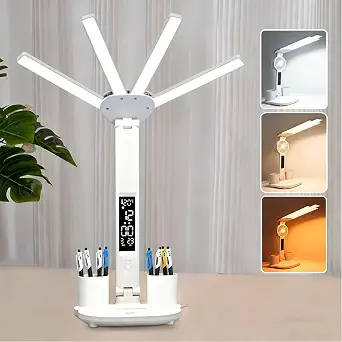
Most budget desk lamps do one thing, but this option stands out for squeezing a built-in clock display showing time, date, and temperature into a lamp that typically costs less than a standalone alarm clock. Where the Lepro LED Desk Lamp keeps things deliberately simple, this model doubles as a desk information hub, which makes it a natural fit for a student study setup where desk surface is scarce and every gadget earns its footprint.
The foldable arms give it more positional flexibility than fixed-base lamps like the LEPOWER Desk Lamp, collapsing flat for storage or travel between dorm and home. Three lighting modes and stepless dimming cover the basics of task lighting, and the eye-care diffusion keeps glare manageable during long reading sessions.
The tradeoffs are real, though. There’s no battery option, and the 1-meter power cord is short — you’ll want a nearby outlet or an extension lead. Compared with the Micomlan 24W clamp lamp, brightness tops out modestly, so anyone lighting a wide desk or dual monitors will find it underpowered.
Pros:- Built-in display shows time, date, and temperature, replacing a separate desk clock
- Foldable arms collapse flat for storage or travel, ideal for dorm use
- Three lighting modes plus dimming cover study, reading, and relaxation needs
- Eye-care diffusion reduces glare during long evening study sessions
Cons:- Wired only with a short 1-meter power cord, limiting desk placement options
- Brightness output is modest compared with high-wattage clamp lamps like the Micomlan 24W
Best for: Students and budget-conscious buyers who want a lamp that doubles as a clock and temperature display in a compact workspace
Not ideal for: Owners of large multi-monitor desks — the modest brightness output and short 1-meter cord won’t cover a wide workstation
- Foldable Design:Yes, adjustable folding arms
- Lighting Modes:3 (cool white, warm white, daylight)
- Dimmable:Yes
- Display:Time, date, temperature
- Power Cord Length:1 meter
- Control Type:Touch
- Power Source:Corded (no battery)
Our verdict“A sensible pick for students who want task lighting and a clock in one affordable, foldable package — as long as the desk is small and the outlet is close.”
How We Picked
I evaluated each lamp against what actually matters for a study desk: light output and coverage, eye-comfort features, adjustability, smart features, and value for money. Brightness was judged by wattage and lumen ratings, but also by physical design — a 24W clamp lamp that spreads light across a full desk beats a 10W lamp that concentrates light on one spot. For eye care, I prioritized models with adjustable color temperature and flicker-free claims over fixed-temperature lamps, since long study sessions demand flexibility between warm evening light and cool daytime focus light.
Smart capability was scored honestly rather than generously: only lamps with genuine app, voice, or sensor-based automation earned ‘smart’ credit, while touch panels and remote controls were treated as convenience features. That’s why the rankings favor the Micomlan auto-dimming clamp lamp at the top, followed by coverage-focused clamp lamps, with basic freestanding models filling out the value tier. Price was weighed against longevity of use — a lamp that lasts through four years of study justifies a premium over a bargain model that needs replacing.
Factors to Consider When Choosing Smart Home Study Lighting
Choosing smart home study lighting involves more than picking the brightest lamp on the list. These are the broader factors that shaped my rankings and that tend to trip up buyers most often.
Clamp vs. Freestanding: Match the Mount to Your Desk
The single most consequential choice is mounting style, and it’s one buyers frequently get wrong. Clamp lamps free up your entire desk surface and sit high enough to eliminate glare on monitors, making them the right call for wide desks, dual-screen setups, or anyone who spreads out books and notes. The catch: clamps require a desk edge of suitable thickness (usually 0.6 to 2.5 inches) and won’t work on full-width drawer units or glass-topped desks. Freestanding lamps trade coverage for portability and simplicity — they move between rooms easily and need no installation, but they occupy footprint and typically top out at lower brightness. A common mistake is buying a powerful clamp lamp for a small dorm desk where the clamp overhangs the edge, or buying a compact table lamp for a 60-inch workstation it was never designed to cover.
What ‘Smart’ Actually Means on the Box
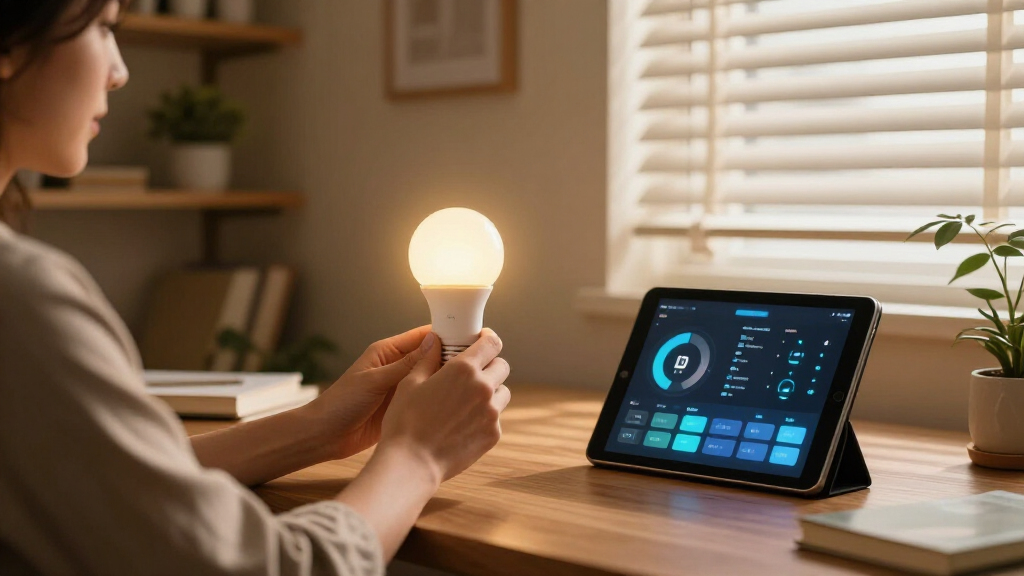
Marketing language in this category is loose, and many lamps labeled ‘smart’ offer nothing more than a touch panel. True smart lighting connects to your phone, a voice assistant, or a hub and supports scheduling, scenes, or automation — like the Hifree lamp’s app and Alexa/Google integration. Sensor-based intelligence, such as auto-dimming that reads room brightness, delivers much of the same hands-free benefit without any network setup, which is why the Micomlan ranks so highly. Remote controls and touch dimmers sit lower on the intelligence scale but are still genuinely useful for quick adjustments mid-study. Before buying, decide whether you want home-automation integration or simply convenient controls — the price gap between them is real, and paying for app features you’ll never configure is wasted money.
Brightness and Color Temperature for Real Study Sessions
Research-backed advice points to 4000K–5000K (neutral to cool white) lighting for sustained reading and focus, with warmer temperatures better for winding down before bed. Lamps with adjustable color temperature beat fixed-color lamps because a study space serves different purposes across the day — homework at 4pm, wind-down reading at 10pm. On brightness, more watts isn’t automatically better: a 24W lamp aimed at a small desk can create harsh shadows and glare, while 8–10W is plenty for illuminating a single textbook or keyboard. The mistake I see most often is under-buying — a dim lamp forces squinting and posture changes that create fatigue long before you notice the lighting itself is the problem. If your budget forces a choice, prioritize a wide brightness range over a wide color range; you’ll adjust brightness far more often.
Eye Care Features: Separating Science from Stickers
Nearly every lamp here claims to be ‘eye-caring,’ but the claims rest on two verifiable features: flicker-free driver circuitry and diffused, non-glare light panels. Flicker — imperceptible refresh cycles in cheap LED drivers — is the main culprit in study-session headaches, and it’s more common in unbranded budget lamps than manufacturers admit. Diffusion matters just as much: a large, frosted panel spreads light evenly across the page, while exposed LED beads create hotspots that force your pupils to constantly readjust. Look for lamps that publish flicker-free or RG0 low-blue-light certifications rather than just using the phrase on packaging. If a lamp causes eye strain within a week of use, no amount of marketing changes the physics — return it.
The Hidden Costs: Ports, Timers, and Replacement Parts
Small features quietly determine long-term satisfaction. A built-in USB charging port (as on the Lampat and White Crown) frees a wall outlet and keeps your phone within reach without extra cables — a bigger daily convenience than it sounds. Sleep timers are underrated for students: a lamp that shuts off after 30 or 60 minutes doubles as a focus tool and prevents the classic all-nighter glow. Check the arm and joint construction too, since the hinge is the first thing to fail on cheap architect lamps, and most budget brands don’t sell replacement parts. Finally, consider whether the power adapter is proprietary or standard USB — a USB-powered lamp survives an adapter failure; a proprietary one often doesn’t.
Budget Tiers: When to Pay More and When Not To
This category splits cleanly into three tiers, and knowing which one you need prevents both overspending and false economy. Under $25 buys a competent single-task lamp — fine for a laptop-and-notebook setup in a dorm. The $30–$50 range is where adjustability, higher wattage, and clamp mounts appear, and it’s the sweet spot for most serious students. Above $50, you’re paying for auto-dimming sensors, premium optics, or full smart-home integration; that premium only makes sense if you study daily or run automations. The mistake worth avoiding is buying the cheap lamp twice: replacing a failed hinge or upgrading an underpowered lamp within a year costs more than buying the mid-tier model once. Students lighting a temporary space should stay cheap; anyone setting up a desk they’ll use for years should start in the middle tier.
Frequently Asked Questions
Can I add true smart control to a lamp that doesn’t have Wi-Fi?
Yes, and for many buyers this is the smarter path than buying a Wi-Fi lamp. Plugging any lamp into a smart plug gives you app scheduling, voice control, and away-from-home on/off for around $10 — but you lose dimming and color control, since the plug only cuts power. This works brilliantly with high-output clamp lamps like the Micomlan or Pzloz that outclass every genuinely smart lamp in this lineup on light quality: set them to your preferred brightness manually, then automate the on/off schedule. If you want app-controlled dimming and color scenes rather than just scheduling, only a native smart lamp like the Hifree will do it. Weigh whether the smart features or the light quality matters more to you before choosing between the two approaches.
Is a clamp lamp or a freestanding lamp better for studying?
For most dedicated study desks, a clamp lamp wins. Mounting to the desk edge lifts the light source higher and farther back, which spreads light evenly across books and monitors without casting your own shadow — the single most common complaint about freestanding lamps. Clamps also reclaim desk space, which matters if you use a textbook alongside a laptop. Freestanding lamps make sense if you rent and can’t modify furniture, share the lamp between rooms, or have a desk edge that’s too thick, curved, or equipped with a full-width drawer for a clamp. If your desk edge is between roughly 0.6 and 2.5 inches thick and square-edged, go clamp; otherwise stay freestanding.
How bright should a study lamp actually be?
For focused desk work, aim for roughly 450–800 lumens landing on your task area, which in lamp terms usually means an 8–12W LED for a compact desk or a 20–24W lamp for a large surface. The key word is ‘landing’ — a 24W clamp lamp washing light across a 48-inch desk delivers comfortable task-level brightness, while the same wattage on a small desk creates glare. Bigger desks don’t need more intensity so much as more spread, which is why wide architect-style heads beat small round ones. If you study primarily on paper, bias slightly brighter; if you work mostly on a screen, dimmer ambient-friendly output reduces contrast strain between the monitor and surrounding darkness.
Do color-changing RGB features help with studying, or are they just a gimmick?
For studying itself, RGB is mostly decoration — research on focus points to tunable white light (warm to cool), not colored light, as the variable that affects concentration. That said, RGB earns its keep in two scenarios: a shared bedroom where the lamp doubles as evening ambiance without waking a roommate, and pairing a cool-white study setting with a warm relax setting in one device. The Hifree lamp handles this dual role well, but its white-light output is weaker than dedicated study lamps at similar prices. My honest recommendation: if the lamp is 90% for study, buy maximum white-light quality and skip RGB entirely. Only buy an RGB-capable lamp if ambiance is a genuine second use case, not a maybe.
Are auto-dimming sensors worth the extra cost?
In this lineup, yes — the auto-dimming sensor on the Micomlan is the feature most likely to change your daily experience, because it keeps light on your page consistent as daylight shifts through the afternoon and into evening. Without it, you manually re-adjust brightness two or three times per study session, and most people simply don’t — they squint instead. The feature matters most if you study near a window or in the evening with overhead lights on and off. It matters least if you study at a consistent time in a consistently dark room, where a fixed manual setting works fine. If the sensor-equipped lamp fits your budget and your study times vary, it’s the upgrade most worth paying for; if your routine is rigid, spend the difference on brightness or build quality instead.
Conclusion
The right pick here depends less on specs and more on how you actually study. For the best overall choice, the Micomlan LED Clamp Lamp pairs a 24W output with auto-dimming — it’s the lamp for anyone with a real desk and daily study hours. The best premium pick is the Pzloz 24W architect lamp, whose dual-screen-friendly coverage suits multi-monitor workstations that even the Micomlan struggles to fully light. On value, the Lepro 9.5W touch lamp delivers dependable eye-care lighting at a student price, while the White Crown lamp with USB charging and timer is my beginner recommendation — simple controls, no app setup, and useful extras from day one. For specific needs: choose the Hifree if voice assistants and app scheduling are non-negotiable, the LED Desk Lamp with Clock for a compact bedside study spot, and a Motumen clamp model if you want Micomlan-style coverage at a lower price. Whatever you choose, match the mount to your desk and the brightness to your space — those two decisions matter more than any brand name on the box.