The best Apple Home smart devices depend on whether you want easy lighting, reliable control of appliances, or a more capable smart-home hub. I’d name Apple TV 4K the best overall foundation for a home already built around Apple, while the Kasa EP25P2 stands out for plug-level energy monitoring and the Aqara Smart Doorbell Camera G410 for HomeKit Secure Video. The main tradeoffs are Matter convenience versus HomeKit-specific features, simple plug-in setup versus wired installation, and low-cost control versus richer monitoring. I compare all 15 picks by their Apple Home fit, everyday usefulness, setup needs, and limitations. Read on for the full breakdown and help choosing devices that match your home.

Get home appliances delivered free with Prime
- Fast, free delivery on millions of items
- Prime Video, Amazon Music and more included
- Member-only deals all year
Complete the kit


Key Takeaways
- Apple TV 4K is the strongest foundation pick in this lineup: unlike individual plugs or bulbs, it can anchor Apple Home control while also serving as a streaming device.
- Kasa EP25P2 is the standout for energy visibility; most of the other plug choices focus on switching appliances on and off rather than showing their power use.
- Matter support appears across several Linkind and meross picks, but it does not remove the need to check Apple Home compatibility, network requirements, and which features work in the Home app.
- Installation is the key dividing line: plugs, bulbs, and the table lamp are approachable starting points, while the KS200 switch requires a neutral wire and thermostat replacement needs a compatibility check.
- The Aqara doorbell and W200 thermostat offer more specialized value than the many plug options, but they make the most sense for buyers ready to add a specific security or climate-control function.
| Linkind Matter Smart LED Bulbs, A19 E26, 60W Equivalent, 800 Lumens, 6 Pack |  | Best for Colorful Apple Home Lighting | Bulb shape and base: A19, E26 | Power: 9 W; 60 W incandescent equivalent | Light output: 800 lumens per bulb | VIEW LATEST PRICE | See Our Full Breakdown |
| Kasa Smart Plug Mini EP25P2 with Apple HomeKit and Energy Monitoring |  | Best Apple Home Plug for Energy Tracking | Model: EP25P2 | Connectivity: 2.4 GHz Wi-Fi | Maximum current: 15 A | VIEW LATEST PRICE | See Our Full Breakdown |
| meross 15A Smart Plug, 4-Pack |  | Best Value Multi-Pack for Apple Home | Model: MSS110HK | Pack quantity: 4 | Maximum current: 15 A | VIEW LATEST PRICE | See Our Full Breakdown |
| Tapo P125 Mini Smart Plug, 15A, 2-Pack |  | Best Compact Plug for Simple Routines | Model: P125 | Quantity: 2 plugs | Maximum wattage: 1800 W | VIEW LATEST PRICE | See Our Full Breakdown |
| meross Smart Table Lamp with HomeKit, Alexa, and SmartThings Compatibility |  | Best Standalone Apple Home Lamp | Light source: LED, 6 W | Bulb base and shape: E26, A19 | Color temperature: 2700–6500 K | VIEW LATEST PRICE | See Our Full Breakdown |
| Linkind Matter Smart Plug, 4-Pack | 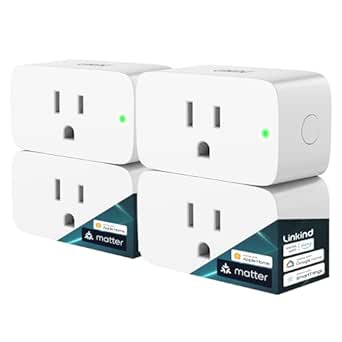 | Best Value for Multi-Platform Homes | Pack quantity: 4 | Maximum current: 15 A | Maximum power: 1800 W | VIEW LATEST PRICE | See Our Full Breakdown |
| Aqara Smart Thermostat W200 with Apple Adaptive Temperature |  | Best Premium Apple Home Thermostat | Display: 4-inch full-color touchscreen | HVAC compatibility: About 85% of systems, including furnaces, air conditioners, heat pumps, boilers, and PTAC units | Connectivity: Dual-band Wi-Fi (2.4/5 GHz), Matter 1.4, Zigbee, Thread | VIEW LATEST PRICE | See Our Full Breakdown |
| meross Outdoor Smart Plug with 3 Independent Sockets |  | Best for Multi-Zone Outdoor Control | Independently controlled outlets: 3 | Connectivity: Wi-Fi; 2.4 GHz setup | Compatibility: Apple HomeKit, Amazon Alexa, Google Assistant, SmartThings | VIEW LATEST PRICE | See Our Full Breakdown |
| Apple HomeView Smart Home Display, Space Gray |  | Best Apple Home Control Center | Display: 7-inch Liquid Retina | Audio: Spatial Audio | Personalized users: Up to 6 | VIEW LATEST PRICE | See Our Full Breakdown |
| Philips Hue Smart Plug, White, 2-Pack |  | Best Compact Plug for Hue Lighting | Pack quantity: 2 | Dimensions: 2.7 x 1.5 x 2.1 inches | Connectivity: Bluetooth, Zigbee | VIEW LATEST PRICE | See Our Full Breakdown |
| Apple TV 4K (4th Generation) |  | Best Apple Home Entertainment Hub | Chip: A19 | Video formats: Dolby Vision, HDR10+ | Audio: Dolby Atmos; Enhance Dialogue | VIEW LATEST PRICE | See Our Full Breakdown |
| meross Matter Smart Wi-Fi Thermostat |  | Best for Broad HVAC Compatibility | Model: MTS300 | HVAC compatibility: Suitable for 95% of HVAC systems | Supported systems: Air conditioner, boiler, dehumidifier, furnace, heat pump, humidifier | VIEW LATEST PRICE | See Our Full Breakdown |
| Kasa KS200 Apple HomeKit Smart Light Switch, Single Pole, Requires Neutral Wire |  | Best for Replacing a Wall Switch | Model: KS200 | Switch type: Single pole, one-way | Wiring requirement: Neutral wire required | VIEW LATEST PRICE | See Our Full Breakdown |
| Linkind Matter Smart Plug with Night Light, 4-Pack |  | Best Multi-Room Value Pick | Pack size: 4 | Connectivity: 2.4 GHz Wi-Fi; IPv6 | Smart home compatibility: Apple Home, Alexa, Google Home, SmartThings; Matter controller required | VIEW LATEST PRICE | See Our Full Breakdown |
| Aqara Smart Doorbell Camera G410 with Chime, HomeKit Secure Video, Black |  | Best Apple Home Security Upgrade | Video resolution: 2K; limited to 1600×1200 with Apple HomeKit | Motion detection: mmWave radar | Chime volume: 95 dB | VIEW LATEST PRICE | See Our Full Breakdown |
| Apple Home smart device | Connectivity | Model |
|---|---|---|
| Linkind Matter Smart LED Bulbs | 2.4 GHz Wi-Fi, Matter | — |
| Kasa Smart Plug Mini EP25P2 wi | 2.4 GHz Wi-Fi | EP25P2 |
| meross 15A Smart Plug | 2.4 GHz Wi-Fi | MSS110HK |
| Tapo P125 Mini Smart Plug | 2.4 GHz Wi-Fi, Bluetooth | P125 |
| meross Smart Table Lamp with H | — | — |
| Linkind Matter Smart Plug | — | — |
| Aqara Smart Thermostat W200 wi | Dual-band Wi-Fi (2.4/5 GHz), Matter 1.4, Zigbee, Thread | — |
| meross Outdoor Smart Plug with | Wi-Fi; 2.4 GHz setup | MSS630 |
| Apple HomeView Smart Home Disp | — | MDH24LL/A |
| Philips Hue Smart Plug | Bluetooth, Zigbee | 552349-2 |
| Apple TV 4K | — | — |
| meross Matter Smart Wi-Fi Ther | Wi-Fi, Matter | MTS300 |
| Kasa KS200 Apple HomeKit Smart | 2.4 GHz Wi-Fi | KS200 |
| Linkind Matter Smart Plug with | 2.4 GHz Wi-Fi; IPv6 | — |
| Aqara Smart Doorbell Camera G4 | 2.4 GHz and 5 GHz Wi-Fi, Bluetooth, Zigbee | — |
More Details on Our Top Picks
Linkind Matter Smart LED Bulbs, A19 E26, 60W Equivalent, 800 Lumens, 6 Pack
For buyers building Apple Home scenes across several rooms, this six-bulb set offers more flexibility than a plug-in lamp: the bulbs fit standard E26 sockets and connect through Matter, with Apple Home compatibility alongside Alexa and Google Home. Each bulb produces 800 lumens, while color control, preset scenes, and voice commands make it easy to change the feel of a room without changing the fixture. Compared with the meross Smart Table Lamp, this is a better way to add smart lighting to existing ceiling or table fixtures; the meross lamp is the simpler choice when you only need one standalone light. The tradeoff is that these bulbs are for indoor fixtures and generally do not work with traditional dimmer switches. Music sync also depends on the AiDot app and microphone permission, which may not suit every household.
Pros:- Matter support works with Apple Home and other listed smart home platforms.
- Six bulbs make it practical to coordinate lighting across multiple fixtures.
- Offers 16 million colors, 104 preset scenes, and voice control.
- Rated for up to 25,000 hours of use.
Cons:- Generally unsupported with traditional dimmer switches.
- Music sync uses the AiDot app and requires microphone permission.
- Indoor use only.
Best for: Apple Home households that want color-changing light in several existing indoor fixtures and already use standard E26 bulbs.
Not ideal for: Buyers with traditional wall dimmers, outdoor fixtures, or a preference for simple white-only lighting without app-based setup.
- Bulb shape and base:A19, E26
- Power:9 W; 60 W incandescent equivalent
- Light output:800 lumens per bulb
- Connectivity:2.4 GHz Wi-Fi, Matter
- Platforms:Apple Home, Alexa, Google Home
- Color options:16 million
- Preset scenes:104
- Pack size:6 bulbs
Our verdict“Choose this set to add Matter-connected color lighting to multiple Apple Home fixtures, but skip it if your switches rely on traditional dimmers.”
Kasa Smart Plug Mini EP25P2 with Apple HomeKit and Energy Monitoring
The EP25P2 earns its place for buyers who want more from an Apple Home plug than on-and-off control: energy monitoring adds real-time and historical usage data, helping identify what an appliance draws over time. Its compact body is designed to leave neighboring outlet space usable, and scheduling and timers cover everyday routines. Compared with the meross 15A Smart Plug 4-Pack, this Kasa model is the more useful pick when tracking consumption matters; meross is the stronger fit when you need several straightforward plugs at once. Both support Apple HomeKit and have the same stated 15 A, 1800 W maximum load. One limitation is shared by these HomeKit options: remote control requires a networked Apple device at home. This plug also depends on 2.4 GHz Wi-Fi and should not be used beyond its rated electrical capacity.
Pros:- Reports real-time and historical energy consumption.
- Supports Apple HomeKit, Siri, Alexa, Google Assistant, and SmartThings.
- Compact design helps preserve access to neighboring outlets.
- Scheduling and timers support routine automation.
Cons:- Remote HomeKit control requires a networked Apple device at home.
- Maximum load is 15 A or 1800 W.
- Connects over 2.4 GHz Wi-Fi.
Best for: Apple Home users who want to track the energy use of a compatible household appliance as well as schedule its power.
Not ideal for: Buyers who need multiple plugs in one purchase, use a 5 GHz-only network, or need remote HomeKit control without a networked Apple device at home.
- Model:EP25P2
- Connectivity:2.4 GHz Wi-Fi
- Maximum current:15 A
- Maximum power:1800 W
- Operating voltage:120 V
- Energy monitoring:Real-time and historical usage
- Hub required:No
- Warranty:2-year limited warranty
Our verdict“Pick the Kasa EP25P2 when energy-use data is a priority; choose the meross four-pack instead if you need more basic plugs in more rooms.”
meross 15A Smart Plug, 4-Pack
This four-pack is a practical way to bring several lamps or small appliances into Apple Home without buying a plug for each room separately. The 15 A, 1800 W rating covers devices within that limit, while scheduling—including sunrise and sunset options—can automate routines without daily manual control. Compared with the Kasa Smart Plug Mini EP25P2, the meross set prioritizes quantity and routine control rather than energy monitoring; choose Kasa if appliance consumption data is a deciding factor. The compact design can also leave room for a second mini plug at the same wall outlet. Its main Apple Home drawback is that remote control requires a compatible Apple home hub powered on and connected to Wi-Fi. Setup also depends on 2.4 GHz Wi-Fi, so it is a less suitable match for networks configured only for 5 GHz.
Pros:- Four plugs provide coverage for multiple devices.
- Supports Apple HomeKit, Siri, Alexa, and Google Assistant.
- Scheduling includes sunrise and sunset options.
- Compact, flame-retardant polycarbonate construction.
Cons:- Remote HomeKit control requires a compatible Apple home hub connected to Wi-Fi.
- Requires a 2.4 GHz Wi-Fi network.
- Does not list energy monitoring, unlike the Kasa EP25P2.
Best for: Apple Home users who want to automate several indoor plug-in devices with schedules or sunrise and sunset routines.
Not ideal for: Buyers who need energy monitoring, use a 5 GHz-only network, or lack a compatible Apple home hub for remote HomeKit control.
- Model:MSS110HK
- Pack quantity:4
- Maximum current:15 A
- Maximum power:1800 W
- Connectivity:2.4 GHz Wi-Fi
- Compatible platforms:Apple HomeKit, Alexa, Google Assistant
- Certifications:ETL, FCC
- Warranty:2 years
Our verdict“Choose this four-pack for broad, schedule-based Apple Home control across several devices, but pick the Kasa EP25P2 if tracking energy use matters more than plug count.”
Tapo P125 Mini Smart Plug, 15A, 2-Pack
The Tapo P125 is a straightforward Apple Home option for buyers who want a pair of compact plugs and familiar automations rather than energy data. Scheduling, timers, and Away Mode can handle recurring routines or make a connected device switch on and off when you are out. Its small form is intended to avoid blocking adjacent outlets, making it easier to fit into a crowded power strip or wall plate than a bulkier plug. Compared with the meross 15A Smart Plug 4-Pack, this set offers fewer plugs but adds a named Away Mode feature; meross may suit households automating more devices at once. Both have a stated 1800 W maximum and require 2.4 GHz Wi-Fi. For Apple Home remote access, this Tapo model also needs a networked Apple device at home, so local convenience does not mean remote access works independently.
Pros:- Two-plug set with a compact design intended to preserve adjacent outlet access.
- Supports Siri, Alexa, Google Assistant, and SmartThings.
- Scheduling, timers, and Away Mode support simple automation.
- Flame-retardant design with UL, FCC, and RoHS certifications.
Cons:- Uses 2.4 GHz Wi-Fi only.
- Remote HomeKit control requires a networked Apple device at home.
- Two plugs provide less coverage than the meross four-pack.
Best for: Apple Home users who want two compact plugs for scheduled lights or household devices, including an Away Mode routine.
Not ideal for: Buyers who need a larger multi-room pack, energy monitoring, or a Wi-Fi network that operates only on 5 GHz.
- Model:P125
- Quantity:2 plugs
- Maximum wattage:1800 W
- Operating voltage:120 V AC
- Connectivity:2.4 GHz Wi-Fi, Bluetooth
- Features:Scheduling, timer, Away Mode
- Certifications:UL, FCC, RoHS
- Hub required:No
Our verdict“Pick the Tapo P125 for compact two-plug control and Away Mode routines; choose meross when you need to automate more outlets at once.”
meross Smart Table Lamp with HomeKit, Alexa, and SmartThings Compatibility
If you want smart lighting without replacing a bulb in an existing fixture, this tabletop lamp brings touch, app, and voice control together in one corded unit. Its adjustable brightness and tunable white range can shift from warm evening light to cooler task lighting, while color options give it more scene flexibility than a basic smart plug paired with a standard lamp. Compared with the Linkind Matter Smart LED Bulbs, the meross is easier to place as a complete bedside or desk light, but the Linkind set is better for updating several existing fixtures and supports Matter. The meross lamp offers locally stored schedules that can continue when the internet is down, though remote control depends on compatible platform connectivity. It is a single indoor lamp, not a way to upgrade an entire room, and its corded, non-water-resistant design limits where it can go.
Pros:- Offers touch, app, and voice control.
- Dimming from 1% to 100% and tunable white light support different tasks and moods.
- Provides 16 million color options.
- Schedules can be stored locally and continue when the internet is down.
Cons:- Corded electric power limits placement.
- Not water resistant.
- One lamp provides less whole-room coverage than the Linkind six-bulb set.
Best for: Apple Home users who want one controllable bedside or desk lamp with touch access, adjustable white light, and color scenes.
Not ideal for: Buyers who need multiple fixtures upgraded, a cordless or outdoor light, or a Matter-connected bulb for an existing lamp.
- Light source:LED, 6 W
- Bulb base and shape:E26, A19
- Color temperature:2700–6500 K
- Brightness range:1%–100%
- Color options:16 million
- Control:Touch, app, and voice
- Compatible platforms:Apple HomeKit, Alexa, SmartThings
- Power source:Corded electric
Our verdict“Choose this meross lamp for a standalone, color-capable bedside or desk light, while the Linkind bulbs are a better fit for upgrading several existing fixtures.”
Linkind Matter Smart Plug, 4-Pack
For adding several everyday devices to Apple Home at once, this four-pack offers a more flexible route than the Philips Hue Smart Plug, which is aimed primarily at lighting and comes in a two-pack. Matter support also gives these plugs access to Alexa, Google Home, and SmartThings, so they suit households that mix platforms. A useful distinction is local LAN control: compatible Matter setups can keep controlling the plugs during an internet outage. The tradeoff is setup complexity. Apple Home needs a Matter-compatible hub, and the network must support 2.4 GHz Wi-Fi and IPv6. Each plug handles up to 15 A and includes overload and short-circuit protection, but buyers should check the connected device’s power needs rather than treating a smart plug as a universal appliance controller.
Pros:- Four plugs make it practical to automate multiple devices in one setup.
- Matter compatibility supports Apple Home and several other major platforms.
- Local LAN control can continue during an internet outage on compatible setups.
- Each plug supports schedules, timers, remote control, and up to 15 A.
Cons:- Apple Home use requires a Matter-compatible hub.
- Requires 2.4 GHz Wi-Fi and an IPv6 network.
- The 1800 W limit means it is not suitable for every high-draw appliance.
Best for: Apple Home households that want to automate several lamps or other compatible devices and may also use Alexa, Google Home, or SmartThings.
Not ideal for: Buyers without a Matter-compatible Apple Home hub or an IPv6-capable 2.4 GHz network, and anyone seeking a plug that works in Apple Home without extra hub requirements.
- Pack quantity:4
- Maximum current:15 A
- Maximum power:1800 W
- Wi-Fi:2.4 GHz; IPv6 network required
- Compatibility:Apple Home, Alexa, Google Home, SmartThings, AiDot
- Apple Home hub requirement:Matter-compatible hub required
- Plug type:Type A
- Certifications:FCC; ETL
Our verdict“Choose this four-pack if you have a Matter-compatible Apple Home hub and want multi-platform control for several devices.”
Aqara Smart Thermostat W200 with Apple Adaptive Temperature
The W200 is the most feature-rich climate-control pick in this group, pairing a 4-inch touchscreen with mmWave presence detection and support for Matter, Zigbee, and Thread. That built-in connectivity gives it a broader smart-home role than the meross Matter Smart Wi-Fi Thermostat, while presence sensing can support automations that respond to whether someone is in a room. It is listed as compatible with about 85% of HVAC systems, spanning several common system types, but that figure is not a substitute for checking your wiring and equipment before purchase. Apple Adaptive Temperature also has specific requirements: a compatible home hub and an iPhone or Apple Watch running version 26 or later. The C-wire adapter is sold separately if your installation needs one, and Clean Energy Guidance is limited to the contiguous U.S.
Pros:- 4-inch touchscreen offers direct thermostat controls and at-a-glance information.
- Built-in mmWave presence sensing can inform room-based automations.
- Matter, Zigbee, and Thread support gives it broader smart-home connectivity than a thermostat limited to one protocol.
- Works with a stated range of HVAC types and includes smart hub functions.
Cons:- A C-wire adapter is sold separately when required.
- Apple Adaptive Temperature requires a compatible home hub and iPhone or Apple Watch running version 26 or later.
- Clean Energy Guidance is available only in the contiguous U.S.
Best for: Apple Home users upgrading a compatible HVAC system who want a touchscreen thermostat, presence-based automations, and Matter, Zigbee, and Thread capabilities in one device.
Not ideal for: Buyers who need a simple thermostat, cannot verify HVAC compatibility, lack the Apple devices and software required for Adaptive Temperature, or need a C-wire adapter included.
- Display:4-inch full-color touchscreen
- HVAC compatibility:About 85% of systems, including furnaces, air conditioners, heat pumps, boilers, and PTAC units
- Connectivity:Dual-band Wi-Fi (2.4/5 GHz), Matter 1.4, Zigbee, Thread
- Built-in sensor:mmWave presence radar
- Smart home platforms:Apple Home, Google Home, Amazon Alexa, Samsung SmartThings, Home Assistant
- C-wire adapter:Sold separately if needed
- Apple Adaptive Temperature requirements:Compatible home hub and iPhone or Apple Watch running version 26 or later
- Clean Energy Guidance availability:Contiguous U.S. only
Our verdict“Pick the W200 if you want a touchscreen Apple Home thermostat with presence sensing and have confirmed both HVAC and Apple-device compatibility.”
meross Outdoor Smart Plug with 3 Independent Sockets
This meross plug is the clear outdoor specialist in the lineup: its three independently controlled sockets let you schedule separate garden or patio devices without adding a plug for each one. That is a better fit for grouped outdoor lighting than the Linkind Matter Smart Plug, 4-Pack, whose listed design is for standard indoor plug-in use and whose Apple Home setup requires a Matter-compatible hub. The meross model supports Apple HomeKit directly, though remote HomeKit control requires a HomePod or Apple TV set up as a home hub. Schedules can follow sunrise and sunset, which is useful for outdoor lights that should adjust with the season. Its IP44 rating offers weather resistance, not protection against every exposure, so placement still matters. Setup also depends on 2.4 GHz Wi-Fi.
Pros:- Three sockets operate independently, so connected devices can follow different schedules.
- Supports Apple HomeKit along with Alexa, Google Assistant, and SmartThings.
- Sunrise and sunset scheduling helps outdoor lighting follow changing daylight.
- IP44 weather resistance and a two-year warranty are specified.
Cons:- Remote HomeKit control requires a HomePod or Apple TV configured as a home hub.
- Setup requires 2.4 GHz Wi-Fi.
- IP44 weather resistance does not make it suitable for every exposed or severe-weather location.
Best for: Apple Home users who want separate schedules for several outdoor lights or other compatible equipment from one weather-resistant unit.
Not ideal for: Buyers who need a fully weatherproof device for exposed conditions, have no 2.4 GHz Wi-Fi, or want remote Apple Home control without a HomePod or Apple TV home hub.
- Independently controlled outlets:3
- Connectivity:Wi-Fi; 2.4 GHz setup
- Compatibility:Apple HomeKit, Amazon Alexa, Google Assistant, SmartThings
- Operating voltage:110 V AC
- Wattage:1200 W
- Weather resistance:IP44
- Dimensions:3.9 x 3.8 x 1.9 inches
- Model:MSS630
Our verdict“Choose this meross model for grouped outdoor devices that need independent schedules, provided your Wi-Fi and home-hub setup meet its requirements.”
Apple HomeView Smart Home Display, Space Gray
Unlike the plugs and thermostat in this roundup, HomeView is a shared screen for a household: it combines Apple Home controls with FaceTime, messaging, Siri, and entertainment. Its 7-inch Liquid Retina display gives people a visual alternative to voice-only control, while personalization for up to six people makes it a stronger fit for a shared space than a device centered on one user. Spatial Audio speakers add an entertainment role that the Aqara Smart Thermostat W200 does not aim to fill; the W200 is the more specialized choice for climate control and built-in home protocols. HomeView’s appeal depends on wanting an Apple-centered display rather than another outlet or sensor. Siri AI is initially available in English, and usage limits may apply, so buyers seeking unrestricted or language-flexible AI features should weigh those limits.
Pros:- Apple Home app integration brings smart accessory controls to a dedicated screen.
- Personalized experiences support up to six people.
- Combines FaceTime, messaging, entertainment, and Siri in one device.
- 7-inch Liquid Retina display and Spatial Audio speakers support visual and audio use.
Cons:- Siri AI is initially available in English.
- Usage limits may apply.
- Its display and communication features may be unnecessary for buyers seeking only a basic Apple Home control device.
Best for: Apple households that want a shared display for Home app controls, video calls, messaging, and entertainment, with personalized experiences for several family members.
Not ideal for: Buyers who only need basic smart-home automation, prefer a screen-free control point, or need Siri AI in a language other than English at launch.
- Display:7-inch Liquid Retina
- Audio:Spatial Audio
- Personalized users:Up to 6
- Smart home integration:Apple Home app
- Dimensions:5.13 x 6.82 x 5.73 inches
- Weight:2.1 pounds
- Color:Space Gray
- Model:MDH24LL/A
Our verdict“Choose HomeView if your household wants a shared Apple Home screen that also handles calls and entertainment, rather than a single-purpose smart device.”
Philips Hue Smart Plug, White, 2-Pack
The Philips Hue Smart Plug is the lighting-focused choice here: its compact body is designed to fit neatly at an outlet, and Bluetooth gives buyers a direct way to set up and control connected lights. Unlike the Linkind Matter Smart Plug, 4-Pack, it is described as a light-control product rather than a general-purpose appliance plug, and its two-pack offers fewer outlets for a multi-device setup. Apple HomeKit is listed as compatible, but buyers should distinguish that from the Hue Bridge features: automations and remote access require a Bridge, sold separately. That makes this a sensible add-on for someone already building around Hue, but a less compelling standalone pick for someone who wants broad scheduling and remote control without extra equipment. Alexa and Google Assistant voice control are also supported.
Pros:- Compact dimensions help it fit neatly at an outlet.
- Bluetooth supports basic setup and light control.
- Apple HomeKit compatibility is listed alongside Alexa and Google Assistant support.
- Two plugs provide a straightforward way to add more than one light.
Cons:- A Hue Bridge, sold separately, is required for automations and remote access.
- The product is positioned for lighting rather than as a general-purpose appliance plug.
- The two-pack offers fewer units than the Linkind four-pack.
Best for: Philips Hue users who want a compact way to add plug-in lights to Apple HomeKit or control them through the Hue app and supported voice assistants.
Not ideal for: Buyers who want a general-purpose plug for appliances, need remote access or automations without purchasing a Hue Bridge, or want more than two plugs in the package.
- Pack quantity:2
- Dimensions:2.7 x 1.5 x 2.1 inches
- Connectivity:Bluetooth, Zigbee
- Smart home compatibility:Apple HomeKit
- Voice assistants:Amazon Alexa, Google Assistant
- Bridge requirement:Hue Bridge required for automations and remote access
- Model:552349-2
- Warranty:2 years
Our verdict“Choose the Hue plug if compact control for plug-in lights matters more than broad appliance use or Bridge-free automations.”
Apple TV 4K (4th Generation)
The Apple TV 4K is the strongest fit here for buyers who want Apple Home control alongside a dedicated living-room streamer. Its 4K Dolby Vision and HDR10+ support cover a broad range of HDR content, while Dolby Atmos and Enhance Dialogue offer more ways to make films and speech easier to enjoy. Built-in far-field microphones add hands-free Siri access, and Home hub features let it do more for Apple Home than a basic smart plug such as the Linkind Matter Smart Plug, 4-Pack.
The tradeoff is that this is an entertainment-first device, not a general-purpose home controller. Its surround-sound setup has a specific four-HomePod requirement, and some Siri features need an iPhone or iPad for setup. Choose it for a TV-centered Apple Home; skip it if you only need inexpensive control of individual outlets.
Pros:- 4K playback supports Dolby Vision and HDR10+
- Dolby Atmos and Enhance Dialogue provide flexible audio options
- Far-field microphones allow Siri voice control from across the room
- Siri Remote includes Find My support
Cons:- The specified immersive surround setup requires four HomePod speakers
- Some Siri features require setup with an iPhone or iPad
Best for: Apple Home households that want a 4K streaming box, hands-free Siri, and home hub functions in the living room.
Not ideal for: Buyers who only need basic device control or who do not want to use an iPhone or iPad for some Siri setup.
- Chip:A19
- Video formats:Dolby Vision, HDR10+
- Audio:Dolby Atmos; Enhance Dialogue
- Microphones:Built-in far-field microphones
- Remote:Siri Remote with touch-enabled clickpad and Find My support
- Smart home:Hands-free accessory control and Home hub features
- Dimensions:3.67 × 3.67 × 1.22 inches
- Weight:7.7 ounces
Our verdict“Choose Apple TV 4K if you want a capable Apple Home hub built into a premium TV streamer, not merely a low-cost smart accessory.”
meross Matter Smart Wi-Fi Thermostat
The meross Matter Smart Wi-Fi Thermostat makes the most sense for Apple Home users who want climate control to work across multiple smart-home platforms. Matter support gives it a wider ecosystem role than the Kasa KS200 Apple HomeKit Smart Light Switch, while programmable schedules, remote adjustments, and system alerts put everyday heating and cooling within reach from an app. Its stated compatibility spans common equipment such as furnaces, boilers, and heat pumps, so it can suit homes where a simple plug or switch cannot meaningfully automate comfort.
Compatibility is not universal, though. It does not support electric baseboard heaters, millivolt thermostats, or two-wire systems, and some installations need a C wire. I’d check the existing HVAC wiring before choosing it; buyers with a supported system gain useful flexibility, while an incompatible setup makes the Matter features irrelevant.
Pros:- Matter support works with Apple Home and several other smart-home platforms
- Supports a broad range of common heating and cooling system types
- Flexible schedules and remote app control simplify routine adjustments
- Alerts can flag filter life and system issues
Cons:- Incompatible with electric baseboard, millivolt, and two-wire systems
- Some wiring configurations require a C wire
Best for: Homeowners with a supported 24-volt HVAC system who want Apple Home control, flexible schedules, and cross-platform Matter support.
Not ideal for: People with electric baseboard heat, millivolt equipment, two-wire systems, or wiring that cannot meet the C-wire requirement.
- Model:MTS300
- HVAC compatibility:Suitable for 95% of HVAC systems
- Supported systems:Air conditioner, boiler, dehumidifier, furnace, heat pump, humidifier
- Connectivity:Wi-Fi, Matter
- Smart home compatibility:Apple Home, Amazon Alexa, Google Home, Home Assistant, Samsung SmartThings
- Power and voltage:Corded electric; 24 volts
- Display:LCD
- Warranty:2 years
Our verdict“Pick the meross thermostat if your HVAC wiring is compatible and you want Matter-based climate control that can span more than Apple Home.”
Kasa KS200 Apple HomeKit Smart Light Switch, Single Pole, Requires Neutral Wire
The Kasa KS200 is a practical Apple Home choice when the goal is to automate a hardwired light rather than add a smart bulb or plug. A wall switch keeps control available to anyone in the room, while Siri, schedules, timers, and Away Mode add app and voice control. That makes it a different kind of upgrade from the Linkind Matter Smart Plug with Night Light: the Kasa replaces a switch location, whereas the Linkind adds smart control at an outlet and includes a night light.
The installation requirements narrow its audience. This is a single-pole switch that needs a neutral wire and 2.4 GHz Wi-Fi, so it is not a fit for every box or multi-location lighting setup. HomeKit remote control also depends on a networked Apple device at home. I’d choose it for a compatible wiring setup, not as a no-install solution.
Pros:- Works with Apple HomeKit and Siri as well as Alexa and Google Assistant
- Schedules, timers, remote control, and Away Mode support everyday automation
- App-guided installation helps with setup
- Wall plate and wiring accessories are included
Cons:- Requires a neutral wire and 2.4 GHz Wi-Fi
- HomeKit remote access requires a networked Apple device at home
Best for: Apple Home users who want to automate one compatible, single-pole light circuit and have neutral wiring in the switch box.
Not ideal for: Renters, homes without a neutral wire, or buyers who need a multi-way switch or a plug-in device.
- Model:KS200
- Switch type:Single pole, one-way
- Wiring requirement:Neutral wire required
- Connectivity:2.4 GHz Wi-Fi
- Voice assistants:Apple Siri, Amazon Alexa, Google Assistant
- Operating voltage:100–120 VAC, 50/60 Hz
- Wattage:600 W
- Certification:UL
Our verdict“Choose the KS200 when you have compatible single-pole wiring and want a permanent wall-switch upgrade instead of a plug-in smart accessory.”
Linkind Matter Smart Plug with Night Light, 4-Pack
This four-pack stands out for buyers who want to automate several outlets while adding a small amount of hallway or bedroom lighting. Each Linkind Matter Smart Plug combines a controllable outlet with an adjustable 30-lumen dusk-to-dawn night light, so it offers more than the outlet control of the meross 15A Smart Plug, 4-Pack. Timers, schedules, and remote control make it useful for lamps and other compatible devices, while the stated 15 A / 1800 W capacity sets a clear electrical limit.
Apple Home control requires a compatible Matter hub, and the plugs use 2.4 GHz Wi-Fi only. That adds a setup dependency the Kasa KS200 wall switch does not share, though the Kasa has its own wiring constraints. Choose Linkind when multiple plug-in points and built-in night lights matter; skip it if you lack a Matter controller or need 5 GHz connectivity.
Pros:- Four smart outlets provide several control points in one set
- Adjustable night lights use dusk-to-dawn sensing
- Supports remote control, timers, and schedules
- LAN control is available when internet access is down
Cons:- Apple Home platform control requires a compatible Matter hub
- Connects over 2.4 GHz Wi-Fi only
- Maximum load is limited to 15 A / 1800 W
Best for: Apple Home households with a compatible Matter hub that want to automate multiple lamps or appliances and add adjustable night lighting.
Not ideal for: Buyers without a Matter controller, those who need 5 GHz Wi-Fi, or anyone whose connected appliance exceeds the stated load limit.
- Pack size:4
- Connectivity:2.4 GHz Wi-Fi; IPv6
- Smart home compatibility:Apple Home, Alexa, Google Home, SmartThings; Matter controller required
- Night light:30 lm; adjustable brightness from 1–100%; dusk-to-dawn sensing
- Maximum power:15 A / 1800 W
- Voltage:120 V
- Plug type:Type B
- Certifications:FCC, ETL
Our verdict“Choose this Linkind set for multi-room outlet control with built-in night lights, provided your Apple Home setup already includes a Matter controller.”
Aqara Smart Doorbell Camera G410 with Chime, HomeKit Secure Video, Black
The Aqara Smart Doorbell Camera G410 is the most security-focused pick in this group, pairing a doorbell camera with a built-in Zigbee and Matter hub. For Apple Home users, HomeKit Secure Video, local face recognition, and optional microSD recording provide several ways to handle footage; that is a different job from the Apple TV 4K, whose Home hub role centers on general device control and entertainment. The indoor chime, dual-band Wi-Fi, and mmWave radar detection also make this more feature-rich than a basic doorbell.
Those capabilities come with clear limits. HomeKit reduces video resolution to 1600×1200, some features require Aqara’s own app, and the unit is not water resistant. The microSD card is sold separately. I’d favor it when its hub and storage options fit the plan, but not for an exposed installation that needs weather resistance.
Pros:- Supports HomeKit Secure Video and multiple other smart-home platforms
- Built-in Zigbee and Matter hub can connect compatible devices
- mmWave radar motion detection and local face recognition add detection options
- Offers encrypted cloud storage or optional microSD recording
Cons:- Not water resistant
- HomeKit limits video resolution to 1600×1200
- MicroSD card is not included, and some features require the Aqara app
Best for: Apple Home households seeking a video doorbell with HomeKit Secure Video, local storage options, and a built-in hub for compatible devices.
Not ideal for: Buyers who need a weather-resistant doorbell, want full 2K resolution through HomeKit, or do not want to use the Aqara app for some features.
- Video resolution:2K; limited to 1600×1200 with Apple HomeKit
- Motion detection:mmWave radar
- Chime volume:95 dB
- Connectivity:2.4 GHz and 5 GHz Wi-Fi, Bluetooth, Zigbee
- Wi-Fi security:WPA3
- Smart home compatibility:Apple HomeKit Secure Video, Matter, Alexa, Google Assistant, SmartThings, Home Assistant, IFTTT
- Storage:Encrypted cloud storage or microSD card up to 512 GB; card not included
- Water resistance:Not water resistant
Our verdict“Choose the G410 if you want a feature-rich Apple Home doorbell with hub and local-storage options, but avoid it for an exposed location that needs water resistance.”
How We Picked
I compared the 15 devices by how useful they are within an Apple Home setup, not by feature count alone. The main criteria were stated Apple Home or HomeKit compatibility, setup demands, the practical value of Matter support, control options, and whether a device fills a distinct role. I also weighed installation and ownership considerations: a plug should be easy to place and use, a bulb should suit the intended fixture, and a thermostat or doorbell should justify the extra planning its installation can require.
The order favors products that serve as useful starting points or offer a clear advantage over similar picks. That puts Apple TV 4K first as a broader home-control and entertainment device, while the Kasa EP25P2 earns a higher spot among plugs for its energy monitoring. The remaining plugs, lighting products, thermostat options, switch, and doorbell are ranked by their specialized benefits and tradeoffs; similar devices are separated by practical differences rather than treated as interchangeable. Product details and compatibility should still be checked against the buyer’s Apple Home setup before purchase.
Factors to Consider When Choosing Best Apple Home Smart Devices
Choosing Apple Home devices is less about collecting the most gadgets and more about matching control, compatibility, and installation to the home you have. I’d settle the following questions before choosing between similar-looking products.
Choose Between HomeKit and Matter With Your Setup in Mind
Matter is a compatibility standard, not a promise that every feature works everywhere. A Matter device may offer broader smart-home platform support, while HomeKit-focused products can center their setup and controls on Apple Home. Before buying, check whether the exact model can be added directly to Apple Home and whether any advertised features require the maker’s own app, account, or hub. A common mistake is assuming that a Matter label means a device needs no setup beyond scanning a code. It can simplify cross-platform use, but network details and supported features still matter. If your household uses only Apple devices, prioritize a smooth Apple Home experience over compatibility you may never use.
Plan for a Home Hub and Remote Control
Local control, automations, and access away from home can depend on your Apple Home setup. Check Apple’s current requirements for hubs and remote access before building a plan around automations or control when nobody is home. Apple TV 4K has a wider role than a single-purpose accessory, but buying one just for smart-home control may not suit every household. Think about where the hub will sit, who needs access, and whether the network reaches the rooms where devices will be installed. Avoid assuming that a device advertised as Wi-Fi or Matter automatically provides every Apple Home feature. Matching the hub to your desired routines can prevent an otherwise compatible device from feeling limited.
Check Electrical Fit Before Ordering
Bulbs, plug-in devices, and wired controls solve different problems. A smart bulb is easy to add, but its smart functions may be unavailable when someone switches off the fixture at the wall. A smart plug preserves the existing lamp or appliance and is a better fit when the outlet is accessible. A wall switch can give the whole room familiar physical control, but the Kasa KS200 requires a neutral wire and single-pole wiring; buyers should confirm their electrical setup before purchase. Thermostats call for a separate check of the heating and cooling system, wiring, and installation requirements. When those details are unclear, a qualified electrician or HVAC professional can help avoid buying a device the home cannot support.
Match the Device to the Load and Location
Smart plugs are not interchangeable for every appliance or setting. Check the device’s rated load against the appliance, and do not use a plug with equipment that its instructions exclude. An outdoor plug needs a suitable outdoor location and protection from exposure as specified by its maker; an indoor mini plug is not a substitute. For lighting, confirm bulb shape, socket type, brightness needs, and whether colored or tunable light matters to you. Multi-outlet and multi-socket products can save space, but their individual controls and ratings should match the intended use. Thinking through the actual outlet and appliance first is more useful than choosing by pack size alone.
Decide Which Features You Will Actually Use
Monitoring and security features are worth paying attention to only when they change a decision or routine. Energy monitoring can help identify appliance use, but it adds little if you only need a lamp to turn on at a set time. A doorbell camera brings privacy, notification, storage, and placement questions that a plug does not. Thermostat features matter most when they fit the household’s schedule and heating system, not simply because they sound automated. Before choosing a camera or climate device, check how recordings, alerts, and controls work with Apple Home and any required subscription or hub. Start with one clearly defined need, then add connected devices that support it.
Frequently Asked Questions
Do I need an Apple TV 4K to use these devices with Apple Home?
No. Many compatible bulbs and plugs can be added to Apple Home without buying an Apple TV 4K solely for basic local control. A home hub may be needed for certain automations, remote access, or other Apple Home functions, so check Apple’s current requirements for the features you plan to use. Apple TV 4K can make more sense if you also want it for streaming and as part of a broader home setup. If your needs are limited to controlling a few devices while at home, confirm what works with your existing equipment first.
Will a Matter device work in Apple Home without the manufacturer’s app?
Not always. Matter can make setup across supported platforms more consistent, but the maker’s app may still be needed for initial configuration, firmware updates, or features beyond basic control. Check the product’s instructions for the exact Apple Home setup path and any required account or hub. Also verify which functions appear in Apple Home rather than assuming that every app feature carries over. If you want to avoid extra apps, favor products whose Apple Home controls cover the functions you actually need.
Should I choose a smart bulb, a smart plug, or a wall switch for a lamp?
Choose a smart bulb if you want app control of the light itself and the fixture uses a compatible socket. A smart plug is a better fit when you want to automate a lamp without changing its bulb, though it generally switches the lamp’s power rather than controlling its light color or brightness. A wall switch can provide familiar room-level control, but it involves wiring and may require a neutral wire, as the Kasa KS200 does. Consider how people in the home use the wall switch: cutting power to a smart bulb can make its connected features unavailable until power returns. The simplest choice is the one that preserves the controls your household already expects.
What should I check before buying an Apple Home thermostat?
Start with compatibility between the thermostat and your heating and cooling equipment, including the existing wiring and any system-specific requirements. Then compare installation demands, app and Apple Home controls, and which scheduling or adaptive features are available for your setup. A thermostat can be a poor fit even when its smart-home compatibility looks strong if the HVAC system is unsupported. Check whether installation is manageable for you or whether you should arrange professional help. These checks matter more than choosing between Matter and HomeKit labels alone.
Is the Aqara G410 doorbell a good choice if I only want Apple Home notifications?
It may be more device than you need if notifications are your only goal. A video doorbell also brings camera placement, Wi-Fi coverage, power, chime behavior, privacy settings, and video storage into the decision. The G410’s HomeKit Secure Video support is especially relevant to buyers who want camera functions within Apple Home, but check its full requirements and which features need Aqara equipment or services. Consider who needs access to alerts and how recordings will be managed before installing a camera at the front door. If you do not want video or its associated setup, a simpler doorbell solution may be a better match.
Conclusion
For most Apple households, I’d choose Apple TV 4K as the best overall because it combines entertainment with a broader role in the connected home. The Kasa EP25P2 is my best value pick for buyers who want energy monitoring, while the Linkind or meross plug packs are better suited to straightforward outlet control. For beginners, I’d start with a plug or bulb rather than a wired switch or thermostat. The Aqara W200 is the best specialized choice for buyers upgrading compatible climate control, and the Aqara G410 suits households specifically seeking a video doorbell with HomeKit Secure Video. Pick the device that solves your clearest need first, then check its Apple Home requirements and installation fit before expanding the setup.