The best electricity monitors depend on whether you want a whole-home view or a close look at individual appliances. I rank the Emporia Vue 3 as the best overall for its 16-circuit coverage, while the Eyedro Smart Home Energy Monitor stands out for flexible connectivity and the Tapo P115 two-pack for simple plug-level tracking. Whole-home systems offer broader insight but need compatible panel installation; plug-in meters are easier to set up but only measure devices connected through them. Read on for the full breakdown and help matching a monitor to your home and energy goals.

Get home appliances delivered free with Prime
- Fast, free delivery on millions of items
- Prime Video, Amazon Music and more included
- Member-only deals all year
Complete the kit



Key Takeaways
- Whole-home coverage and plug-level detail solve different problems: circuit monitors such as the Emporia Vue 3 track multiple panel circuits, while plug-in meters focus on a single connected appliance at a time.
- The Emporia Vue 3 is the strongest all-around choice in this lineup because its 16 circuit sensors give buyers a practical route to monitoring individual circuits, rather than only the home’s total usage.
- Connectivity and platform preferences separate the smart-home picks: Eyedro offers Wi-Fi and Ethernet, while Sungrass and Refoss options call out Home Assistant or open/local control.
- Bundles can reduce setup gaps: the Emporia Vue bundle pairs circuit sensors with smart plugs, joining panel-level monitoring with appliance-level readings.
- Sensor count alone does not settle the choice: the Meross model lists 18 CT sensors, but buyers still need to check panel fit, circuit needs, app expectations, and installation requirements.
| Eyedro Smart Home Energy Monitor with 200A Sensors, WiFi and Ethernet |  | Best for Whole-Home Monitoring | Model: EYEDRO-HOME | Current sensor capacity: 200A | Connectivity: 2.4 GHz Wi-Fi or Ethernet | VIEW LATEST PRICE | See Our Full Breakdown |
| Plug-In Power Meter and Energy Monitor |  | Best for Appliance Cost Checks | Power source: Corded electric | Minimum operating voltage: 120 V | Overload threshold: 1800 W | VIEW LATEST PRICE | See Our Full Breakdown |
| SURAIELEC Outlet Watt Meter and Energy Cost Calculator |  | Best for Retaining Outlet Readings | Model: WMA02A | Voltage range: 90–250 Vac | Current range: 0–16 A | VIEW LATEST PRICE | See Our Full Breakdown |
| Sungrass eMonHub Home Energy Monitor for Home Assistant |  | Best for Home Assistant and Solar | Model: eMonHub-HNA0A-HA | Circuits monitored: 10 | Connectivity: Wi-Fi and Ethernet | VIEW LATEST PRICE | See Our Full Breakdown |
| KETOTEK DC Energy Meter, 14–600 V, 63 A, DIN Rail | 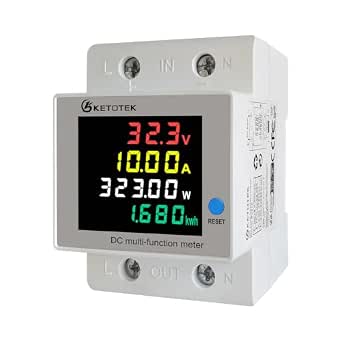 | Best for DC Systems and Electrical Cabinets | Model: KT-B0315 | Voltage range: 14.0–600.0 V DC | Current range: 0.00–63.00 A DC | VIEW LATEST PRICE | See Our Full Breakdown |
| 2-Pack Upgraded Watt Meter Power Plug Electricity Usage Monitor |  | Best Value for Monitoring Two Appliances | Manufacturer: MECHEER | Model: JK-PM07-2P-US | Pack size: 2 | VIEW LATEST PRICE | See Our Full Breakdown |
| Emporia Energy Monitoring Smart Plug, 4-Pack |  | Best for Monitoring and Controlling Several Devices | Model: EMSO1-4 | Quantity: 4 smart plugs | Voltage: 120 V | VIEW LATEST PRICE | See Our Full Breakdown |
| Refoss EM16P Smart Home Energy Monitor with Open API and Home Assistant |  | Best for Local Whole-Home and Circuit-Level Monitoring | Model: EM16P | Main circuit sensors: 2 × 200 A | Branch circuit sensors: 16 × 1–60 A | VIEW LATEST PRICE | See Our Full Breakdown |
| Plug-In Watt Meter and Home Electricity Usage Monitor |  | Best for Detailed On-Device Readings | Display modes: 7 | Display size: 2.36 × 1.85 inches | Measurements: Power, energy, voltage, current, frequency, power factor, cost, and minimum and maximum power | VIEW LATEST PRICE | See Our Full Breakdown |
| Tapo P115 Smart Wi-Fi Plug with Energy Monitoring, 2-Pack, 15A |  | Best Compact Smart-Plug Pick | Model: P115 | Quantity: 2 plugs | Operating voltage: 125 V | VIEW LATEST PRICE | See Our Full Breakdown |
| Emporia Vue 3 Home Energy Monitor with 16 Circuit Sensors |  | Best for Solar-Aware Whole-Home Monitoring | Model: EMV3A-2P-16 | Included sensors: 16 branch circuit sensors, 50A | Accuracy: ±2% | VIEW LATEST PRICE | See Our Full Breakdown |
| Smart Home Energy Monitor with 16 Circuit Sensors |  | Best for Local Home Assistant Integration | Model: SEM-Meter | Sensors: 16 clamp-on sensors, 50A each | Measurement accuracy: 1% | VIEW LATEST PRICE | See Our Full Breakdown |
| Emporia Vue Whole-Home Energy Monitor Bundle with 16 Sensors and 4 Smart Plugs |  | Best Bundle for Circuit and Outlet Tracking | Circuit sensors: 16 | Smart plugs: 4 Wi-Fi plugs | App: Emporia app for iOS and Android | VIEW LATEST PRICE | See Our Full Breakdown |
| Refoss Smart Home Energy Monitor with 16 Circuit Sensors and Local Control |  | Best for Long-Term Local Data History | Model: EM16P | Main sensors: 2, up to 200A | Branch sensors: 16, up to 60A | VIEW LATEST PRICE | See Our Full Breakdown |
| Meross Smart Home Energy Monitor with 18 CT Sensors |  | Best for Detailed Electrical Readings and Alerts | Model: EM16 | Main circuit capacity: 2 circuits, up to 200A | Branch circuit capacity: 16 circuits, up to 60A | VIEW LATEST PRICE | See Our Full Breakdown |
| electricity monitor | Model |
|---|---|
| Eyedro Smart Home Energy Monit | EYEDRO-HOME |
| Plug-In Power Meter and Energy | — |
| SURAIELEC Outlet Watt Meter an | WMA02A |
| Sungrass eMonHub Home Energy M | eMonHub-HNA0A-HA |
| KETOTEK DC Energy Meter | KT-B0315 |
| 2-Pack Upgraded Watt Meter Pow | JK-PM07-2P-US |
| Emporia Energy Monitoring Smar | EMSO1-4 |
| Refoss EM16P Smart Home Energy | EM16P |
| Plug-In Watt Meter and Home El | — |
| Tapo P115 Smart Wi-Fi Plug wit | P115 |
| Emporia Vue 3 Home Energy Moni | EMV3A-2P-16 |
| Smart Home Energy Monitor with | SEM-Meter |
| Emporia Vue Whole-Home Energy | — |
| Refoss Smart Home Energy Monit | EM16P |
| Meross Smart Home Energy Monit | EM16 |
More Details on Our Top Picks
Eyedro Smart Home Energy Monitor with 200A Sensors, WiFi and Ethernet
The Eyedro Smart Home Energy Monitor is the strongest fit here for buyers who want a live view of household electricity use rather than measurements from one appliance at a time. Its two 200A sensors and MyEyedro cloud readings can show watts, amps, volts, and estimated cost, while Wi-Fi or Ethernet gives it more connection flexibility than the plug-in SURAIELEC Outlet Watt Meter. Cloud access has no subscription, which keeps ongoing access straightforward. The main limitation is how it handles solar: each meter tracks grid energy, solar, or net metering, but not grid use and solar generation simultaneously. Buyers seeking circuit-level Home Assistant data may prefer the Sungrass eMonHub; Eyedro makes more sense for simpler whole-home or single-source monitoring.
Pros:- Tracks whole-home grid energy, solar generation, or net metering
- Reports watts, amps, volts, and electricity cost in real time
- Offers both 2.4 GHz Wi-Fi and Ethernet connectivity
- Includes two 200A sensors and cloud access without a subscription
Cons:- A single meter monitors only grid energy, solar, or net metering at one time
- Monitoring grid use separately from solar generation requires a second meter
Best for: Homeowners who want cloud-based, real-time monitoring of grid consumption or solar generation without a subscription.
Not ideal for: Solar households that need one meter to measure grid use and generation at the same time, or Home Assistant users seeking circuit-level integrations.
- Model:EYEDRO-HOME
- Current sensor capacity:200A
- Connectivity:2.4 GHz Wi-Fi or Ethernet
- Monitoring options:Grid, solar, or net metering; one at a time per meter
- Measurements:Watts, amps, volts, and cost
- Cloud access:MyEyedro cloud; no subscription
- Power source:AC
- Dimensions:8 × 8 × 3 inches
Our verdict“Choose Eyedro for straightforward, subscription-free cloud monitoring of whole-home electricity or a single solar or grid source.”
Plug-In Power Meter and Energy Monitor
This Plug-In Power Meter suits buyers who want to investigate a particular appliance without setting up a whole-home monitor. It displays power, energy, voltage, frequency, current, power factor, and calculated cost across eight display modes, giving it a broader on-screen readout than the simpler idea of checking only watts. The backlit LCD and saved cumulative data make it useful for comparing an appliance’s ongoing consumption, while an overload warning flags loads above 1800 W. Compared with the Eyedro Smart Home Energy Monitor, it is inexpensive to set up in scope, but its reach stops at a standard US outlet rather than the home’s circuits. Saved settings and cumulative usage persist through unplugging, though current, voltage, power, and power-factor readings do not.
Pros:- Displays eight measurement and cost views, including power factor and cumulative cost
- Backlit LCD makes readings easier to check in low light
- Overload warning activates above 1800 W
- Retains settings and cumulative usage data through unplugging or power loss
Cons:- Only monitors appliances connected to a standard US socket
- Does not retain current, voltage, power, or power-factor readings
- Backlight switches off after 10 minutes without a button press
Best for: Renters and homeowners who want to check the energy use and estimated cost of individual appliances at a standard US outlet.
Not ideal for: Buyers who need whole-home or remote monitoring, or who want electrical readings such as voltage and current saved for later review.
- Power source:Corded electric
- Minimum operating voltage:120 V
- Overload threshold:1800 W
- Display modes:8
- Measurements:Power, energy, voltage, frequency, current, power factor, unit price, and total cost
- Compatible devices:Appliances with a standard US socket
- Dimensions:5.5 × 3.5 × 2.5 inches
- Material:ABS
Our verdict“Pick this meter for hands-on appliance cost checks at an outlet, not for whole-home visibility or saved electrical diagnostics.”
SURAIELEC Outlet Watt Meter and Energy Cost Calculator
The SURAIELEC Outlet Watt Meter earns its place for buyers who want appliance-level measurements that remain available after unplugging the unit. Its battery-backed memory holds data for up to 90 days, a practical advantage over the Plug-In Power Meter and Energy Monitor, which retains cumulative use but not several live electrical readings. SURAIELEC also covers power, voltage, current, frequency, power factor, and cumulative energy, with cost calculations based on a user-set rate. The backlit screen helps when checking readings in a dim utility area. This remains a local, outlet-based tool: unlike the Eyedro Smart Home Energy Monitor, it offers no described wireless or remote access, and its 16 A limit makes it a poor fit for higher-current applications.
Pros:- Measures power, voltage, current, frequency, power factor, and cumulative energy
- Calculates estimated electricity cost using a user-set rate
- Battery-backed memory retains data for up to 90 days
- Backlit LCD is easier to read in low-light spaces
Cons:- Maximum current is limited to 16 A
- No wireless monitoring or remote access is described
Best for: People tracking an appliance’s energy use over time who want readings retained between unplugging and later checks.
Not ideal for: Buyers who need remote access, whole-home or circuit-level monitoring, or loads that exceed 16 A.
- Model:WMA02A
- Voltage range:90–250 Vac
- Current range:0–16 A
- Maximum power:3680 W
- Accuracy:Class 1.0
- Display:Backlit LCD
- Data retention:Up to 90 days
- Warranty:1-year limited
Our verdict“Choose SURAIELEC over a basic outlet meter when retained readings and cost calculations matter more than remote access.”
Sungrass eMonHub Home Energy Monitor for Home Assistant
For a technically minded household, the Sungrass eMonHub offers the most flexible system view among these five. It monitors 10 circuits and supports bidirectional readings, so buyers can track consumption alongside grid feed-in from solar, batteries, or V2G setups. Its Home Assistant integration adds local data storage and automation possibilities that the cloud-focused Eyedro Smart Home Energy Monitor does not emphasize. Wi-Fi and Ethernet provide two ways to connect it. That added control comes with a more involved setup: the monitor must be placed in the circuit panel, unlike the SURAIELEC or Plug-In Power Meter, which simply sit at an outlet. Choose it when circuit-level data and local automation justify panel installation; skip it for a quick, single-appliance check.
Pros:- Monitors electricity use across 10 circuits
- Bidirectional metering tracks consumption and grid feed-in
- Supports solar, V2G, and battery storage monitoring
- Integrates with Home Assistant for local data and automations, with Wi-Fi and Ethernet
Cons:- Requires placement in the circuit panel, making setup more involved than outlet meters
- Its Home Assistant focus may be unnecessary for buyers seeking a simple display-only monitor
Best for: Home Assistant users with solar, battery, or V2G equipment who want local, bidirectional monitoring across multiple circuits.
Not ideal for: Renters, beginners seeking a plug-in monitor, or households unwilling or unable to install equipment at the circuit panel.
- Model:eMonHub-HNA0A-HA
- Circuits monitored:10
- Connectivity:Wi-Fi and Ethernet
- Integration:Home Assistant
- Metering:Bidirectional
- Supported monitoring:Solar, V2G, battery storage, and grid feed-in
- Dimensions:4.73 × 3.15 × 1.22 inches
- Certifications and standards:FCC and CE certified; tested to UL/IEC standards
Our verdict“Choose eMonHub for Home Assistant-driven circuit monitoring and bidirectional energy tracking if panel installation suits your setup.”
KETOTEK DC Energy Meter, 14–600 V, 63 A, DIN Rail
The KETOTEK DC Energy Meter fills a different niche from the household AC monitors here: it measures DC voltage, current, power, and accumulated energy, with all four values visible on its color LCD. Its DIN-rail form suits an indoor electrical cabinet, workshop, or residential DC installation, while stored energy readings survive a power loss. That makes it a better match for compatible DC equipment than the Eyedro Smart Home Energy Monitor, which is aimed at whole-home grid, solar, or net-metering views, or the outlet-based SURAIELEC. The tradeoff is narrower application: this is not a general-purpose AC home monitor, and its 600 V and 63 A ceilings must be respected. Buyers also get a local display rather than described wireless monitoring.
Pros:- Measures DC voltage, current, power, and accumulated energy
- Shows all four readings together on a color LCD
- Stores accumulated energy readings during power loss
- Compact DIN-rail mounting suits cabinets and indoor electrical setups
Cons:- Designed for DC measurement, not general whole-home AC monitoring
- Indoor use only
- Must remain within the 600 V and 63 A maximum ratings
Best for: Workshop operators and technically capable homeowners monitoring an indoor DC system within the meter’s voltage and current limits.
Not ideal for: Buyers seeking whole-home AC monitoring, wireless access, outdoor installation, or readings beyond 600 V DC or 63 A DC.
- Model:KT-B0315
- Voltage range:14.0–600.0 V DC
- Current range:0.00–63.00 A DC
- Power range:0.0–37,800 W DC
- Energy capacity:Up to 999,999 kWh
- Display:Color LCD
- Mounting:DIN rail
- Indoor use:Yes
Our verdict“Choose KETOTEK for a compact, local readout of a compatible indoor DC system, not for monitoring household AC consumption.”
2-Pack Upgraded Watt Meter Power Plug Electricity Usage Monitor
The MECHEER two-pack makes sense when you want direct readings from more than one appliance without moving a single meter between outlets. It reports watts, kWh, voltage, current, and estimated cost, so you can compare everyday loads as well as track cumulative use. Audible and visual overload alerts add a practical safeguard, while memory retention preserves accumulated readings after a power loss. Compared with the Emporia Energy Monitoring Smart Plug, this is focused on local, on-device measurement rather than app control, scheduling, or voice commands. That simplicity suits buyers who mainly want to read consumption at the outlet, but setup may take patience: alarm and overload thresholds can be confusing, and the plugs work only with US-style sockets. Choose it for straightforward measurements across two devices, not smart-home automation.
Pros:- Two meters let you monitor separate appliances at the same time.
- Eight display modes cover usage, electrical readings, and estimated cost.
- Audible and visual overload alerts add a safety warning.
- Memory retains settings and cumulative readings after power loss.
Cons:- Alarm and overload threshold setup may be confusing.
- Compatible only with US standard sockets.
- Does not provide the remote control or scheduling available with smart plugs such as the Emporia EMSO1.
Best for: Households that want to compare the electricity use of two plug-in appliances using on-device readings rather than an app.
Not ideal for: Buyers who need remote control, schedules, voice-assistant support, or compatibility with non-US sockets.
- Manufacturer:MECHEER
- Model:JK-PM07-2P-US
- Pack size:2
- Measurements:Voltage, current, watts, kilowatt-hours, and estimated cost
- Display modes:8
- Alerts:Audible and visual overload alerts
- Memory:Retains settings and cumulative usage after power loss
- Dimensions:5.2 × 2.7 × 2.4 inches
Our verdict“Choose the MECHEER two-pack if you want detailed outlet readings for two appliances and can do without app-based control.”
Emporia Energy Monitoring Smart Plug, 4-Pack
For buyers who want electricity tracking to lead to an action, the Emporia four-pack pairs device-level energy monitoring with app control, schedules, and Alexa or Google Assistant support. Four plugs make it easier to track several appliances at once, and remote switching can help cut standby use without walking to each outlet. Compared with the MECHEER two-pack, Emporia trades a screen-centered, standalone meter experience for connected controls and app-based access. It also includes more plugs, but requires 2.4 GHz Wi-Fi and supports a maximum continuous load of 10 A, so it is not the pick for higher-draw equipment. The 1200 W limit is a meaningful boundary for appliance selection. I’d choose it for everyday compatible devices and routines, not for heavy loads or buyers who want readings without network setup.
Pros:- Four plugs support simultaneous monitoring of multiple devices.
- App scheduling and remote switching can help manage standby power.
- Compatible with Alexa and Google Assistant voice control.
- Offers app, remote, touch, voice, and push-button control.
Cons:- Requires a 2.4 GHz Wi-Fi connection.
- The 10 A continuous-load limit restricts which appliances it can monitor.
- Smart controls and energy tracking depend on app and network setup.
Best for: Smart-home households that want to track and schedule several compatible 120 V devices from one app.
Not ideal for: People monitoring high-draw appliances, relying on 5 GHz-only Wi-Fi, or seeking a standalone meter that works without app setup.
- Model:EMSO1-4
- Quantity:4 smart plugs
- Voltage:120 V
- Power:1200 W
- Connectivity:2.4 GHz Wi-Fi
- Compatible assistants:Amazon Alexa and Google Assistant
- Control options:App, remote, touch, voice, and push button
- Dimensions:1.97 × 3.31 × 1.5 inches
- Warranty:1 year
Our verdict“Pick the Emporia four-pack if app-based energy tracking and scheduled control across several moderate-load devices matter more than standalone readings.”
Refoss EM16P Smart Home Energy Monitor with Open API and Home Assistant
The Refoss EM16P is the most capable option here for understanding electricity use beyond individual plug-in devices. Its clamp-on sensors cover two main circuits and up to 16 branch circuits, giving homeowners a way to compare whole-home demand with specific circuit loads. Local web access, Open API, MQTT, and native Home Assistant support set it apart from plug-in choices such as the Tapo P115, which focuses on individual devices and smart-plug controls. Refoss also supports solar-use automation and up to five years of exportable history, useful for longer-term analysis without depending on cloud access. The tradeoff is installation: sensors need access to the home’s circuit panel, so this is not a quick outlet-level setup. Low-current accuracy is ±2%, and buyers should be comfortable with panel work or arrange qualified help.
Pros:- Monitors two main circuits and up to 16 branch circuits.
- Local web access, Open API, MQTT, and native Home Assistant integration.
- Stores up to five years of exportable historical data.
- Supports solar-use automation and alerts.
Cons:- Installation requires access to the home’s circuit panel.
- Accuracy is ±2% at low current.
- More involved to install and configure than plug-in monitors such as the Tapo P115.
Best for: Homeowners and Home Assistant users who want local whole-home data, branch-circuit visibility, and solar automation.
Not ideal for: Renters, buyers who only need to measure one plug-in appliance, or anyone unwilling to install sensors at the circuit panel.
- Model:EM16P
- Main circuit sensors:2 × 200 A
- Branch circuit sensors:16 × 1–60 A
- Accuracy:±1%; ±2% at low current
- Connectivity:Wi-Fi, Open API, and MQTT
- Home Assistant integration:Native
- Data storage:Up to 5 years; exportable
- Certification:ETL certified; compliant with UL 61010
- Warranty:2 years
Our verdict“Choose the EM16P if you want local, circuit-level home energy data and are prepared for a panel-mounted installation.”
Plug-In Watt Meter and Home Electricity Usage Monitor
This plug-in meter suits buyers who want a broad set of electrical readings on one screen rather than smart-plug controls. Its seven display modes include power, energy, voltage, current, frequency, power factor, estimated cost, and minimum and maximum power, while the large backlit LCD is easier to read than a basic meter with a small, unlit display. Like the MECHEER two-pack, it keeps readings on the device and retains data after unplugging or power failure; unlike that option, this listing describes a single monitor rather than a two-pack. Adjustable backlight timing helps limit unnecessary illumination, and overload protection adds a warning when a chosen threshold is exceeded. The main compromise is setup: the overload threshold may need adjustment before use. It also lacks the remote access and scheduling found on the Tapo P115.
Pros:- Seven modes cover a wide range of electrical measurements.
- Large backlit LCD supports adjustable lighting duration.
- Retains readings after unplugging or a power failure.
- Adjustable overload protection can be set up to 3680 W.
Cons:- The overload threshold may need adjustment before use.
- No app, voice control, or scheduling features like those on the Tapo P115.
- A single meter cannot monitor multiple appliances simultaneously.
Best for: Appliance owners who want a readable display with detailed electrical measurements and retained usage data at the outlet.
Not ideal for: Buyers who need multiple meters at once, app-based access, smart scheduling, or automatic remote control.
- Display modes:7
- Display size:2.36 × 1.85 inches
- Measurements:Power, energy, voltage, current, frequency, power factor, cost, and minimum and maximum power
- Backlight settings:10 minutes, 1 hour, 4 hours, 8 hours, or always on
- Overload protection:Adjustable from 0 to 3680 W
- Data memory:Retains readings after unplugging or power failure
Our verdict“Choose this meter for detailed, easy-to-read outlet measurements, but choose a smart plug if remote control is part of your plan.”
Tapo P115 Smart Wi-Fi Plug with Energy Monitoring, 2-Pack, 15A
The Tapo P115 two-pack is a compact choice for monitoring and managing everyday plug-in devices. It combines energy statistics and charts with app and voice control, scheduling, and remote operation; its small design is intended to leave neighboring outlets accessible. The overload auto-shutoff adds a safeguard, while support for Alexa, Google Assistant, and Samsung SmartThings gives it more connected-home flexibility than the screen-based Plug-In Watt Meter and Home Electricity Usage Monitor. That comparison also shows the tradeoff: Tapo prioritizes remote management and trends over a dedicated display of detailed electrical readings. It needs 2.4 GHz Wi-Fi, and its 125 V operating limit and 1800 W maximum narrow the choice of devices it can handle. It makes the most sense for ordinary compatible loads, not buyers seeking circuit-panel monitoring like the Refoss EM16P.
Pros:- Energy statistics and charts make usage trends easier to review.
- App, voice, and remote control support flexible operation.
- Scheduling can automate connected-device use.
- Compact design is intended to leave neighboring outlets accessible.
Cons:- Requires a 2.4 GHz Wi-Fi connection.
- Maximum operating voltage is 125 V, with a maximum wattage of 1800 W.
- Does not provide the direct, detailed on-device readings available from a dedicated watt meter.
Best for: Smart-home users who want compact, app-controlled energy tracking and scheduling for two everyday plug-in devices.
Not ideal for: Buyers who need a standalone display, detailed circuit-level monitoring, 5 GHz-only Wi-Fi, or support beyond the stated 125 V and 1800 W limits.
- Model:P115
- Quantity:2 plugs
- Operating voltage:125 V
- Maximum wattage:1800 W
- Connectivity:2.4 GHz Wi-Fi
- Control:Tapo app, voice, and remote
- Voice assistants:Alexa and Google Assistant
- Compatible platforms:Samsung SmartThings
- Certifications:ETL, FCC, and RoHS
Our verdict“Pick the Tapo P115 if compact smart control and energy trends matter more than a dedicated meter display or whole-home monitoring.”
Emporia Vue 3 Home Energy Monitor with 16 Circuit Sensors
The Emporia Vue 3 is a strong fit for homeowners who want a single app view of whole-home demand and individual circuit use, including solar and net metering. Its 16 included 50A branch sensors give it more circuit coverage out of the box than a basic whole-home monitor, while real-time app data can help identify which loads are driving consumption. Compared with the Smart Home Energy Monitor with 16 Circuit Sensors, this model has a clearly stated ±2% accuracy rather than 1%, and it does not list local MQTT operation. Its appeal is the Emporia app and straightforward solar support, not maximum precision or local-control flexibility. Installation requires access to a compatible breaker panel, plus 2.4 GHz Wi-Fi and internet; some supported electrical systems need an additional 200A sensor.
Pros:- Tracks whole-home use and up to 16 individual circuits
- Supports solar and net metering
- Includes 16 branch circuit sensors rated at 50A
- Provides real-time readings through the Emporia app
Cons:- Requires 2.4 GHz Wi-Fi and an internet connection
- Stated accuracy of ±2% is lower than the 1% listed for several alternatives
- Some supported electrical systems require an additional 200A sensor
Best for: Homeowners with solar or net metering who want whole-home and up to 16 circuit readings in the Emporia app.
Not ideal for: Home Assistant users who want local MQTT control, or households without reliable 2.4 GHz Wi-Fi and internet access.
- Model:EMV3A-2P-16
- Included sensors:16 branch circuit sensors, 50A
- Accuracy:±2%
- Connectivity:2.4 GHz Wi-Fi and internet connection required
- Supported systems:Single phase, single-split phase, and 2-wire; select 3-wire and 3-phase systems with an additional sensor
- Solar support:Supports solar and net metering
- Certifications:UL and CE listed
- Warranty:1 year
Our verdict“Choose the Vue 3 if solar-aware circuit monitoring through the Emporia app matters more than local control or the tightest stated accuracy.”
Smart Home Energy Monitor with 16 Circuit Sensors
This monitor suits technically confident homeowners who want circuit-level cost tracking without relying entirely on a vendor cloud. It pairs 16 clamp-on sensors with app access over 2.4 GHz Wi-Fi, and its local MQTT mode can feed readings into Home Assistant. Time-of-use pricing and estimated circuit costs make the data more useful for households trying to connect energy use with their bills. Against the Emporia Vue 3, it lists higher measurement accuracy at 1% and offers a local integration path, while the Vue 3 may be a simpler choice for buyers already using Emporia’s app and ecosystem. There are practical limits: installation still means working at the electrical panel, busbar-only panels need separately available flexible sensors, and three-phase Delta systems are unsupported.
Pros:- Measures up to 16 circuits with stated 1% accuracy
- Supports local MQTT operation and Home Assistant
- Tracks estimated costs and supports time-of-use pricing
- Supports solar monitoring and net metering
Cons:- Installation requires access to the circuit panel
- Busbar-only panels require separately available flexible sensors
- Does not support three-phase Delta systems
Best for: Homeowners comfortable with panel installation who want circuit-level cost data and local MQTT integration with Home Assistant.
Not ideal for: People with three-phase Delta service, busbar-only panels who do not want to source extra sensors, or buyers seeking a simple plug-in monitor.
- Model:SEM-Meter
- Sensors:16 clamp-on sensors, 50A each
- Measurement accuracy:1%
- Supported voltage:Up to 240VAC line-neutral; 120/240VAC split-phase; up to 415Y/240VAC three-phase, no Delta
- Connectivity:2.4 GHz Wi-Fi; local MQTT mode
- Data history:Hourly exports retained for 90 days; day, month, and year exports permanent
- Dimensions:3.1 x 1.2 x 4.18 inches
- Warranty:1 year
Our verdict“Pick this model if local Home Assistant data and circuit-level cost estimates matter more than a simple, app-only setup.”
Emporia Vue Whole-Home Energy Monitor Bundle with 16 Sensors and 4 Smart Plugs
This bundle is for buyers who want to monitor more than the circuits inside the panel. Alongside whole-home and 16-circuit monitoring, it includes four Wi-Fi smart plugs that measure outlet-level use and allow remote control or scheduling through the Emporia app. That makes it easier to track devices that plug-in monitors can measure individually, while still seeing broader household demand. Compared with the standalone Emporia Vue 3, the bundle adds outlet tracking and Alexa compatibility, but its description does not specify installation requirements or measurement accuracy. It also stores energy data in the cloud, which may not suit households seeking local-only control. Choose it for the combined monitoring-and-control setup; skip it if you need explicit technical detail or want to avoid cloud data storage.
Pros:- Monitors whole-home use and up to 16 individual circuits
- Includes four Wi-Fi smart plugs with energy tracking
- Smart plugs support remote control and schedules
- Works with iOS, Android, Alexa, and solar net metering
Cons:- Energy data is stored in the cloud
- The product description does not specify installation requirements
- The supplied details do not state a measurement accuracy
Best for: Households that want panel-based circuit monitoring plus four smart plugs for tracking and scheduling individual appliances.
Not ideal for: Privacy-focused buyers who want local-only data, or shoppers who need clearly stated installation and accuracy specifications before choosing.
- Circuit sensors:16
- Smart plugs:4 Wi-Fi plugs
- App:Emporia app for iOS and Android
- Compatible devices:Smart plugs, energy monitors, solar systems, iOS devices, Android devices, and Alexa-enabled devices
- Solar support:Supports solar net metering
- Data storage:Cloud data storage
Our verdict“Choose this bundle if you want circuit monitoring and four remotely controllable, energy-tracking plugs in one Emporia setup.”
Refoss Smart Home Energy Monitor with 16 Circuit Sensors and Local Control
The Refoss EM16P stands out for homeowners who want substantial circuit coverage without making cloud access the center of their monitoring setup. It measures two main circuits and 16 branch circuits, supports local web access and integrations such as Home Assistant, and keeps daily data for up to five years with CSV export. That retention gives energy-conscious users a longer record for comparing seasonal patterns than the Smart Home Energy Monitor with 16 Circuit Sensors, whose export history is specified differently. Refoss also lists ±1% accuracy and a two-year warranty. The tradeoff is a more technically involved, panel-based installation and specific electrical-system compatibility: it supports single-phase, split-phase, and three-phase 4-wire Wye, but not every three-phase configuration. Check your service type before buying.
Pros:- Monitors two main circuits and 16 branch circuits
- Offers local web control, Open API, MQTT, WebSocket, and Home Assistant integration
- Stores daily data for five years and supports CSV export
- Lists ±1% accuracy and a two-year warranty
Cons:- Installation requires access to the breaker box
- Electrical compatibility is limited to specified system configurations
- Home Assistant integration is specified through Refoss_RPC rather than as a generic direct integration
Best for: Homeowners with a supported electrical system who want local integrations, long-term energy history, and exportable data.
Not ideal for: Buyers with Delta or other unsupported electrical configurations, or anyone unwilling to work with a breaker panel or hire an installer.
- Model:EM16P
- Main sensors:2, up to 200A
- Branch sensors:16, up to 60A
- Accuracy:±1%
- Supported electrical systems:Single-phase, split-phase, and 3-phase 4-wire Wye
- Connectivity and integrations:Wi-Fi, Local Web UI, Open API, MQTT, WebSocket, Home Assistant via Refoss_RPC
- Data retention and export:Daily data stored for 5 years; CSV export
- Certification and warranty:ETL; 2 years
Our verdict“Choose the Refoss EM16P if long-term local data and broad integration options outweigh installation complexity and system-compatibility limits.”
Meross Smart Home Energy Monitor with 18 CT Sensors
Meross is a good match for buyers who want more than consumption totals: it reports power, voltage, current, and power factor, with historical charts, exportable reports, and custom alerts. Its two main current transformers and 16 branch sensors cover whole-home demand alongside individual circuits, while local data storage and Home Assistant support suit households building a connected energy setup. Compared with the Refoss EM16P, Meross offers a similarly broad sensor arrangement, ±1% stated accuracy, and a two-year warranty, but the supplied details specify data retention only as up to five years and do not list Refoss’s range of local interfaces. Neither is a plug-in alternative: this system needs a compatible electrical panel, and three-phase Delta systems are not supported. Its extra electrical readings are most useful to buyers who will act on that detail.
Pros:- Monitors two main circuits and up to 16 branch circuits
- Reports power, voltage, current, and power factor
- Supports Home Assistant, local data storage, and solar automation
- Includes historical charts, report exports, alerts, and a two-year warranty
Cons:- Does not support three-phase Delta electrical systems
- Requires a compatible home electrical system and circuit-panel installation
- The description does not specify the exact local storage or integration setup
Best for: Homeowners who want detailed electrical measurements, circuit-level tracking, alerts, and Home Assistant or local-data options.
Not ideal for: Households with three-phase Delta service, renters without panel access, or buyers who only need to measure a single appliance at an outlet.
- Model:EM16
- Main circuit capacity:2 circuits, up to 200A
- Branch circuit capacity:16 circuits, up to 60A
- Included sensors:2 x 200A current transformers and 16 x 60A current transformers
- Measurement accuracy:±1%
- Compatibility:Single-phase 2-wire, split-phase 3-wire, and 3-phase 4-wire Wye systems; no Delta
- Connectivity and integrations:Home Assistant, Open API, Wi-Fi, and web control
- Data retention and warranty:Up to 5 years; 2 years
Our verdict“Choose Meross if you want detailed circuit readings and local smart-home features, provided your electrical system is compatible.”

How We Picked
I compared these 15 electricity monitors by the job they can do, not by feature count alone. The main criteria were coverage type (whole-home, circuit-level, DC, or plug-level), stated sensor and current capacity, connectivity and smart-home compatibility, and how much setup the product appears to require. I also looked at whether a product supports a distinct use case, such as Home Assistant integration, local control, Ethernet, multi-plug monitoring, or energy-cost calculations.
The ranking gives more weight to versatility for a typical household than to a narrow feature or a larger sensor count. Whole-home options rise when they combine broad circuit visibility with useful connectivity; plug-in meters rank well for focused appliance checks and easier setup, but cannot represent an entire home’s consumption. Products with overlapping functions are separated by their stated differentiators, while buyers should still confirm panel compatibility, electrical limits, and regional installation rules before choosing.
Factors to Consider When Choosing Best Electricity Monitors
Before choosing an electricity monitor, decide what question you want it to answer: where the home’s energy goes, how much one appliance uses, or whether a smart-home system can act on that data. The right product depends as much on measurement scope and installation fit as on the monitor’s app or sensor count.
Choose Between Whole-Home, Circuit, and Plug-Level Readings
A whole-home monitor measures the incoming supply, while circuit sensors can help separate usage across selected breakers and plug-in meters isolate one appliance. These readings are not interchangeable: a plug meter cannot reveal consumption from hardwired equipment, and a whole-home total may not identify which device caused a change. Start with the decision you want to make, such as finding a high-use circuit or comparing two appliances. A common mistake is buying a panel monitor when the real need is a quick check of a portable device. If both views matter, a system that pairs panel sensors with smart plugs can bridge the gap, though it adds components and setup.
Check Electrical Compatibility Before Buying
Panel monitors and DC meters have specific electrical limits and installation conditions, so do not assume a product fits just because its sensor count looks right. Check the panel layout, service rating, conductor size, voltage range, and whether the product’s sensors can fit around the wires you need to monitor. A DC meter such as the KETOTEK serves a different purpose from an AC home panel monitor and should match the system it is meant to measure. If you are unsure about panel access or safe installation, ask a qualified electrician rather than improvising. Compatibility errors can make a capable monitor unusable, while oversizing the feature set may add complexity without improving the readings you need.
Match Sensor Count to the Circuits You Actually Want to Track
More sensors can provide more circuit-level visibility, but only if you have enough relevant circuits and room to install them. List the loads you want to separate before comparing 16- and 18-sensor products; some circuits may not need their own reading, and some appliances may need a different measurement approach. Also check whether the product includes the sensors in its stated configuration or offers them as an add-on. Buyers often treat sensor count as a proxy for accuracy or usefulness, though it mainly describes potential coverage. Choose enough sensors for your monitoring plan, with some allowance for future changes, rather than selecting the largest number by default.
Decide How Much Smart-Home Integration You Need
For some households, a clear app and basic history are enough; others want data in Home Assistant, an open API, or local control. These capabilities can affect how much control you retain and whether readings can feed into automations, but they may require more setup and troubleshooting. Check whether a feature is explicitly supported by the specific model and whether it depends on cloud access, a hub, or a compatible network. Do not assume that every monitor with Wi-Fi offers the same level of data access. If you mainly want to identify high-use appliances, prioritize straightforward readings; if you plan to build automations, verify integration details before purchase.
Balance Easy Setup Against Broader Coverage
Plug-in meters and smart plugs generally ask less of the buyer because they monitor equipment through an outlet, but they only cover devices that can use that outlet. Panel monitors can show a wider picture and break usage into circuits, yet installation and panel compatibility become part of the decision. Consider who will install the unit, whether you can safely access the panel, and how much time you want to spend configuring sensors. A low-effort plug monitor may be the better starting point if you are checking a few portable appliances. Paying for panel coverage makes more sense when you need to identify usage across hardwired loads or want a household-wide view.
Think About the Measurement’s Next Step
Monitoring is most useful when it informs a decision: changing a schedule, comparing an appliance, or checking whether a specific circuit draws power when expected. A detailed dashboard has limited value if you do not plan to review the data or act on it. Before buying, decide how often you will check readings and whether you need cost estimates, historical tracking, or smart-home automation. Cost calculators can help translate energy use into an understandable bill estimate, but results depend on entering appropriate utility rates. Choose a monitor whose reporting matches the decision you intend to make, rather than paying for data features you are unlikely to use.
Frequently Asked Questions
Should I buy a whole-home monitor or a plug-in electricity meter?
Choose a whole-home monitor if you want to observe the home’s supply or separate usage across panel circuits, including hardwired equipment. Choose a plug-in meter if you only need readings for an appliance that connects through an outlet and prefer to avoid panel installation. Neither type replaces the other: a plug meter is more focused, while a panel system covers more of the home’s electrical use. If you have a few specific devices to investigate, start with plug-level monitoring. If your question is where household usage is concentrated, a panel monitor is the better fit.
Can I install a circuit-based electricity monitor myself?
Installation depends on the product, your electrical panel, and local rules, so I would not assume that a circuit monitor is a simple DIY project. Panel work can expose hazardous electrical components, and a tight or incompatible panel can make sensor placement difficult. Read the manufacturer’s installation requirements before buying and check whether a qualified electrician is needed. Plug-in meters and smart plugs usually avoid panel work, making them a more approachable option for basic appliance checks. If you are uncertain about safe access, have a professional handle the installation.
Do I need one sensor for every circuit in my breaker panel?
No; sensor needs depend on which circuits you want to distinguish and what the monitor’s design supports. Monitoring selected circuits can answer focused questions, while broader sensor coverage gives you a more detailed picture of how usage is distributed. Some loads may be better measured with a plug-in monitor, and the number of listed sensors does not by itself confirm that they will fit your panel. Map the circuits you care about and check the included sensor configuration before selecting a system. Leave room in your plan for panel layout and installation constraints.
What should I check before choosing a Home Assistant or local-control monitor?
Confirm the exact model supports the integration you want, not just a related product in the same brand’s range. Check whether setup requires an account, internet access, a hub, or a particular network configuration, and whether local data access is available for the features you plan to use. An open API or Home Assistant compatibility can provide more flexibility, but it may also require configuration beyond a standard app setup. Look for current documentation and supported data points before purchasing. If you only need basic energy readings, a simpler app-based monitor may take less effort to maintain.
Can an electricity monitor tell me exactly how much my next bill will be?
It can help estimate energy costs, but a monitor’s calculation may not match the final utility bill exactly. The estimate depends on accurate readings and the rates or billing details entered, while utility charges can include time-based rates, fees, taxes, and other adjustments. A monitor is most useful for comparing usage patterns or spotting changes, rather than treating its cost display as a guaranteed bill total. Check whether the product lets you configure the relevant rate structure. Use your utility statement as the final reference for billed charges.
Conclusion
For broad household coverage, I recommend the Emporia Vue 3 as the best overall pick, while the Emporia Vue bundle makes more sense if you also want smart-plug readings alongside circuit monitoring. For easier, focused appliance checks, the Tapo P115 two-pack is my best beginner-friendly choice; plug-in watt meters are another practical route when you need direct readings without panel work. Buyers who prioritize connectivity can compare Eyedro’s Wi-Fi and Ethernet with the Home Assistant, open-API, and local-control options from Sungrass and Refoss. For a distinct need, choose the KETOTEK DC meter only when its DC measurement range fits your system, and consider the Meross 18-sensor model if its coverage matches your panel plan. My recommendation is to settle the measurement scope and compatibility questions first, then choose the monitor whose controls and integrations you will actually use.