
Smart home learning devices have moved well beyond simple programmable gadgets — today’s best thermostats study your schedule, adjust to your habits automatically, and trim your energy bill without constant tinkering. In this comparison, the Google Nest Learning Thermostat (4th Gen) earns the top spot for its genuinely hands-free learning, refined design, and remote sensor support that keeps every room comfortable. Close behind, the ecobee Smart Thermostat Premium bundle adds air quality monitoring and security features that make it the best pick for whole-home ecosystems, while the Amazon Smart Thermostat proves you can get reliable smart scheduling for under $100 — as long as you don’t mind skipping true auto-learning. The main tradeoff in this category is price versus autonomy: the cheapest models require you to build schedules yourself, while premium models do the work for you and often pay for themselves in energy savings. Keep reading for the full breakdown, including who each option suits best and which ones are worth skipping.

Get home appliances delivered free with Prime
- Fast, free delivery on millions of items
- Prime Video, Amazon Music and more included
- Member-only deals all year
Complete the kit


Key Takeaways
- Only the Nest Learning Thermostat models (4th Gen in Silver and Polished Gold) offer true self-programming — the standard Nest Thermostat and Amazon Smart Thermostat both require manual schedule setup, which is the single biggest divide in this lineup.
- The ecobee bundle is the only option that bundles security and air quality sensing, making it the strongest pick for buyers building a whole-home smart ecosystem rather than just upgrading one thermostat.
- The color variants (Snow, Charcoal, Polished Gold, Silver) are purely cosmetic — choosing between the standard Nest Thermostat’s Snow and Charcoal models should come down to decor, not features.
- The Amazon Smart Thermostat is the only pick that strictly requires a C-wire with no built-in workarounds, so buyers with older HVAC systems should check wiring before choosing it over the Nest models.
- Remote temperature sensors (included with both Nest Learning Thermostat 4th Gen bundles) solve the common problem of uneven heating between floors — a feature the standard Nest Thermostat and Amazon option can’t match.
| Google Nest Thermostat – Smart Wi-Fi Programmable Thermostat for Home – Snow |  | Best Value Pick | Connectivity: Wi-Fi | Energy Star Certified: Yes | Compatible Systems: Most homes without C wire; heating, cooling, zone control, heat pump | VIEW LATEST PRICE | See Our Full Breakdown |
| Google Nest Learning Thermostat (4th Gen, 2024) with Nest Temperature Sensor – Polished Gold |  | Best Premium Pick | Model: 4th Gen, 2024 | Color: Polished Gold | Compatibility: Most 24V systems: gas, electric, oil, forced air, heat pump, radiant | VIEW LATEST PRICE | See Our Full Breakdown |
| Google Nest Thermostat – Smart Thermostat for Home – Programmable Wi-Fi – Charcoal | 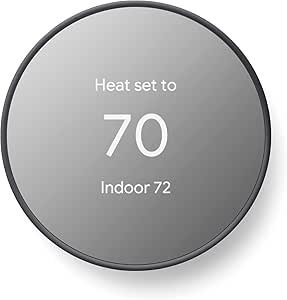 | Best for Beginners | Connectivity: Wi-Fi 802.11b/g/n 2.4 GHz, 802.11a/n 5 GHz; Bluetooth Low Energy | Compatibility: Works without C wire in most homes; Google Assistant and Matter-certified assistants | Installation: Usually 30 minutes or less | VIEW LATEST PRICE | See Our Full Breakdown |
| ecobee Total Security and Savings Bundle with Smart Thermostat Premium |  | Best All-in-One Security Bundle | Controller Type: Apple HomeKit, Amazon Alexa, Samsung SmartThings | Additional Features: Smoke alarm detection, siren, activity alerts, auto-scheduling | Connectivity: Wi-Fi | VIEW LATEST PRICE | See Our Full Breakdown |
| Google Nest Learning Thermostat (4th gen) + Nest Temperature Sensor (2nd gen) – Silver |  | Best Overall | Model: 4th generation | Finish: Silver | Includes: Nest Temperature Sensor (2nd gen) | VIEW LATEST PRICE | See Our Full Breakdown |
| Amazon Smart Thermostat, Compatible with Alexa and Ring, C-wire Required |  | Best Budget Pick | Size: 3.56 x 3.56 x 0.84 in | Weight: 3.86 oz | Model number: S6ED3R | VIEW LATEST PRICE | See Our Full Breakdown |
| smart home learning device | Connectivity | Compatibility |
|---|---|---|
| Google Nest Thermostat | Wi-Fi | — |
| Google Nest Learning Thermosta | — | Most 24V systems: gas, electric, oil, forced air, heat pump, radiant |
| Google Nest Thermostat | Wi-Fi 802.11b/g/n 2.4 GHz, 802.11a/n 5 GHz; Bluetooth Low Energy | Works without C wire in most homes; Google Assistant and Matter-certified assistants |
| ecobee Total Security and Savi | Wi-Fi | — |
| Google Nest Learning Thermosta | Wi-Fi with app control | Most 24V systems; Alexa, Siri, Google Assistant, Matter |
| Amazon Smart Thermostat | — | Most 24V HVAC systems, requires C-wire |
More Details on Our Top Picks
Google Nest Thermostat – Smart Wi-Fi Programmable Thermostat for Home – Snow
Best for buyers who want Nest basics without the premium price. Compared with the Learning Thermostat (4th Gen), this model skips automatic schedule learning — you program it yourself or rely on the app — but you still get ENERGY STAR-certified savings, remote control, and HVAC monitoring. That tradeoff translates to real outcomes: a lower upfront cost and a simpler mental model, at the expense of hands-off convenience. Compared with the Amazon Smart Thermostat, the Snow Nest offers broader ecosystem support (Google Assistant, Alexa, and Matter), though Alexa-centric households may prefer Amazon’s tighter Ring integration. The mirror-like display keeps energy info glanceable, and setup in most homes works without a C wire. Just know what you’re giving up: no lock feature to prevent tampering, and some HVAC systems will need a power accessory before everything runs smoothly.
Pros:- ENERGY STAR certified with genuine energy savings through scheduling and HVAC monitoring
- Works without a C wire in most homes, keeping installation simple
- Broad platform support across Google Assistant, Alexa, and Matter
- Clean mirror-finish display reads well in most lighting
Cons:- No self-learning — schedules must be programmed manually
- No lock feature, so kids or guests can change settings freely
Best for: Budget-conscious homeowners in Google or Matter smart homes who don’t mind setting their own schedules
Not ideal for: Buyers who want the thermostat to build its own schedule automatically — this model requires manual programming
- Connectivity:Wi-Fi
- Energy Star Certified:Yes
- Compatible Systems:Most homes without C wire; heating, cooling, zone control, heat pump
- Voice Control:Google Assistant and Alexa
- Remote Control:Yes, via mobile devices
- Smart Home Compatibility:Google Home, Matter-certified voice assistants
- Energy Saving Features:Scheduling, Nest Renew integration, HVAC monitoring
Our verdict“The smart pick if you want Nest ecosystem reliability and energy savings at the lineup’s most accessible price.”
Google Nest Learning Thermostat (4th Gen, 2024) with Nest Temperature Sensor – Polished Gold
This is the showcase option — the one where design and automation meet. The Polished Gold finish makes it a statement piece on the wall rather than an appliance to hide, and the 60% larger display with dynamic Farsight lights up with useful info as you approach. What separates it from the standard Nest Thermostat (Snow) is genuine learning: it studies your comings and goings, builds its own schedule, and can cut heating and cooling bills by up to 31%. The bundled Nest Temperature Sensor solves a real problem — rooms that run hot or cold — by letting the thermostat prioritize the space that matters. Unlike the ecobee Premium bundle, its focus is comfort and efficiency rather than security. The costs are obvious: it’s the priciest entry here, it leans on Wi-Fi for full functionality, and first-time smart device owners may hit a learning curve during setup.
Pros:- True schedule learning that requires no programming after the first week or two
- Up to 31% reduction in heating and cooling bills
- Included room sensor enables true multi-room comfort balancing
- Striking Polished Gold finish with a 60% larger, dynamic Farsight display
Cons:- Highest price in this lineup by a wide margin
- Wi-Fi dependency means remote features and notifications stop working during outages
- Setup can frustrate users new to smart home devices
Best for: Design-conscious homeowners who want a thermostat that automates itself and matches a premium interior
Not ideal for: Renters or budget buyers — the price buys looks and learning they may not need
- Model:4th Gen, 2024
- Color:Polished Gold
- Compatibility:Most 24V systems: gas, electric, oil, forced air, heat pump, radiant
- Display Size:60% larger than previous generation
- Sensor Included:Nest Temperature Sensor (2nd gen)
- Voice Assistant Support:Alexa, Siri, Google Assistant
- Energy Savings:Up to 31% on heating and cooling bills
Our verdict“Buy it if you want the most capable, best-looking Nest and are willing to pay for automation; skip it if a programmable model covers your needs.”
Google Nest Thermostat – Smart Thermostat for Home – Programmable Wi-Fi – Charcoal
The easiest on-ramp into smart climate control. This Charcoal Nest typically installs in 30 minutes or less without professional help, and the Google Home app walks newcomers through wiring checks and scheduling step by step — a friendlier first experience than the ecobee bundle, whose security features and possible pro installation add complexity. Like its Snow sibling, it’s an ENERGY STAR-certified, manually programmable model rather than a learning one, so the savings come from auto turn-down when you’re away and the schedules you set. Compared with the Amazon Smart Thermostat, it avoids the C-wire requirement that trips up many Alexa households, and it adds maintenance alerts that flag HVAC issues early. The tradeoffs are honest ones: remote control and notifications die without internet, there’s no lock to protect your settings, and certain HVAC setups will still need an accessory before they behave.
Pros:- Installs in about 30 minutes with no professional help needed
- Guided Google Home app setup ideal for smart home newcomers
- Works without a C wire in most homes, unlike the Amazon Smart Thermostat
- HVAC monitoring sends maintenance alerts before small problems grow
Cons:- Remote features and notifications require constant internet and Wi-Fi
- No lock feature, so settings can be changed by anyone in the house
Best for: First-time smart thermostat buyers who want a fast DIY install and guided app setup
Not ideal for: Households that want hands-off automation — without learning, you’ll be adjusting schedules yourself
- Connectivity:Wi-Fi 802.11b/g/n 2.4 GHz, 802.11a/n 5 GHz; Bluetooth Low Energy
- Compatibility:Works without C wire in most homes; Google Assistant and Matter-certified assistants
- Installation:Usually 30 minutes or less
- Energy Star Certified:Yes
- Remote Control:Google Home app
- Energy Saving Features:Auto turn-down when away, programmable schedules, HVAC alerts
Our verdict“The right first smart thermostat if ease of installation matters more than automatic schedule learning.”
ecobee Total Security and Savings Bundle with Smart Thermostat Premium
The only entry here that treats your thermostat as part of a home security system. Built-in smoke alarm detection, a siren, and activity alerts mean the ecobee Premium does double duty that no Nest model in this lineup attempts — the Nest Learning Thermostat (4th Gen) monitors your HVAC, but ecobee watches for smoke and unexpected motion too. Annual energy savings of up to 26% sit slightly below Nest Learning’s 31%, yet the bundle’s value depends on whether security matters to you. Platform flexibility is a genuine strength: Apple HomeKit, Alexa, and SmartThings all work out of the box, which beats the standard Nest Thermostat’s narrower Matter-and-Google focus for Apple households. Be clear-eyed about the strings attached — full security features require a paid ecobee Smart Security plan, some setups benefit from professional installation, and compatibility details beyond the big three platforms are thin.
Pros:- Built-in smoke alarm detection, siren, and activity alerts no Nest here offers
- Works natively with Apple HomeKit, Alexa, and SmartThings
- Up to 26% annual energy savings with auto-scheduling
- LCD touchscreen with remote monitoring from anywhere
Cons:- Core security features require a paid ecobee Smart Security plan
- Some installations may need professional help, raising total cost
Best for: Homeowners who want to combine climate control and basic security monitoring in a single purchase
Not ideal for: Buyers unwilling to pay a subscription — the security features that justify the bundle sit behind a monthly plan
- Controller Type:Apple HomeKit, Amazon Alexa, Samsung SmartThings
- Additional Features:Smoke alarm detection, siren, activity alerts, auto-scheduling
- Connectivity:Wi-Fi
- Power Source:Corded Electric
- Display:LCD touch screen
- Mounting Type:Wall Mount
- Energy Savings:Up to 26% annually
- Subscription:ecobee Smart Security plan required for full security features
Our verdict“Choose this bundle only if you’ll actually use the security features; pure climate-control buyers get more value from Nest.”
Google Nest Learning Thermostat (4th gen) + Nest Temperature Sensor (2nd gen) – Silver
The best balance of capability, automation, and price in this roundup. This Silver 4th-generation model delivers the same self-learning schedule and 60% larger display as the Polished Gold edition, but in a neutral finish that suits nearly any wall — usually at a friendlier price than the premium colorway. Its learning algorithm is the headline: after a week or two of observing your habits, it adjusts heating and cooling on its own, and the included Nest Temperature Sensor lets it prioritize a nursery or home office instead of averaging the whole house. Compared with the programmable Charcoal Nest, you give up nothing in ecosystem reach — Alexa, Siri, Google Assistant, and Matter all work — while gaining adaptive eco mode and hands-off optimization. The drawbacks are shared with its Gold sibling: Wi-Fi is mandatory for the smart features that justify the purchase, and setup can puzzle smart-home newcomers. For most homes, this is the one to buy.
Pros:- Learns your routine and builds its own schedule without programming
- Included 2nd-gen sensor enables room-by-room temperature priority
- Widest voice assistant support: Alexa, Siri, Google Assistant, and Matter
- Large, easy-to-read display with adaptive eco mode for extra savings
Cons:- Full functionality depends on a reliable Wi-Fi connection
- Setup complexity can frustrate users without smart device experience
- Meaningfully more expensive than programmable alternatives
Best for: Homeowners who want a thermostat that truly manages itself and balances specific rooms’ temperatures
Not ideal for: Smart home beginners on tight budgets — the Charcoal Nest covers the basics for less with simpler setup
- Model:4th generation
- Finish:Silver
- Includes:Nest Temperature Sensor (2nd gen)
- Display Size:60% larger
- Compatibility:Most 24V systems; Alexa, Siri, Google Assistant, Matter
- Connectivity:Wi-Fi with app control
- Smart Features:Learning schedule, energy savings, notifications, adaptive eco mode
Our verdict“The default recommendation — self-learning automation and room sensing at a price most serious buyers can justify.”
Amazon Smart Thermostat, Compatible with Alexa and Ring, C-wire Required
At a fraction of the price of the Google Nest Learning Thermostat (4th Gen) or the ecobee Smart Thermostat Premium, this option proves that solid smart climate control doesn’t require a premium spend. What you get is the essentials done well: ENERGY STAR-certified energy savings, presence-based automatic adjustments, customizable schedules through the Alexa app, and clean guided installation that most homeowners can handle without an electrician. The tradeoffs are real, though. Unlike the Nest Learning Thermostat, it doesn’t learn your habits autonomously — you build the schedules yourself. It also skips the built-in speaker and far-field microphones, so voice control only works through a separate Echo device. Compared with the standard Google Nest Thermostat, the hardware feels more basic, but the Alexa and Ring integration makes it the obvious choice for households already running an Amazon-centric smart home.
Pros:- Very low price compared with Nest and ecobee alternatives
- Guided DIY installation through the Alexa app
- ENERGY STAR certified with customizable schedules and presence detection
- Deep Alexa and Ring integration for voice and app control
Cons:- Requires a C-wire or a separate power adapter purchase
- No built-in microphone or speaker — voice control needs a separate Echo device
- 2.4 GHz Wi-Fi only, which can be limiting on congested networks
Best for: Alexa households that want app-controlled, energy-saving climate automation without paying Nest or ecobee prices
Not ideal for: Homeowners without a C-wire who don’t want to buy a power adapter, or anyone wanting a thermostat that learns routines on its own
- Size:3.56 x 3.56 x 0.84 in
- Weight:3.86 oz
- Model number:S6ED3R
- Compatibility:Most 24V HVAC systems, requires C-wire
- Network connectivity:2.4 GHz, 802.11 b/g/n
- Certifications:ENERGY STAR, ECOLOGO Gold
- Ecosystem:Alexa and Ring
Our verdict“Buy this if you live in an Alexa-powered home and want reliable smart thermostat basics for a bargain; skip it if you want self-learning automation or hardware-free voice control.”
How We Picked
I ranked these six devices around the question that matters most for smart home learning devices: how much of the work does the thermostat actually do for you? The evaluation weighed learning capability first — whether the device builds its own schedule from your habits or relies on manual programming. Energy savings potential came second, since auto-adjustment and occupancy sensing are what turn a $130-plus purchase into a net positive on your utility bill. I also compared ecosystem compatibility (Google Home versus Alexa versus Apple Home), installation requirements like C-wire needs, and expandability through remote sensors and bundled hardware.
The ranking logic follows a clear hierarchy: the Nest Learning Thermostat 4th Gen leads because it combines genuine auto-learning with sensor support and a premium build. The ecobee bundle takes the runner-up position for ecosystem depth, the standard Nest Thermostat variants slot into the value tier, and the Amazon Smart Thermostat anchors the budget end. Two identical devices with different finishes (the Snow and Charcoal Nest, and the Silver versus Gold Learning Thermostat) are treated as styling choices within their respective tiers rather than separate rankings.
| smart home learning device | Connectivity | Compatibility |
|---|---|---|
| Google Nest Thermostat | Wi-Fi | — |
| Google Nest Learning Thermosta | — | Most 24V systems: gas, electric, oil, forced air, heat pump, radiant |
| Google Nest Thermostat | Wi-Fi 802.11b/g/n 2.4 GHz, 802.11a/n 5 GHz; Bluetooth Low Energy | Works without C wire in most homes; Google Assistant and Matter-certified assistants |
| ecobee Total Security and Savi | Wi-Fi | — |
| Google Nest Learning Thermosta | Wi-Fi with app control | Most 24V systems; Alexa, Siri, Google Assistant, Matter |
| Amazon Smart Thermostat | — | Most 24V HVAC systems, requires C-wire |
Factors to Consider When Choosing Smart Home Learning Devices
Choosing between these six devices comes down to a handful of decisions that go beyond spec sheets. Before committing, think through the following factors — each one can change which pick makes sense for your home.
True Learning vs. Manual Programming
The word “learning” gets used loosely in this category, and misunderstanding it is the most common buying mistake. A true learning thermostat — only the Nest Learning Thermostat 4th Gen models qualify here — observes when you adjust the temperature and builds a schedule automatically over about a week. The standard Nest Thermostat and Amazon Smart Thermostat are smart in the sense that they connect to Wi-Fi and apps, but you have to program their schedules yourself. If you travel often or keep irregular hours, self-programmed schedules go stale quickly, and the premium for real learning often pays for itself. On the other hand, if your routine is fixed and you’re willing to set a schedule once, paying extra for auto-learning buys you convenience you may never use.
Your Existing Smart Home Ecosystem
Every device in this roundup leans toward a specific platform, and mixing them creates friction you’ll feel every day. Google’s thermostats integrate most smoothly with Google Home and Android, the Amazon Smart Thermostat pairs naturally with Alexa and Ring devices, and the ecobee is the most platform-neutral, supporting Apple HomeKit alongside Alexa and Google. A thermostat that fights your voice assistant means pulling out your phone for basic adjustments. Buyers deep in the Ring security ecosystem get particular value from the Amazon option’s Ring compatibility, while Apple Home users should look hard at the ecobee since no Nest thermostat supports HomeKit natively. Match the thermostat to the assistant you already use, not the one you think you might adopt later.
C-Wire and HVAC Compatibility
This is the factor that derails more installations than any other, and it’s rarely mentioned prominently in marketing. The Amazon Smart Thermostat flatly requires a C-wire — a constant power wire that many older homes lack — while the Nest models can often run without one using power-sharing circuitry, though with some HVAC system types this causes drain or reliability issues. Before buying anything in this category, pop off your current thermostat and check whether a blue (or similarly unused) wire is connected to the C terminal. If your home lacks a C-wire, budget an extra $25–$40 for a power-extender kit or factor in an electrician visit. Ignoring wiring compatibility is the fastest way to turn a weekend DIY project into a return shipment.
Multi-Room Sensing and Home Layout
A thermostat only knows the temperature where it’s mounted — usually a hallway, which is often the least representative room in the house. Remote sensors, like the Nest Temperature Sensor included with both 4th Gen Learning Thermostat bundles, let the system average readings from bedrooms or upstairs spaces and eliminate the classic complaint that one floor is always too hot or too cold. This matters most in multi-story homes and homes with vaulted ceilings or finished basements. If you live in a small apartment or single-story home with even airflow, sensors are a nice-to-have rather than a need-to-have, and the standard Nest Thermostat’s lack of sensor support becomes much less of a limitation. The ecobee takes this concept furthest, since its smart sensors also detect occupancy.
Total Cost of Ownership vs. Upfront Price
The sticker price tells only part of the story in this category. A $90 Amazon Smart Thermostat that requires a $150 electrician visit for a C-wire install costs more than a learning thermostat you install yourself. Conversely, a $280 learning thermostat that saves 10–15% on heating and cooling can recoup its premium within two heating seasons in a home with high utility bills. Utility rebates are another overlooked factor — many energy providers offer $50–$100 rebates on ENERGY STAR certified smart thermostats, and all six of these devices typically qualify. Calculate your payback window based on your actual monthly heating and cooling costs before assuming the cheapest option is the value pick, because in colder climates it often isn’t.
Bundles vs. Standalone Purchases
Two entries in this roundup are bundles — the ecobee Total Security and Savings package and the Nest Learning Thermostat with sensor — and bundles deserve scrutiny rather than automatic appeal. A bundle makes sense when you would have bought the extras anyway; the ecobee package includes security sensors and a camera that separately cost well over their bundled share, so it rewards buyers planning a security upgrade. But if you only need a thermostat, bundles bury you in hardware you’ll never install, and the extra components can complicate setup with additional apps and accounts. Standalone purchases also resell more easily if you move or change platforms. The rule of thumb: buy the bundle when the second product solves a problem you already have, not one the marketing convinced you that you have.
Frequently Asked Questions
Is the Nest Learning Thermostat 4th Gen worth the extra cost over the standard Nest Thermostat?
The premium buys you three things: genuine auto-learning that builds a schedule from your habits, compatibility with remote temperature sensors for multi-room comfort, and a higher-end metal design with a sharper display. If you keep a regular schedule and live in a small, evenly heated space, the standard Nest covers the essentials for roughly half the price and you may never miss the extras. But in a multi-story home or with an unpredictable routine, the learning feature and sensor support close the comfort gaps that manual programming struggles with. Over a few winters, the energy savings from true auto-adjustment can narrow or erase the price gap, which is why the 4th Gen earns the top spot for most buyers.
Does the color of the Nest thermostat affect anything besides appearance?
No — the Snow and Charcoal versions of the standard Nest Thermostat are functionally identical, and the same goes for the Polished Gold and Silver versions of the Learning Thermostat 4th Gen. The internals, software, learning capability, and sensor compatibility are exactly the same across finishes. The only practical difference beyond looks is occasional pricing drift, since less popular finishes sometimes sell at a discount. Choose the finish that matches your wall and decor, and if one variant happens to be cheaper at purchase time, that’s the one to grab.
What happens if my home doesn’t have a C-wire?
The Amazon Smart Thermostat simply won’t work reliably without one, so it’s off the table unless you add a power extender kit or run a new wire. The Nest models are more forgiving — they can often draw power through existing wires using power-sharing, though this depends on your HVAC system type and occasionally causes battery drain or short-cycling on older systems. The safest path is to check your wiring first, and if there’s no C-wire, either budget for a power extender kit or lean toward the Nest options. The ecobee Premium includes a power extender in the box, which quietly makes it one of the easiest premium options to retrofit into older homes.
Can I control these thermostats when I’m away from home?
All six devices offer remote control through their companion apps — Google Home for the Nest models, the Alexa app for the Amazon thermostat, and the ecobee app for the ecobee. You can adjust temperature, view history, and change schedules from anywhere with an internet connection. The differences show up in the extras: the ecobee app layers in air quality readings and occupancy data, while the Nest Learning models add Home/Away Assist, which uses location and sensing to automatically set back the temperature when nobody’s home. If remote setback automation matters more than manual remote control, the learning-capable models have a real advantage here.
Which of these works best with Alexa or Ring security devices?
The Amazon Smart Thermostat is the natural fit — it’s built for Alexa voice control and integrates directly with Ring, so temperature adjustments can sit alongside your cameras and doorbell in one app experience. The ecobee Premium is a close second for Alexa households, adding Apple HomeKit support and working with Alexa as well, which makes it the better pick if you want flexibility across platforms later. The Google Nest models do respond to Alexa commands, but the integration is shallower and the experience is clearly designed around Google Home first. If your home is already stocked with Echo speakers and Ring cameras, fighting that ecosystem with a Nest usually isn’t worth the friction.
Conclusion
After comparing all six devices, the recommendations break down cleanly by buyer type. For best overall, the Google Nest Learning Thermostat (4th Gen) in either Silver or Polished Gold stands apart — it’s the only device here that truly learns your routine and supports remote sensors, justifying its premium through comfort and energy savings. For best value, the Amazon Smart Thermostat delivers dependable smart control and Alexa integration at a fraction of the price, provided your home has a C-wire. For best premium, the ecobee Total Security and Savings Bundle rewards buyers building a complete ecosystem with air quality monitoring, occupancy sensing, and security hardware in one package. For beginners, the standard Google Nest Thermostat in Snow or Charcoal offers the gentlest setup experience with guided installation and a simple app, without the learning-curve or price of the flagship models. And for multi-story homes with uneven temperatures, the Nest Learning Thermostat with its included remote sensor is the pick that solves the problem no basic thermostat can. Whichever direction you choose, check your wiring first, match the device to your existing voice assistant, and the right option from this list will earn its place on your wall.
Fall yard work Picks
leaf blowers
As an affiliate, we earn on qualifying purchases.