Choosing a smart thermostat is less about whether an app can change the temperature and more about how much control you want to give up to automation. The Google Nest Learning Thermostat is designed to learn a routine and adjust the schedule with relatively little manual planning. The ecobee Smart Thermostat Premium takes a more configurable approach, pairing its thermostat with a room sensor and adding features such as built-in air quality monitoring and a speaker.

Get home appliances delivered free with Prime
- Fast, free delivery on millions of items
- Prime Video, Amazon Music and more included
- Member-only deals all year

Google Nest Thermostat – Smart Wi‑Fi Thermostat for Home
- ✔ Connectivity: Wi-Fi
- ✔ Control: Google Home app, voice assistants, and buttons
- ✔ Temperature control: Heating and cooling

Sensi Smart Thermostat (ST55) – Wi-Fi, DIY Installation, Alexa Compatible, Energy Star Certified
- ✔ Connectivity: Wi-Fi
- ✔ Compatible platforms: Alexa, Google Assistant, Apple HomeKit, SmartThings, Vera
- ✔ Power: 24 V AC corded electric
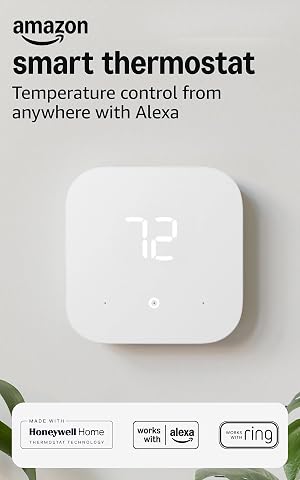
Amazon Smart Thermostat – Save Money and Energy, Works with Alexa and Ring (C-wire Required)
- ✔ Model: S6ED3R
- ✔ Compatibility: Most 24V conventional forced air, heat pump, and radiant boiler systems
- ✔ Power requirement: C-wire required or optional power adapter kit
That makes these two a useful comparison for homeowners deciding between a simpler learning system and a more feature-rich setup. Nest is the stronger fit if you want the thermostat to build a schedule and already use Google Home. ecobee is more compelling if temperatures vary between rooms, you want to manage comfort room by room, or you value its extra hardware features. Compatibility with your heating and cooling system should come first: features and installation options depend on the wiring and equipment in your home.
At a Glance
| Criteria | Google Nest Learning Thermostat | ecobee Smart Thermostat Premium | Winner |
|---|---|---|---|
| Scheduling and automation | Learns patterns and builds an automatic schedule | Offers schedules and occupancy-based adjustments with more user control | A |
| Room-by-room comfort | Supports additional Nest Temperature Sensors, sold separately | Includes a SmartSensor; supports additional sensors for selected rooms | B |
| Smart home features | Strong Google Home integration; fewer built-in extras | Works with major smart home platforms and adds air quality monitoring and a speaker | B |
| Controls and interface | Simple thermostat interface and Google Home app | Touchscreen, app settings, and more adjustable features | Depends |
| Compatibility and installation | Works with many common systems; check wiring and system support before purchase | Supports many common systems; installation needs depend on wiring and equipment | Depends |
| Energy management | Scheduling and energy reports can help reduce unnecessary heating or cooling | Schedules, occupancy features, and room sensors can target comfort where needed | Depends |
| Price and value | Usually the less expensive choice, especially if extra sensors are not needed | Costs more, but bundled sensor and added functions can justify the premium for some homes | Depends |
Google Nest Thermostat – Smart Wi‑Fi Thermostat for Home
The Google Nest Thermostat is our best overall pick because it combines remote control, programmable schedules, and energy-saving suggestions with a useful installation advantage: it can operate without a C-wire in many homes. That can simplify a DIY replacement compared with the Amazon Smart Thermostat, which explicitly requires a C-wire or separate power adapter. Nest also connects through the Google Home app and supports major voice assistants, so it is not limited to households using only one ecosystem.That flexibility still has boundaries. The product description notes that heating-only or zone-controlled systems may need a C-wire or power accessory, so we would verify the home’s wiring and HVAC setup before buying. It depends on stable Wi-Fi for its connected features, and its battery power means periodic replacement may be part of ownership. Compared with Sensi’s broader platform list and privacy emphasis, Nest is less distinctive for buyers focused on HomeKit or data handling; its appeal is the balance of accessible controls and potentially simpler wiring.For a buyer replacing a compatible thermostat who wants app access without committing every household device to Alexa, Nest is the most balanced choice here. Its HVAC monitoring alerts add another practical layer, while its compact display and button controls keep basic adjustments straightforward. We would skip it if the home has an unsupported system or the buyer expects a connected thermostat to work independently of Wi-Fi.
Pros:
- Can operate without a C-wire in many homes, which may simplify a DIY installation.
- Remote control, schedules, and energy-saving suggestions are available through the Google Home app.
- Works with major voice assistants and is ENERGY STAR certified.
- HVAC monitoring alerts can help flag system issues.
Cons:
- Some HVAC configurations still need a C-wire or power accessory.
- Connected features depend on stable Wi-Fi and compatible smart devices.
- Battery power may require periodic battery replacement.
Best for: Homeowners who want Google Home app control, voice compatibility, and a chance of avoiding C-wire work on a compatible system.
Not ideal for: People with heating-only, zone-controlled, or otherwise incompatible HVAC setups unless they have confirmed wiring support, and buyers seeking a thermostat that does not rely on Wi-Fi.
Bottom line: Choose Nest for the most balanced combination of app control and potential wiring flexibility, after checking your HVAC compatibility.
“Choose Nest for the most balanced combination of app control and potential wiring flexibility, after checking your HVAC compatibility.”
Sensi Smart Thermostat (ST55) – Wi-Fi, DIY Installation, Alexa Compatible, Energy Star Certified
The Sensi ST55 is the choice for buyers who do not want their thermostat decision to lock them into one smart-home ecosystem. It supports Alexa, Google Assistant, Apple HomeKit, and other platforms, giving it broader listed compatibility than either Nest’s Google Home-centered setup or Amazon’s Alexa-led controls. Its privacy emphasis is also unusually clear in this lineup: the product description says personal information is not sold, a point that may matter to households weighing connected convenience against data use.Setup is designed for DIY installation, with a built-in level and step-by-step app guidance. That makes the physical installation process approachable, though it does not remove the need to check wiring. Sensi may require a C-wire for some HVAC systems, which makes Nest the more attractive option when avoiding extra wiring is the priority. Its schedules, usage reports, remote monitoring, and filter-change indicator give owners several ways to manage routines, but advertised potential energy reductions are not a promise of a particular household outcome.Compared with the Amazon model, Sensi offers a less ecosystem-specific path and includes HomeKit support; Amazon is more directly integrated for Alexa routines and presence-based adjustments. Sensi’s tradeoff is that buyers need to confirm their equipment and power requirements before starting installation. Its listed display is larger than Nest’s, but the strongest reason to choose it is the combination of platform choice, guided setup, and privacy positioning.
Pros:
- Supports Alexa, Google Assistant, Apple HomeKit, and additional platforms.
- Built-in level and guided app instructions support a DIY installation.
- Privacy-focused positioning states that personal information is not sold.
- Includes scheduling, usage reports, remote monitoring, and a filter-change indicator.
Cons:
- May require a C-wire depending on the HVAC system.
- Wi-Fi and app access are needed for connected control and monitoring.
Best for: Households that use a mix of smart-home platforms, especially Apple HomeKit users, and buyers who value a stated privacy commitment.
Not ideal for: Buyers who have not checked for a C-wire and need guaranteed wiring simplicity, or those who want a thermostat centered on Alexa presence routines.
Bottom line: Pick Sensi when platform flexibility and privacy matter more than avoiding a possible C-wire requirement.
“Pick Sensi when platform flexibility and privacy matter more than avoiding a possible C-wire requirement.”
Amazon Smart Thermostat – Save Money and Energy, Works with Alexa and Ring (C-wire Required)
For a home already built around Alexa, the Amazon Smart Thermostat offers the most direct fit. Alexa app control, routines, and Ring integration put its smart features in the same ecosystem many households already use, while schedules, vacation mode, humidity sensing, and automatic air-filter ordering add practical controls. Its presence-based adjustments can help automate temperature changes around household routines, though buyers should consider whether they want that style of automation and configure it to suit their preferences.The main constraint is electrical compatibility: this model requires a C-wire or optional power adapter kit. That makes it a less straightforward replacement than Nest for a compatible home without a C-wire. Its Wi-Fi support is also limited to 2.4 GHz, so it is not the right choice for a network setup that only provides 5 GHz access. Voice control requires an Alexa-enabled device because the thermostat has no far-field microphone.Compared with Sensi, Amazon is more focused on Alexa rather than offering the same spread of listed platforms, including Apple HomeKit. Compared with Nest, it leans further into ecosystem routines and home-presence adjustments but gives up some wiring flexibility. We would choose it when those Alexa features are the point of the purchase and the home’s wiring and Wi-Fi are already compatible. Buyers who want broader assistant choice or an easier chance of C-wire-free installation should start with Sensi or Nest instead.
Pros:
- Integrates with Alexa and Ring for app control and routines.
- Offers scheduling, vacation mode, humidity sensing, and presence-based adjustments.
- ENERGY STAR certified and compatible with many standard 24V HVAC systems.
- Guided installation is provided through the Alexa app.
Cons:
- Requires a C-wire or separate power adapter kit.
- Supports 2.4 GHz Wi-Fi only.
- Needs an Alexa-enabled device for voice commands because it has no built-in microphone.
Best for: Alexa households with compatible 24V HVAC wiring and 2.4 GHz Wi-Fi that want app routines and presence-based adjustments.
Not ideal for: Homes without a C-wire or adapter plan, households using only 5 GHz Wi-Fi, or buyers who need built-in voice listening or broad platform compatibility.
Bottom line: Choose Amazon when Alexa routines are central to your home and you have confirmed the C-wire and 2.4 GHz requirements.
“Choose Amazon when Alexa routines are central to your home and you have confirmed the C-wire and 2.4 GHz requirements.”
As an Amazon Associate we earn from qualifying purchases.
Key Differences
The central choice is how the thermostat should manage comfort. Nest puts more emphasis on learning a household routine and reducing the need to build a detailed schedule. That suits people who want automation to take the lead. ecobee gives owners more ways to set conditions, use occupancy information, and respond to temperatures in rooms away from the thermostat. Its included SmartSensor makes that room-level approach useful from the start.
The price gap buys more than a different interface on ecobee: the Premium model includes a sensor and adds air quality monitoring and a speaker. Those features have practical value only if you will use them. A household that heats or cools evenly and mainly wants reliable app control may get better value from Nest. A home with hot or cold bedrooms, or someone who wants a broader smart home device at the thermostat, has a stronger case for ecobee.
Neither model should be chosen on brand features alone. Check the thermostat’s compatibility guidance against your HVAC system and wiring, including any heat pump, multi-stage equipment, or accessory controls. A thermostat that lacks support for a specific system feature is a poor fit regardless of its learning or sensor capabilities.
Detailed Comparison
Scheduling and automation (Google Nest Learning Thermostat wins — moderate)
Nest wins for households that want the thermostat to infer a routine and create a schedule with limited setup. ecobee also supports schedules and occupancy-based adjustments, but it gives the owner more settings to shape. The gap is moderate: Nest can reduce initial planning, while ecobee offers more deliberate control for people whose routines change or who want to tune behavior themselves.
ecobee wins because a SmartSensor is included with the Premium thermostat, giving owners a way to account for a room away from the central thermostat. Nest supports extra temperature sensors, but they are an additional purchase. This is a major advantage for ecobee in homes where a bedroom or upstairs area stays uncomfortable; in a small, evenly heated home, the difference may matter little.
ecobee wins on built-in breadth, with air quality monitoring and a speaker alongside its thermostat functions. Nest is a more focused choice for people invested in Google Home and does not bundle the same range of hardware features. The gap is moderate: ecobee offers more in one device, but those extras should not be treated as value if you will not use them.
Controls and interface (minor difference)
There is no universal winner. Nest’s simpler interface and learning approach suit owners who prefer fewer decisions and Google Home control. ecobee’s touchscreen and broader settings suit people who want to inspect and adjust more of the system directly. The difference is minor for app-first users, but can be moderate for households that often make changes at the wall.
Compatibility and installation (major difference)
This is a tie until the HVAC system is known. Both thermostats support many common heating and cooling setups, but wiring, system type, and accessory requirements can change what works and whether installation is straightforward. Check each brand’s compatibility information before buying; the practical winner is whichever model supports all functions your existing system uses.
Energy management (moderate difference)
This depends on the home and the settings. Nest’s learned schedule can limit heating or cooling when a household is away or follows a predictable routine. ecobee can use occupancy and room sensors to target comfort more selectively. Neither guarantees lower bills: savings depend on the previous schedule, climate, equipment, and how residents use the controls. Nest is easier for hands-off scheduling; ecobee offers more ways to tailor it.
Price and value (moderate difference)
Nest is generally the better value for someone who wants smart scheduling and app control without paying for extra hardware. ecobee’s higher price can make sense if the included sensor solves a real comfort problem or its additional features replace devices you would otherwise buy. This is a moderate tradeoff: compare the full setup cost, including any extra sensors, rather than the thermostat price alone.
Google Nest Learning Thermostat: Pros and Cons
Pros:
- Learns routines to reduce schedule setup
- Straightforward Google Home experience
- Often costs less when room sensors are unnecessary
Cons:
- Additional temperature sensors cost extra
- Fewer built-in features than ecobee Premium
- Learning may be less useful for households with irregular routines
Pros:
- Includes a SmartSensor for another room
- Adds air quality monitoring and a speaker
- Offers more settings for room comfort and automation
Cons:
- Higher purchase price
- More features and settings can take time to configure
- Some included functions may go unused in homes with even temperatures
Who Should Choose What
Choose Google Nest Learning Thermostat if:
- You want automatic schedule learning with little setup
- You already use Google Home and want a focused thermostat
- Your home stays comfortable without additional room sensors and you value a lower upfront cost
Choose ecobee Smart Thermostat Premium if:
- A bedroom or other room differs noticeably from the thermostat area
- You want a sensor included and more control over room comfort
- You will use the air quality monitor, speaker, or broader smart home features
Skip both if: Your HVAC wiring or equipment is unsupported, or you need professional system controls that neither model provides; choose a compatible thermostat specified for your setup.
Value for Money
Nest is the stronger value when the main goal is smart scheduling, remote control, and a low-effort Google Home setup. Paying more for ecobee is worthwhile when the included sensor addresses uneven temperatures or when its extra hardware features have a clear role in your home. If you would need to buy a Nest sensor separately, compare the combined cost with ecobee’s package. A premium price is harder to justify for a small home with consistent temperatures and no interest in the added features.
Final Verdict
For most buyers who want a straightforward smart thermostat and already use Google Home, choose the Google Nest Learning Thermostat. Its learning approach makes routine scheduling easier, and it avoids charging for features many households will not use. Choose ecobee Smart Thermostat Premium if room comfort is the deciding factor: its included SmartSensor and added controls make it the better fit for homes with temperature differences between rooms. The biggest deciding factor is whether you need room-level sensing. If you do, ecobee’s premium is easier to justify; if you do not, Nest is the more sensible buy. Confirm HVAC compatibility before either purchase.
Frequently Asked Questions
Which thermostat is better for a home with uneven temperatures?
ecobee Smart Thermostat Premium is the stronger choice because it includes a SmartSensor that can account for a selected room. Nest can also use additional temperature sensors, but those add to the purchase cost.
Does Nest or ecobee save more energy?
Neither model can promise lower bills on its own. Nest may suit a predictable routine with its learned schedule, while ecobee gives you more ways to use occupancy and room sensors. Results depend on your existing habits, home, climate, and HVAC system.
Is ecobee Premium worth paying more for?
Yes if you will use the included room sensor, air quality monitoring, speaker, or added room controls. If you mainly want scheduling and app access, Nest is likely the better value.
Should I check compatibility before choosing between them?
Yes. Wiring and HVAC equipment determine whether each thermostat can control your system and its features. Check the manufacturer’s compatibility information for your exact setup before buying.