
If you’re setting up a surveillance system, choosing the right POE network switch for cameras is essential for reliable power and data transfer. The NETGEAR 26-Port Gigabit Ethernet PoE Smart Managed Switch (GS324TPv2) stands out as the overall best option due to its extensive port count and smart management features, ideal for larger setups. For smaller or budget-conscious installations, the TP-Link LS108GP offers solid performance with 8 PoE ports at a more affordable price. Keep in mind, the main tradeoffs in this category revolve around balancing port quantity, management features, power budgets, and price. Continue reading for a detailed breakdown of the top picks and what sets them apart.

Get home appliances delivered free with Prime
- Fast, free delivery on millions of items
- Prime Video, Amazon Music and more included
- Member-only deals all year
Complete the kit


Key Takeaways
- Top-performing switches balance port count with power budget to support multiple cameras simultaneously.
- Managed switches provide more control but come at a higher cost and complexity compared to unmanaged options.
- PoE+ support ensures compatibility with higher-power cameras and devices, future-proofing your setup.
- Size and form factor matter: compact switches suit small spaces, while rack-mount models support larger installations.
- Price often correlates with features; understanding your needs helps avoid paying for unnecessary capabilities.
| NETGEAR 26-Port Gigabit Ethernet PoE Smart Managed Switch (GS324TPv2) |  | Best Overall for Large, Flexible Network Setups | Number of Ethernet ports: 24 | Ethernet speed: 1.0Gbps | PoE+ ports: 24 | VIEW ON AMAZON | See Our Full Breakdown |
| 10 Port Full Gigabit PoE+ Switch with Rack Mount Ears, 8 PoE Ports, 2 Uplink Ports, 120W Power Budget, 48V 802.3af/at Compliant |  | Best for Small to Medium Camera Deployments on a Budget | Ports: 5 | PoE Ports: 4 | PoE Standard: 802.3at/af | VIEW ON AMAZON | See Our Full Breakdown |
| TP-Link LS108GP 8-Port PoE Gigabit Ethernet Switch |  | Best Compact, Silent Solution for Small-Scale Camera Networks | Number of Ports: 8 | PoE Standard: 802.3at/af | PoE Power per Port: 30W | VIEW ON AMAZON | See Our Full Breakdown |
| NETGEAR 16 Port PoE Gigabit Ethernet Unmanaged Network Switch (GS316PP) |  | Best Unmanaged, High-Performance for Small to Medium Camera Setups | Number of Ports: 16 | Port Speed: 1.0Gbps | PoE Power: Up to 30W per port | VIEW ON AMAZON | See Our Full Breakdown |
| TP-Link TL-SF1005P 5-Port Fast Ethernet PoE Switch | 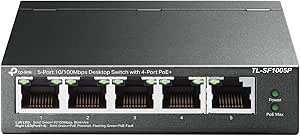 | Best Budget-Friendly for Small-Scale PoE Camera Setups | Ports: 5 | PoE Ports: 4 | PoE Standard: 802.3at/af | VIEW ON AMAZON | See Our Full Breakdown |
| REOLINK PoE Switch with 4 Ports + 1 Uplink, High Speed, Stable Power |  | Best for Long-Distance IP Camera Deployment | Ports: 4 downlink + 1 uplink | Transmission Speeds: 10/100/1000Mbps | PoE Standards: IEEE 802.3af/at (PoE+) | VIEW ON AMAZON | See Our Full Breakdown |
| NETGEAR 5-Port PoE Gigabit Ethernet Easy Smart Managed Switch (GS305EPP) |  | Best for Small Business Network Management | Number of Ports: 5 | Port Type: Gigabit Ethernet | PoE Ports: 4 PoE+ | VIEW ON AMAZON | See Our Full Breakdown |
| TP-Link TL-SG1005P 5-Port Gigabit PoE Switch |  | Best for Cost-Conscious Small Installations | Number of Ports: 5 | PoE+ Ports: 4 | PoE Power per Port: 30W | VIEW ON AMAZON | See Our Full Breakdown |
| Reolink PoE Switch with 8 PoE and 2 Gigabit Uplink Ports RLA-PS1 |  | Best for Large IP Camera Systems with High Power Demands | Number of Ports: 10 | PoE Ports: 8 | Uplink Ports: 2 Gigabit | VIEW ON AMAZON | See Our Full Breakdown |
| NETGEAR 8 Port PoE Gigabit Ethernet Easy Smart Managed Switch (GS308EP) |  | Best for Versatile Small Business Networks | Number of Ports: 8 | PoE+ Ports: 8 | Total Power: 62W | VIEW ON AMAZON | See Our Full Breakdown |
| UGREEN Ethernet Switch, 10-Port PoE Switch, 8 PoE+ @ 60W + 2 Gigabit Uplink |  | Best Overall for IP Camera Networks | Number of Ports: 10 | PoE+ Ports: 8 | Total Power Budget: 60W | VIEW ON AMAZON | See Our Full Breakdown |
| 5-Port Ethernet PoE Switch with Extend Function, Managed, Fanless Metal Design, VLAN, QoS, Desktop/Wall Mount |  | Best for Small Office or Home Camera Setups | Ports: 4 PoE + 1 uplink | PoE Power: Up to 30W per port | Total PoE Budget: 52W | VIEW ON AMAZON | See Our Full Breakdown |
| NETGEAR 28-Port PoE Gigabit Ethernet Smart Switch (GS728TP) – Managed, Cloud Management, 24 PoE+ @ 190W, 4 SFP, Desktop or Rackmount |  | Best for Large-Scale IP Camera Deployments | Number of Ports: 28 | PoE+ Ports: 24 | PoE Power Budget: 190W | VIEW ON AMAZON | See Our Full Breakdown |
| 8-Port PoE+ Switch, 2 Uplink, 120W 802.3af/at Unmanaged Switch |  | Best for Outdoor or Remote IP Camera Installations | Number of Ports: 8 PoE + 2 uplink | Total Power Budget: 120W | Transmission Distance: 250 meters | VIEW ON AMAZON | See Our Full Breakdown |
| NETGEAR 5-Port PoE Gigabit Ethernet Unmanaged Switch (GS305P) |  | Best Compact, Low-Noise Choice for Small Networks | Number of Ports: 5 | PoE Ports: 4 | Total Power Budget: 63W | VIEW ON AMAZON | See Our Full Breakdown |
More Details on Our Top Picks
NETGEAR 26-Port Gigabit Ethernet PoE Smart Managed Switch (GS324TPv2)
The NETGEAR GS324TPv2 stands out for its combination of high port count, PoE+ support, and fiber connectivity, making it ideal for expanding security camera networks. Compared to the smaller TP-Link LS108GP, it offers more ports and better scalability, though it lacks advanced Layer 3 features that some enterprise environments demand. Its 24 GbE ports and 190W PoE budget support a broad array of cameras and access points, with fiber SFP ports for future uplinks. While it excels in performance and management, it’s best suited for larger setups rather than small-scale installations. The main tradeoff is its higher complexity and cost, which may be unnecessary for small or home-based systems.
Pros:- High port density with 24 Gigabit Ethernet ports
- Supports PoE+ with a generous 190W budget for multiple devices
- Includes 2 SFP ports for fiber uplinks and future expansion
- Easy-to-use management interface
Cons:- Lacks advanced Layer 3 routing features for complex networks
- Potentially overkill for small or simple camera systems
Best for: Large business or campus environments needing extensive PoE device support and flexible network expansion
Not ideal for: Small home users or setups with only a few cameras, due to its size and cost
- Number of Ethernet ports:24
- Ethernet speed:1.0Gbps
- PoE+ ports:24
- PoE power budget:190W
- SFP ports:2
- Mounting options:Desktop or rack-mount
Our verdict“This switch is best suited for larger camera networks requiring high capacity and flexible connectivity options.”
10 Port Full Gigabit PoE+ Switch with Rack Mount Ears, 8 PoE Ports, 2 Uplink Ports, 120W Power Budget, 48V 802.3af/at Compliant
The TP-Link TL-SF1005P offers a compact, affordable solution for small camera systems, with 8 PoE ports supporting up to 30W each. Compared to the larger NETGEAR GS324TPv2, it is limited to 10 ports and 100 Mbps speeds, but it’s easier to deploy and manage in small setups. Its plug-and-play design simplifies installation, and the 120W PoE budget covers most small camera arrays. However, it doesn’t support gigabit Ethernet, which can bottleneck higher data rates in larger camera networks. Its limited management features make it less suitable for complex environments but ideal for straightforward, small-scale surveillance systems.
Pros:- Supports PoE with up to 30W per port for most cameras
- Durable metal casing suitable for various environments
- Auto recovery for dropped PoE devices
Cons:- Limited to 10/100 Mbps speeds, not gigabit
- No advanced management features for network control
- Speed reduction in Extend Mode to 10 Mbps
Best for: Small business owners or home security setups with up to 4-5 cameras needing simple PoE power
Not ideal for: Larger networks or high-resolution camera systems requiring gigabit speeds and advanced management
- Ports:5
- PoE Ports:4
- PoE Standard:802.3at/af
- PoE Power per Port:30W
- Total PoE Budget:67W
- Data Transmission Range:up to 250m in Extend Mode
Our verdict“This switch is a solid choice for small, budget-conscious camera setups where gigabit speed isn’t critical.”
TP-Link LS108GP 8-Port PoE Gigabit Ethernet Switch
The TP-Link LS108GP provides reliable gigabit connectivity in a small, fanless form factor, making it ideal for discreet camera setups in homes or small offices. Unlike the NETGEAR GS316PP, it offers gigabit speeds for each port, ensuring smooth video streams, while maintaining quiet operation thanks to its fanless design. Its 8 PoE ports with 30W support per port cover most small to medium camera systems. However, its total PoE budget of 65W limits the number or power of cameras supported simultaneously, and it doesn’t have advanced features like VLAN or QoS. This makes it perfect for users seeking straightforward, silent operation with reliable performance.
Pros:- Gigabit speeds for all ports support high-quality video streams
- Fanless, silent operation suits quiet environments
- Supports extended PoE transmission distance
Cons:- Limited total PoE power of 65W restricts device support
- No advanced management or VLAN features
- Only 8 ports may limit larger camera deployments
Best for: Small business or home users needing gigabit, silent, and easy-to-deploy PoE switches
Not ideal for: Large-scale or enterprise camera networks requiring advanced network features or higher power budgets
- Number of Ports:8
- PoE Standard:802.3at/af
- PoE Power per Port:30W
- Total PoE Budget:65W
- Switching Capacity:16 Gbps
- Transmission Distance:820 ft
Our verdict“This switch is ideal for small, silent, gigabit camera networks where simplicity is valued over advanced features.”
NETGEAR 16 Port PoE Gigabit Ethernet Unmanaged Network Switch (GS316PP)
The NETGEAR GS316PP offers a straightforward, high-speed solution for small to medium-sized camera networks, with 16 gigabit ports and PoE+ support. Compared with the TP-Link LS108GP, it provides double the ports and a higher total power budget of 183W, supporting more cameras simultaneously. Its unmanaged design simplifies deployment, making it suitable for users who prioritize plug-and-play functionality without complex configuration. However, the lack of managed features limits fine-tuning or future scalability, and its power budget may fall short for very high-power cameras or multiple access points. Still, it balances performance and simplicity well for most surveillance needs.
Pros:- Gigabit speeds for fast data transfer
- PoE+ support with up to 30W per port
- Fanless, silent operation with durable metal casing
- Plug-and-play with flexible mounting options
Cons:- Unmanaged switch limits network control and customization
- Power budget may not support very high-power devices
- No advanced network features like VLAN or QoS
Best for: Small to medium-sized surveillance setups needing reliable, high-speed PoE without complex management
Not ideal for: Large, enterprise networks or those requiring VLANs and advanced control features
- Number of Ports:16
- Port Speed:1.0Gbps
- PoE Power:Up to 30W per port
- Total Power Budget:183W
- Design:Fanless, metal
- Energy Efficiency:IEEE 802.3az
Our verdict“This switch offers a reliable, high-speed, and easy-to-deploy solution for small to medium camera networks without management complexity.”
TP-Link TL-SF1005P 5-Port Fast Ethernet PoE Switch
The TP-Link TL-SF1005P is a simple, affordable choice for powering a few cameras or low-bandwidth devices. Its 5 ports, with 4 PoE-capable, support basic surveillance needs, especially in small or temporary installations. Compared to gigabit switches like the NETGEAR GS316PP, it offers only 10/100 Mbps speeds, which can limit video quality and data transfer rates. Its extend mode allows longer cable runs, but at reduced speeds, making it less suitable for high-resolution cameras or larger networks. Its metal case ensures durability, yet the limited power budget and basic features make it best suited for small, low-demand deployments where cost is a priority.
Pros:- Supports PoE for powering cameras directly
- Durable metal casing
- Auto recovery feature for dropped PoE devices
Cons:- Limited to 10/100 Mbps speeds, not gigabit
- Extend mode reduces speed significantly
- Lacks management features for network control
Best for: Home or small business users deploying a few cameras with basic needs and budget constraints
Not ideal for: High-resolution or large camera networks that require gigabit speeds or higher power budgets
- Ports:5
- PoE Ports:4
- PoE Standard:802.3at/af
- PoE Power per Port:30W
- Total PoE Budget:67W
- Operation Mode:Desktop/wall-mount
Our verdict“This switch fits small, budget-conscious camera projects where gigabit speed and advanced features are not necessary.”
REOLINK PoE Switch with 4 Ports + 1 Uplink, High Speed, Stable Power
This REOLINK switch excels in environments where cameras are spread out over large areas, thanks to its extend mode supporting up to 820 feet. Its support for gigabit speeds ensures swift data transfer, which is crucial for high-resolution IP cameras. Compared to the NETGEAR GS305EPP, it offers better long-distance capabilities but lacks advanced configuration options, making it suitable for straightforward setups. Its fanless design keeps installation silent and maintenance simple, while surge protection enhances reliability. The main tradeoff is that it requires standard Cat5E or higher cables for extended reach, and its plug-and-play approach limits customization.
Pros:- Supports gigabit data transfer for high-quality video streams
- Smart power management for stable operation
- Fanless design ensures silent, low-maintenance use
- Extend mode reaches up to 820 ft for long-distance installations
Cons:- Requires Cat5E or higher cables for optimal performance in extend mode
- Limited configuration options—plug-and-play only
Best for: Small-scale surveillance setups needing long cable runs in outdoor or sprawling environments.
Not ideal for: Users looking for advanced network management or multi-vendor integration, as it offers limited configuration options.
- Ports:4 downlink + 1 uplink
- Transmission Speeds:10/100/1000Mbps
- PoE Standards:IEEE 802.3af/at (PoE+)
- Power Management:Automatic detection, intelligent power down
- Extend Mode:Yes, up to 820 ft (250 meters)
- Surge Protection:4KV on ports and power input
Our verdict“This switch is ideal for IP camera deployments requiring extended Ethernet runs over large areas, prioritizing simplicity and stability.”
NETGEAR 5-Port PoE Gigabit Ethernet Easy Smart Managed Switch (GS305EPP)
The NETGEAR GS305EPP stands out for its user-friendly management interface, making it accessible for small business owners who want reliable PoE without complex setup. Compared with the more powerful NETGEAR GS308EP, it has fewer ports but remains suitable for modest camera networks, offering essential VLAN and QoS features. Its silent, fanless design and flexible mounting options make it versatile for office or retail environments. However, with only 5 ports, it limits scalability, and its basic management features may fall short for advanced network customization. It strikes a balance between ease of use and functionality for small-scale security systems.
Pros:- Easy to configure with intuitive management interface
- Silent operation and flexible mounting options
- Includes 4 PoE+ ports with a 120W budget for powering multiple cameras
- Compact design fits small spaces
Cons:- Limited to 5 ports, not scalable for larger systems
- Lacks advanced features like Layer 3 routing
Best for: Small businesses or home security setups needing managed PoE switches with straightforward configuration.
Not ideal for: Large or highly complex networks requiring advanced layer 3 features or more ports.
- Number of Ports:5
- Port Type:Gigabit Ethernet
- PoE Ports:4 PoE+
- Total Power Budget:120W
- Design:Fanless, metal enclosure
- Mounting Options:Desktop or wall-mount
Our verdict“This switch provides manageable PoE connectivity for small security setups with minimal fuss.”
TP-Link TL-SG1005P 5-Port Gigabit PoE Switch
The TP-Link TL-SG1005P delivers reliable gigabit speeds with up to 30W per port, making it a solid choice for budget-conscious users deploying IP cameras. Its plug-and-play setup simplifies installation, while its sturdy metal case ensures durability. Compared to the NETGEAR GS305EPP, it provides comparable performance but offers a slightly higher PoE wattage per port, supporting more power-hungry cameras. Nonetheless, it is limited to 4 PoE+ ports and doesn’t include management features, making it less suitable for complex networks. This switch balances affordability with essential PoE capabilities.
Pros:- Easy plug-and-play operation
- Sturdy metal construction for durability
- Fanless, quiet operation
- Supports advanced QoS and IGMP Snooping
Cons:- Limited to 4 PoE+ ports, restricting device connections
- No managed features for advanced network control
Best for: Small-scale IP camera setups where budget and simplicity are priorities.
Not ideal for: Environments requiring network management, VLAN segmentation, or scalability beyond 4 PoE ports.
- Number of Ports:5
- PoE+ Ports:4
- PoE Power per Port:30W
- Total PoE Budget:65W
- Switch Type:Desktop
- Material:Metal
Our verdict“This switch offers a cost-effective, straightforward solution for small IP camera deployments with moderate power needs.”
Reolink PoE Switch with 8 PoE and 2 Gigabit Uplink Ports RLA-PS1
The Reolink RLA-PS1 offers a substantial upgrade with 8 PoE ports and 2 gigabit uplinks, suitable for larger camera networks. Its support for 30W per port and 120W total power budget makes it ideal for high-resolution, power-hungry IP cameras. Compared with the smaller REOLINK 4-port switch, it scales better for bigger projects but lacks remote management features, focusing instead on plug-and-play simplicity. Its intelligent power management prevents overloads, which is vital for stable long-term operation. This switch is well-suited for professional installations where capacity and power are critical.
Pros:- Supports up to 30W per port for high-powered cameras
- Includes 8 PoE ports and 2 gigabit uplinks for scalability
- Intelligent power management avoids overloads
- Plug-and-play with easy mounting options
Cons:- Limited to 8 PoE devices simultaneously
- No remote management or advanced network controls
Best for: Large IP camera networks requiring high power per port and multiple uplinks for redundancy.
Not ideal for: Small setups or users needing remote management or advanced network features.
- Number of Ports:10
- PoE Ports:8
- Uplink Ports:2 Gigabit
- Power Budget:120W
- PoE Power per Port:Up to 30W
- Standards:IEEE802.3af/at
Our verdict“Designed for extensive camera networks, this switch balances high power output with straightforward deployment.”
NETGEAR 8 Port PoE Gigabit Ethernet Easy Smart Managed Switch (GS308EP)
The NETGEAR GS308EP offers a compact, managed solution with 8 PoE+ ports, making it a versatile choice for small business security or office IP camera setups. Its support for VLANs, QoS, and port monitoring facilitates better network control compared to unmanaged switches like the TP-Link TL-SG1005P. Its energy-efficient, fanless design ensures quiet operation, and flexible mounting options allow discreet installation. However, it’s limited to small networks, and its basic management features might not satisfy users needing extensive customization or remote control. Still, it provides a reliable, manageable platform for small-scale IP camera systems.
Pros:- Supports high-speed gigabit Ethernet connections
- Includes 8 PoE+ ports with a 62W power budget
- Silent, fanless operation with flexible mounting
- Supports VLANs and QoS for better traffic control
Cons:- Limited to small network environments
- Basic management features may be insufficient for complex setups
Best for: Small businesses or advanced home users seeking manageable PoE switches with moderate scalability.
Not ideal for: Large or enterprise-level networks requiring extensive layer 3 features or high port counts.
- Number of Ports:8
- PoE+ Ports:8
- Total Power:62W
- Supported Features:VLAN, QoS, port monitoring
- Mounting Options:Desktop or wall
- Switch Type:PoE Managed
Our verdict“This switch balances manageability and performance for small networks deploying multiple PoE cameras with moderate power needs.”
UGREEN Ethernet Switch, 10-Port PoE Switch, 8 PoE+ @ 60W + 2 Gigabit Uplink
This unmanaged switch stands out for its high number of PoE+ ports—8 in total—delivering a solid 60W power budget, making it ideal for large camera deployments. Compared with the NETGEAR GS728TP, it offers simpler setup and a more compact form factor, though the total power budget is lower, limiting high-power device support. The support for VLAN and extend mode adds flexibility for complex networks, which is less common in simpler unmanaged switches like the NETGEAR GS305P. However, the 60W limit could be a constraint for larger or more power-hungry camera arrays, requiring future upgrades. This pick makes the most sense for IP camera setups where ease of use and port density are priorities, but it’s less suited for expanding high-power environments.
Pros:- Supports 8 PoE+ ports with sufficient power for most security cameras
- Includes VLAN, extend mode, and auto recovery for flexible network configurations
- Compact metal case with intelligent power management
Cons:- Limited to a 60W total power budget, restricting high-power devices
- Requires a compatible power supply capable of supporting full PoE operation
Best for: Businesses or security setups needing multiple PoE+ capable cameras with straightforward management
Not ideal for: Large-scale or high-power deployments requiring more than 60W total power budget
- Number of Ports:10
- PoE+ Ports:8
- Total Power Budget:60W
- Data Transfer Rate:1000 Mbps
- Interface:RJ45
- Switch Type:Unmanaged
Our verdict“Ideal for medium-sized IP camera networks needing easy setup and reliable PoE+ support within a moderate power budget.”
5-Port Ethernet PoE Switch with Extend Function, Managed, Fanless Metal Design, VLAN, QoS, Desktop/Wall Mount
This managed switch offers a straightforward 5-port design with 4 PoE ports supporting up to 30W each, making it suitable for small-scale security or IoT device networks. Its cloud management features and easy plug-and-play setup differentiate it from the unmanaged NETGEAR GS305P. The fanless metal housing ensures quiet operation, and the VLAN and QoS support add a layer of network control that’s missing from simpler switches. However, with only 4 PoE ports and a 30W per port limit, it’s less suitable for larger camera arrays or high-power devices. The limited port count and power make it ideal for small deployments where ease of management and quiet operation are priorities.
Pros:- Cloud management for easy remote control
- Fanless, silent metal design for unobtrusive installation
- Supports VLAN and QoS for network segmentation and traffic prioritization
Cons:- Limited to 4 PoE ports and 30W per port, restricting device support
- No included power supply, requiring compatible external power source
Best for: Home or small office users deploying a few IP cameras or low-power IoT devices
Not ideal for: Environments with multiple high-power cameras or expanding network needs
- Ports:4 PoE + 1 uplink
- PoE Power:Up to 30W per port
- Total PoE Budget:52W
- Standards:IEEE802.3af/at
- Design:Fanless metal
- Mounting Options:Desktop or wall mount
Our verdict“Best suited for small-scale IP camera setups where quiet operation and simple management are key.”
NETGEAR 28-Port PoE Gigabit Ethernet Smart Switch (GS728TP) – Managed, Cloud Management, 24 PoE+ @ 190W, 4 SFP, Desktop or Rackmount
The NETGEAR GS728TP offers an expansive 28-port design, with 24 PoE+ ports supporting up to 190W total power, making it a prime choice for large security networks. Its multiple SFP ports add fiber flexibility, unlike smaller switches such as the NETGEAR GS324TPv2. The advanced management software and cloud support provide comprehensive control over complex setups, although the switch’s size and complexity can be overwhelming for smaller or less technical users. The power budget and port density mean it can handle many high-power cameras simultaneously, but it requires a suitable power supply and familiarity with managed switches. It’s ideal for security installations where scalability and management are critical.
Pros:- High port density with 24 PoE+ ports supporting up to 190W
- Includes 4 SFP ports for fiber connections
- Advanced cloud management and SNMP support
Cons:- Requires a compatible power supply and network management knowledge
- Potentially complex for users unfamiliar with managed switches
Best for: Large enterprises or security firms managing extensive IP camera networks
Not ideal for: Small offices or home users with limited technical expertise
- Number of Ports:28
- PoE+ Ports:24
- PoE Power Budget:190W
- SFP Ports:4
- Management:Cloud and SNMP
- Switch Type:Managed
Our verdict“Designed for large-scale, high-density IP camera networks requiring robust management and power capacity.”
8-Port PoE+ Switch, 2 Uplink, 120W 802.3af/at Unmanaged Switch
This unmanaged switch offers 8 PoE+ ports with a total power budget of 120W, supporting demanding IP cameras over long distances up to 250 meters. Its fanless design makes it suitable for outdoor or noise-sensitive environments, unlike smaller unmanaged switches such as the TP-Link TL-SG1005P. The long transmission distance and rugged temperature range extend its usability into outdoor or warehouse settings. However, being unmanaged limits configuration options, and the lack of included power supply might be an obstacle for quick deployment. This model is best for remote outdoor security where simplicity and durability outweigh advanced features.
Pros:- Supports high power output up to 30W per port
- Long transmission distance of 250 meters for outdoor applications
- Fanless, rugged design ensures quiet, durable operation
Cons:- Unmanaged, with no advanced configuration options
- No included power supply, which could impact deployment speed
Best for: Outdoor surveillance setups or remote IP camera installations requiring long-distance PoE power
Not ideal for: Indoor or complex networks where managed control is needed
- Number of Ports:8 PoE + 2 uplink
- Total Power Budget:120W
- Transmission Distance:250 meters
- Standard:802.3af/at
- Temperature Range:-10°C to 55°C
- Design:Fanless
Our verdict“Excellent for outdoor or remote IP camera setups needing long-distance PoE and rugged, silent operation.”
NETGEAR 5-Port PoE Gigabit Ethernet Unmanaged Switch (GS305P)
The NETGEAR GS305P offers a slim, fanless design with 5 Gigabit ports, including 4 PoE+ ports supporting a total of 63W. Its simple plug-and-play operation makes it ideal for small networks or secondary camera setups, unlike larger managed options like the NETGEAR GS728TP. While its power budget is limited, it supports high-speed connections and flexible mounting, making it suitable for discreet installations. The absence of advanced management features limits its use in complex setups, but its silent operation and ease of use make it attractive for small or home security arrangements. The limited port count and power budget are tradeoffs for its compact size and simplicity.
Pros:- Plug-and-play setup with no configuration required
- Silent operation thanks to fanless design
- Supports high-speed Gigabit Ethernet with flexible mounting
Cons:- Limited to 4 PoE+ ports and 63W total power
- No advanced management or configuration options
Best for: Small office or home users deploying a few PoE cameras with minimal management needs
Not ideal for: Large or high-power camera systems requiring extensive port capacity or management
- Number of Ports:5
- PoE Ports:4
- Total Power Budget:63W
- Ethernet Speed:1 Gbps
- Design:Fanless, metal
- Mounting Options:Desktop or wall-mount
Our verdict“Perfect for small, low-maintenance IP camera networks where space and noise are concerns.”

How We Picked
I evaluated these POE network switches based on core criteria that matter most for camera installations. Performance metrics like port count, PoE power budget, and data throughput were fundamental, ensuring the switches can handle multiple cameras without bottlenecks. Usability features such as management capabilities, ease of setup, and firmware stability influenced the rankings, as these factors impact ongoing maintenance. Build quality and expandability were also considered, especially for larger or future-proofed systems. The products are ordered to highlight the best overall options first, with a focus on balancing cost, features, and reliable power delivery for IP cameras.Factors to Consider When Choosing Poe Network Switches For Cameras
Choosing the right POE network switch for cameras involves more than just looking at port numbers. Several key factors influence how well a switch will serve your surveillance needs, including power capacity, management features, and compatibility. Making an informed decision requires understanding these elements to avoid overspending or ending up with insufficient support for your cameras.Port Count and Power Budget
Assess how many cameras you plan to connect now and in the future. More ports provide scalability, but ensure the switch’s PoE power budget can support all connected devices simultaneously. A switch with a higher power budget prevents outages caused by insufficient power delivery, especially if using high-PoE+ cameras. Overestimating your needs can lead to unnecessary expense, so match the switch to your current setup with room to grow.
Managed vs. Unmanaged Switches
Managed switches offer advanced features like VLANs, QoS, and remote management, which help optimize network traffic and security for multiple cameras. However, they tend to be more expensive and complex to configure. Unmanaged switches are simpler, plug-and-play options suitable for small or straightforward setups. Choose managed models if you need granular control or plan to expand your system, but for basic security needs, unmanaged models often suffice.
PoE+ Support and Future-Proofing
PoE+ (802.3at) support delivers higher wattage per port, accommodating more demanding cameras or other IP devices. If your cameras are high resolution or include pan-tilt-zoom features, PoE+ becomes a necessity. Investing in a switch with PoE+ support helps future-proof your installation, but it can come at a higher initial cost. Balance your current needs with potential upgrades before committing.
Size, Form Factor, and Mounting Options
Consider where you will install the switch. Compact desktop models work well for small setups or wall mounting, whereas rackmount switches suit larger, professional installations. Physical size impacts cable management and airflow, so choose a model fitting your space constraints. Also, check if the switch includes features like fanless operation for silent running or ventilation for heat dissipation, especially in enclosed environments.
Price and Long-Term Value
While cost is a key factor, prioritizing features that match your system’s needs prevents overspending. Higher-priced switches often include management capabilities, higher PoE budgets, and better build quality, providing value over time through reliability and expandability. Conversely, budget models may suffice for small-scale or temporary setups but could require upgrades sooner. Clarify your priorities—whether it’s saving upfront or investing in longevity—to make the best choice.
Frequently Asked Questions
Can I use a regular switch for POE cameras?
Using a standard non-PoE switch for IP cameras is generally not recommended because it won’t supply power over Ethernet. This means each camera would need its own power source, complicating installation and increasing costs. POE switches simplify wiring by combining data and power in a single cable, making setups cleaner and more reliable. If you already have a non-PoE switch, you would need separate power injectors or adapters for each camera, which can be less efficient.
How many cameras can I connect to a POE switch?
The number of cameras supported depends on the port count and power budget of your switch. For example, a switch with 8 PoE ports and a total power budget of 120W can typically handle 8 cameras if each consumes around 15W. Always check the power requirements of your cameras and ensure the total PoE budget covers all devices. Overloading the switch can lead to power failures or camera drops, so plan accordingly.
Is managed switching worth the extra cost for home security systems?
Managed switches can offer benefits like VLAN segmentation, traffic prioritization, and remote management, which improve network performance and security. For most home setups with a few cameras, unmanaged switches may be enough, simplifying installation and reducing costs. However, if you’re setting up a larger or more complex system, managed switches provide more control and can help troubleshoot issues more efficiently. Consider your current and future needs to determine if the added features justify the price.
Should I prioritize higher PoE wattage or port count?
It depends on your camera lineup. If you plan to install several high-power cameras, a switch with a higher PoE wattage is essential to support all devices simultaneously. On the other hand, if you need to connect many cameras but each consumes less power, a switch with more ports might be more beneficial. Balancing both factors ensures your system remains scalable and reliable without overpaying for unused capacity.
What is the advantage of cloud-managed POE switches?
Cloud-managed switches enable remote configuration, monitoring, and troubleshooting, which can simplify maintenance and improve uptime. They often include user-friendly dashboards accessible from anywhere, making managing multiple sites easier. This feature is especially useful for larger or distributed camera systems where onsite management isn’t practical. However, they tend to be more expensive and may introduce security considerations, so assess whether the convenience aligns with your security protocols.
Conclusion
For those seeking the best overall performance, the NETGEAR 26-Port Gigabit Ethernet PoE Smart Managed Switch (GS324TPv2) offers extensive port capacity and advanced features, ideal for larger or professional setups. Budget-conscious buyers or small systems will find the TP-Link LS108GP to be a reliable, straightforward choice that balances cost with essential PoE support. For users new to network management or seeking simplicity, unmanaged options like the NETGEAR GS305P deliver plug-and-play convenience. Finally, if future scalability and higher power support are priorities, investing in a managed, PoE+ capable switch ensures your system remains robust and adaptable, no matter the expansion plans.