
TL;DR

Get home appliances delivered free with Prime
- Fast, free delivery on millions of items
- Prime Video, Amazon Music and more included
- Member-only deals all year
Smart home security cameras combine high-tech video with internet connectivity and AI. They can deter crime, provide peace of mind, and help you keep tabs on your home, but choosing the right one depends on quality, privacy, and your lifestyle needs.
Imagine hearing a faint sound at night. Your smart home camera instantly detects motion, zooms in, and sends you a clear alert — even in complete darkness. That’s not science fiction; it’s the reality of modern home security. These cameras are more than simple peep-holes; they’re powerful tools that combine video, AI, and automation to keep your home safer.
But with dozens of options flooding the market, how do you pick the right one? What features really matter? And how do you avoid the pitfalls that can turn a helpful device into a privacy nightmare? This guide breaks down the essentials, showing you what to look for and how to use smart cameras to your advantage.
High resolution alone doesn’t guarantee clear identification — good lighting, lens quality, and positioning matter more.
Prioritize cameras with on-device AI and detection zones to reduce false alerts and improve response times.
Wired cameras excel in reliability and continuous recording, while wireless models offer flexibility and easier installation.
Secure your camera systems with strong passwords, two-factor authentication, and regular firmware updates.
Placement and lighting are critical — mount outdoor cameras high enough to prevent tampering and avoid invading neighbors’ privacy.
What Makes a Smart Home Security Camera Actually Smart?
Smart cameras aren’t just about recording footage anymore. They analyze what they see and hear in real-time, using artificial intelligence to distinguish between a falling leaf and an intruder. Think of it like a vigilant neighbor who not only watches but also understands what’s happening.
For example, a 2023 review found that cameras with on-device AI can reduce false alerts by up to 80%, saving you time and frustration. Features like person detection, vehicle recognition, and sound alerts turn a simple camera into a proactive security partner. The best models process data locally, so responses are faster and your privacy stays tighter.
Understanding how these AI features work helps you appreciate their importance: they significantly reduce false alarms, which are common in traditional motion detection systems. False alerts can desensitize you to real threats or lead to unnecessary expenses. The tradeoff, however, is that more advanced AI features often come at a higher cost and may require more processing power, which could impact device longevity or response times if not optimized properly. Choosing a camera with on-device AI balances privacy with performance, but it’s essential to assess whether the AI capabilities align with your specific security needs.
Products Worth Considering

Arlo Pro Wireless Security Camera, 2K HDR, 6th Generation, 4-Camera Kit

eufy Security SoloCam E42 4-Camera Kit, 4K Solar Security Cameras with HomeBase 3

eufy Security E30 4K Indoor Camera, 2-Pack
As an affiliate, we earn on qualifying purchases.
How to Choose the Right Camera for Your Home
- Assess your needs: Are you protecting an entryway, backyard, or inside your home? Indoor cameras need privacy considerations, outdoor ones must withstand weather.
- Focus on video quality: Aim for 1080p as a baseline, but consider HDR, low-light performance, and lens quality. A well-lit driveway or porch benefits from good night vision and clear images.
- Check detection features: Look for models that distinguish people from animals or cars. Adjustable detection zones and sensitivity prevent unnecessary alerts.
- Evaluate storage options: Cloud subscriptions offer long-term video, but local storage—like microSD cards—can save you recurring costs. Balance convenience with security risks.
- Prioritize privacy and security: Choose cameras with end-to-end encryption, strong passwords, and clear privacy controls. Firmware updates matter to patch vulnerabilities.
Making informed decisions about these features ensures you don’t just buy a camera — you select a security tool tailored to your lifestyle. For instance, opting for high-resolution cameras with advanced detection features might seem ideal, but if your internet bandwidth is limited, it could lead to lag or missed alerts. Similarly, sacrificing some resolution for better low-light performance can be more effective in certain environments. Balancing these tradeoffs is crucial for an effective security setup that offers both reliability and peace of mind.
Comparison Table: Wired vs. Wireless Cameras
| Feature | Wired Cameras | Wireless Cameras |
|---|---|---|
| Power | Constant power via cable | Batteries or rechargeable |
| Installation | More complex, needs wiring | Simple, DIY-friendly |
| Reliability | High, no Wi-Fi dependency | Dependent on Wi-Fi stability |
| Cost | Usually more upfront, less ongoing | Potentially cheaper but with subscription fees |
| Flexibility | Limited placement options | Easy to reposition |
Choosing between wired and wireless cameras involves understanding their strengths and limitations. Wired cameras offer consistent power and a stable connection, which is critical for continuous recording and high-quality footage. However, their installation complexity can be a barrier, especially in retrofitting existing homes. Wireless cameras provide flexibility and ease of installation, making them suitable for renters or those who want quick setup. The tradeoff is that they depend heavily on Wi-Fi stability—any network interruption can compromise live feeds or alerts. The decision hinges on your home’s infrastructure, your technical comfort level, and your security priorities. For instance, if you prioritize reliability and continuous recording, wired might be better; if convenience and flexibility matter more, wireless could be the way to go.
Latest Features Elevating Home Security Cameras in 2024
Today’s cameras pack in features that would have seemed sci-fi just a few years ago. On-device AI now handles detection locally, reducing lag and preserving your privacy. Expect to see more models with:
- Enhanced object recognition — from familiar faces to license plates
- Better night vision — HDR and dual lenses for clear images in low light
- Smarter alerts — summaries, grouping events, and prioritizing unusual activity
- Solar-powered options — for outdoor cameras that stay charged with sunlight
- Deeper integration — triggering lights, locks, or alarms based on activity
The significance of these features lies in their ability to make your security system more responsive and less intrusive. For example, advanced object recognition helps prioritize alerts, so you’re not overwhelmed with false alarms, enabling quicker responses to genuine threats. Solar power enhances sustainability and reduces maintenance, especially in hard-to-reach areas. Integration with other smart home devices creates a cohesive security ecosystem, allowing your cameras to act as the command center for your home automation. These innovations reflect a shift towards smarter, more efficient security systems that adapt to your lifestyle, reducing false alarms and increasing reliability—key factors in maintaining effective home protection.
The Privacy and Security Risks You Must Avoid
Smart cameras can be gateways for hackers if not properly protected. Reusing passwords, neglecting updates, or poorly secured networks open doors for unauthorized access. A breach in 2021 exposed millions of cameras worldwide, highlighting the importance of strong security practices.
Choose models with end-to-end encryption, change default passwords, and enable two-factor authentication. Keep firmware updated — manufacturers often release patches that close security gaps. And always review privacy controls—some cameras can be turned off physically or have shutter covers for extra peace of mind.
Understanding these risks and implementing robust security practices is vital because a compromised camera can give intruders access to your entire network, potentially exposing sensitive personal information. The implications extend beyond privacy invasion; it could lead to physical security breaches or financial theft if your home automation is manipulated. Therefore, investing time in securing your devices is as crucial as installing them. Regularly updating firmware, using strong, unique passwords, and enabling multi-factor authentication are simple yet effective steps to safeguard your system. Recognizing that security is an ongoing process, not a one-time setup, helps ensure your smart home remains a safe haven.
Where and How to Place Your Cameras for Maximum Effectiveness
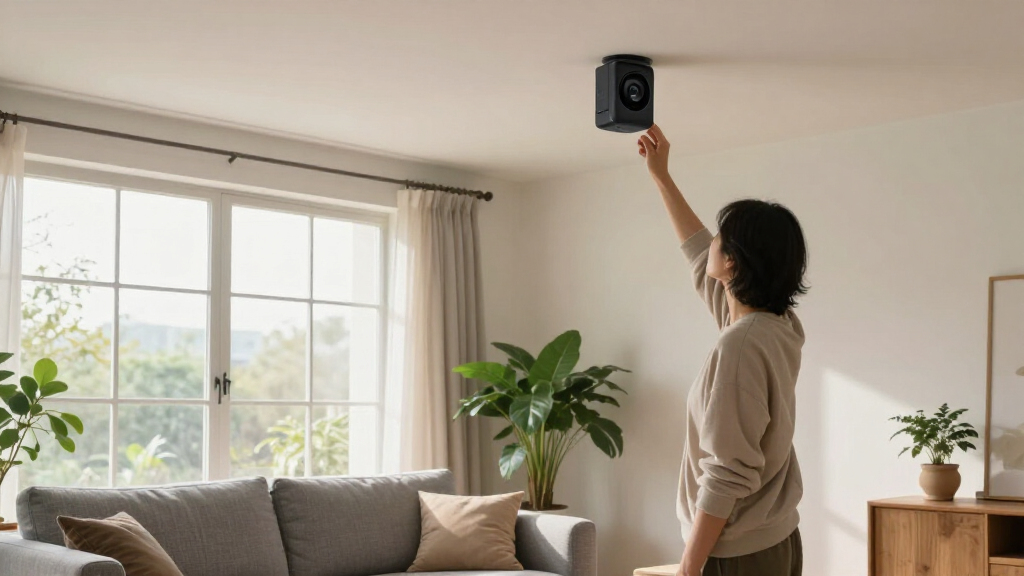
Placement is everything. Outdoor cameras should be mounted high enough to avoid tampering, yet low enough to capture faces clearly. Ideal spots include front doors, driveways, and side gates.
Indoor cameras work best in common areas, but avoid placing them where people expect privacy, like bedrooms or bathrooms. For example, placing a camera at the front porch facing the street can deter package thieves and give you a clear view of visitors.
Remember, lighting matters. Bright, well-lit areas produce sharper images, while infrared night vision can pick up details in darkness. Avoid pointing cameras into neighbors’ yards — privacy laws vary, and you want to respect boundaries.
Strategic placement and proper lighting are critical because they directly influence the quality and usefulness of your footage. A poorly placed camera might miss key activity or produce grainy images that are useless for identification. Ensuring your outdoor cameras are mounted high prevents tampering, but also consider their field of view—obstructions or improper angles can create blind spots. Similarly, indoor cameras placed in well-lit areas or with infrared capabilities ensure clear night images, aiding in identification during emergencies. Respecting neighbors’ privacy not only complies with legal standards but also fosters good community relations, preventing potential conflicts or legal issues.
What’s the Real Deal with Cloud Storage and Local Storage?
Cloud storage offers ease of access and longer history, but it often comes with monthly fees. Local storage—via microSD cards or network-attached drives—keeps your footage on-site, reducing recurring costs but risking data loss if the device is stolen.
For example, a homeowner might choose a camera with a 32GB microSD card for local saves, but also subscribe to a cloud plan for extended history and advanced AI detection. Combining both provides a safety net and flexibility.
Understanding the implications of each storage option is crucial: cloud storage provides seamless access from anywhere and automatic backups, which is invaluable if your device is physically compromised. However, ongoing subscription costs can add up over time. Local storage, while cost-effective and independent of internet bandwidth, poses risks if the device is stolen or damaged, as footage can be lost without a backup. Many security-conscious users opt for a hybrid approach—using local storage for immediate footage and cloud services for long-term backups—balancing convenience, security, and cost. Additionally, be aware of privacy policies: some vendors store data on their servers, which could be vulnerable if not properly secured. Making an informed choice involves weighing these factors against your security priorities and budget.
Frequently Asked Questions
Can smart security cameras work without Wi-Fi?
Some cameras can record locally without Wi-Fi, but remote access, alerts, and cloud storage depend on internet connectivity. Most consumer models require Wi-Fi unless they support Ethernet or cellular backup.
Is 4K resolution worth it over 1080p?
4K provides sharper images and better zoom capabilities, especially for larger areas or distant views. However, it also demands more bandwidth and storage, so consider your internet speed and storage capacity before upgrading.
Are wired cameras better than wireless?
Wired cameras tend to be more reliable and support continuous recording, but they’re harder to install. Wireless cameras are easier to set up and move, but rely on Wi-Fi stability. Choose based on your home’s layout and needs.
Do I need a subscription for cloud storage?
Not always. Some cameras include free local storage or basic alerts, but subscriptions unlock extended video history, AI detection, and professional monitoring. Weigh the ongoing cost against your security needs.
How do I keep my smart camera system secure?
Use unique passwords, enable two-factor authentication, keep firmware updated, and disable unnecessary features like remote access if not needed. These steps significantly lower the risk of hacking or unauthorized access.
Conclusion
Your home’s safety hinges on making smart choices, not just buying the latest gadget. Focus on what truly matters: good image quality, privacy protection, and proper placement. Remember, a well-placed camera with smart detection beats a dozen poorly positioned ones every time.
Think of your security system as a vigilant, silent guardian — constantly watching, alerting, and protecting. The better you understand its strengths and limits, the more peace of mind you’ll enjoy. Now, go ahead, secure your home with confidence.