
The best Matter smart home devices make it easier to connect everyday controls across compatible smart home platforms, but the right choice depends on what you want to automate. I’d put the Tapo P316M power strip first for its mix of multiple outlets and energy monitoring, while the Tapo S505 switches stand out for built-in lighting control and the Kwikset Halo Select Wi-Fi and Matter deadbolt for buyers focused on a smart lock. The main tradeoffs are whether you need a plug, a permanent switch, or a security device—and how much setup and compatibility checking each involves. This roundup also compares single plugs with multipacks and color bulbs with practical controls. Read on for the full breakdown and help matching a device to your home.

Get home appliances delivered free with Prime
- Fast, free delivery on millions of items
- Prime Video, Amazon Music and more included
- Member-only deals all year
Complete the kit
![[Genuine] Waterdrop PF-01A Water Filter Replacement for W...](https://m.media-amazon.com/images/I/41+5tl9EiKL._SX342_SY445_QL70_FMwebp_.jpg)


Key Takeaways
- The Tapo P316M is the most versatile plug-style pick because it combines multiple controlled outlets with energy monitoring; buyers who only need one outlet can choose a smaller plug instead.
- Multipacks serve different needs: Linkind’s six-pack suits several rooms, while Tapo’s three-pack offers a smaller batch of compact plugs rated up to 15A/1800W.
- The Tapo S505 switches address a different problem than smart plugs. They give installed lighting circuits smart control, but require switch installation and a suitable electrical setup.
- Linkind’s 800-lumen multicolor bulb adds adjustable lighting, while its plugs focus on on/off control; choose based on whether mood and color matter or appliance control is the goal.
- The three Kwikset lock entries are not interchangeable. Aura Reach, Halo Select Plus, and Halo Select Wi-Fi and Matter differ by model and connectivity, so verify the exact functions and platform support before choosing.
| Tapo Smart Wi‑Fi Power Strip (Matter Certified) – Model P316M with Energy Monitoring |  | Best Matter Power Strip | Smart AC outlets: 6 individually controlled | USB ports: 3 always-on ports, 5V 2.4A | Maximum devices supported: 9 total | VIEW LATEST PRICE | See Our Full Breakdown |
| Linkind Matter Smart Plug, 6-Pack |  | Best Multi-Room Value | Pack size: 6 plugs | Connectivity: 2.4 GHz Wi-Fi; IPv6 network | Power capacity: 1800 W | VIEW LATEST PRICE | See Our Full Breakdown |
| Linkind Matter Smart Light Bulb, 60W Equivalent, 800 Lumens, Multicolor |  | Best for Colorful Lighting | Brightness: 800 lumens | Wattage equivalent: 60 W | Colors: 16 million | VIEW LATEST PRICE | See Our Full Breakdown |
| Kwikset Aura Reach Matter-Enabled Smart Lock, Satin Nickel |  | Best for High-Capacity Guest Access | Lock type: Deadbolt | Connectivity: Matter over Thread; Bluetooth | Compatible platforms: Apple Home, Amazon Alexa, Google Home, SmartThings | VIEW LATEST PRICE | See Our Full Breakdown |
| Kwikset Halo Select Plus Smart Lock Deadbolt, Satin Nickel |  | Best for Apple Home Key | Lock type: Touchscreen smart deadbolt | Connectivity: Wi-Fi, Matter | Smart home compatibility: Amazon Alexa, Apple Home, Google Home | VIEW LATEST PRICE | See Our Full Breakdown |
| TP-Link Tapo S505 Matter Smart Light Switch, 2-Pack | 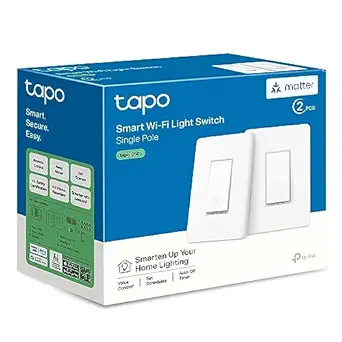 | Best Matter Switch Value | Model: Tapo S505 | Pack size: 2 switches | Connectivity: Matter and 2.4 GHz Wi-Fi | VIEW LATEST PRICE | See Our Full Breakdown |
| Kwikset Halo Select Wi-Fi and Matter Smart Deadbolt, Satin Nickel |  | Best Matter Lock for High-Capacity Access | Model: Halo Select; model number 998000-003 | Finish: Satin Nickel | Connectivity: Wi-Fi; Matter over Thread capable | VIEW LATEST PRICE | See Our Full Breakdown |
| TP-Link Tapo P125M Matter Smart Plug Mini, 15A/1800W, 3-Pack |  | Best Matter Plug Bundle | Model: Tapo P125M | Pack size: 3 plugs | Maximum load: 15 A / 1800 W | VIEW LATEST PRICE | See Our Full Breakdown |
| Linkind Matter Smart Plug, 2-Pack |  | Best Matter Plug for Protected Loads | Pack size: 2 plugs | Connectivity: 2.4 GHz Wi-Fi; IPv6 network | Matter support: Yes | VIEW LATEST PRICE | See Our Full Breakdown |
| Linkind Matter Smart Plug |  | Best Single Matter Plug for AiDot Users | Connectivity: Matter; 2.4 GHz Wi-Fi | Compatible platforms: Apple Home, Alexa, Google Home, SmartThings, AiDot | Power capacity: 15 A / 1800 W | VIEW LATEST PRICE | See Our Full Breakdown |
| Matter smart home device | Connectivity | Compatible platforms |
|---|---|---|
| Tapo Smart Wi‑Fi Power Strip | — | — |
| Linkind Matter Smart Plug | 2.4 GHz Wi-Fi; IPv6 network | Apple Home, Alexa, Google Home, SmartThings, AiDot |
| Linkind Matter Smart Light Bul | 2.4 GHz Wi-Fi | — |
| Kwikset Aura Reach Matter-Enab | Matter over Thread; Bluetooth | Apple Home, Amazon Alexa, Google Home, SmartThings |
| Kwikset Halo Select Plus Smart | Wi-Fi, Matter | — |
| TP-Link Tapo S505 Matter Smart | Matter and 2.4 GHz Wi-Fi | Apple Home, Amazon Alexa, Google Home, Samsung SmartThings |
| Kwikset Halo Select Wi-Fi and | Wi-Fi; Matter over Thread capable | Amazon Alexa, Apple Home, Google Home |
| TP-Link Tapo P125M Matter Smar | 2.4 GHz Wi-Fi; Matter | Apple Home, Amazon Alexa, Google Home, Samsung SmartThings |
| Linkind Matter Smart Plug | 2.4 GHz Wi-Fi; IPv6 network | Apple Home, Alexa, Google Home, SmartThings, AiDot |
| Linkind Matter Smart Plug | Matter; 2.4 GHz Wi-Fi | Apple Home, Alexa, Google Home, SmartThings, AiDot |
More Details on Our Top Picks
Tapo Smart Wi‑Fi Power Strip (Matter Certified) – Model P316M with Energy Monitoring
The Tapo P316M is the strongest fit here when one outlet needs to become a managed charging and appliance hub. Its six individually controlled AC outlets let you schedule devices separately, while per-outlet energy monitoring helps identify which connected equipment is drawing power. That makes it more informative than the Linkind Matter Smart Plug, 6-Pack, which spreads control across separate plugs but does not list energy monitoring. The P316M also adds three always-on USB ports and a flush-fitting plug for tight spaces. The tradeoff is that its USB ports cannot be controlled individually, and the supplied details do not state a total power rating. Choose it for consolidated control and energy visibility; choose individual plugs when you need outlets in different rooms.
Pros:- Six AC outlets can be controlled and scheduled independently
- Per-outlet energy monitoring makes device-level usage easier to track
- Matter support and local LAN control support broad, responsive smart-home integration
- Flush-fitting plug and 3-foot cord suit tighter layouts
Cons:- The three USB ports are always on rather than individually managed
- No explicit total power rating is provided in the supplied specifications
Best for: People who want to control and track energy use for several devices gathered around one desk, media center, or bedside area
Not ideal for: Buyers who need smart control over USB charging or need a clearly stated total power capacity before connecting demanding equipment
- Smart AC outlets:6 individually controlled
- USB ports:3 always-on ports, 5V 2.4A
- Maximum devices supported:9 total
- Power cord:3 ft
- Matter certified:Yes
- Energy monitoring:Per outlet
- Local control:Local LAN control supported
- Voice assistant compatibility:Siri, Alexa, Google Assistant, Bixby
Our verdict“Choose the Tapo P316M if you want Matter control and per-device energy tracking from one compact power strip.”
Linkind Matter Smart Plug, 6-Pack
This six-pack makes the most sense when you want to add Matter-controlled outlets across several rooms in one go. Unlike the Tapo P316M, which gathers six controlled outlets in a single strip, the Linkind plugs can be placed wherever your lamps and small appliances are located. Scheduling, timers, remote app access, and voice commands cover the everyday jobs, while local network control can keep routines working during an internet outage. The plugs are rated for 15A and 1800W, but they rely on 2.4 GHz Wi-Fi and IPv6; Apple Home, Alexa, Google Home, and SmartThings also require a compatible Matter controller. Buyers using AiDot can use its app without a hub. The compact form favors distributed control, not energy tracking or a single centralized setup.
Pros:- Six separate plugs can be distributed around the home
- Supports schedules, timers, remote access, and voice commands
- Local network control can remain available during internet outages
- ETL and FCC certification plus short-circuit and overload protection
Cons:- Most listed platforms require a compatible Matter hub or controller
- Requires both 2.4 GHz Wi-Fi and an IPv6 network
- Does not list energy monitoring
Best for: Households adding smart control to lamps and suitable appliances in multiple rooms, especially those with a compatible Matter controller already set up
Not ideal for: People without 2.4 GHz Wi-Fi, IPv6, or a Matter controller for their preferred platform, or anyone seeking outlet-level energy monitoring
- Pack size:6 plugs
- Connectivity:2.4 GHz Wi-Fi; IPv6 network
- Power capacity:1800 W
- Voltage and amperage:120 V; 15 A
- Plug type:Type B, 3-prong
- Compatible platforms:Apple Home, Alexa, Google Home, SmartThings, AiDot
- Certifications:ETL, FCC
- Protection:Short-circuit and overload protection
Our verdict“Pick this six-pack to spread Matter outlet control across rooms, provided your network and chosen platform meet its requirements.”
Linkind Matter Smart Light Bulb, 60W Equivalent, 800 Lumens, Multicolor
For an easy Matter lighting upgrade, this Linkind bulb pairs useful everyday brightness with a broad palette of color and scene options. Its 800 lumens suit many standard lamps, while 16 million colors, 104 preset scenes, and music syncing offer more room for decorative lighting than a basic smart switch such as the TP-Link Tapo S505. A bulb also lets you change color without replacing a wall control, though it only helps the fixture where it is installed. The main compatibility caveat is physical: it may not work with traditional dimmer switches, so the existing wall control matters. It also needs 2.4 GHz Wi-Fi. Choose this model for room-level color effects and voice or app control, not for whole-room lighting control from a single switch.
Pros:- Matter compatibility spans Apple Home, Alexa, and Google Home
- 800 lumens provide practical brightness alongside color effects
- 16 million colors and 104 preset scenes allow varied lighting choices
- Music syncing adds an entertainment-focused lighting mode
Cons:- Requires a 2.4 GHz Wi-Fi network
- May not work with traditional dimmer switches
- Color controls apply to this bulb rather than a whole fixture or room
Best for: Renters and smart-lighting newcomers who want colorful, app-controlled lighting in a lamp or fixture without replacing a wall switch
Not ideal for: People using traditional dimmer switches, relying on 5 GHz-only Wi-Fi, or seeking to control several bulbs together from a single wall switch
- Brightness:800 lumens
- Wattage equivalent:60 W
- Colors:16 million
- Preset scenes:104
- Connectivity:2.4 GHz Wi-Fi
- Smart home compatibility:Matter, Apple Home, Alexa, Google Home
- Lifespan:Over 25,000 hours
- Dimming compatibility:Generally not compatible with traditional dimmer switches
Our verdict“Choose the Linkind bulb for Matter-based color and scene control in an individual lamp, after checking the fixture’s dimmer setup.”
Kwikset Aura Reach Matter-Enabled Smart Lock, Satin Nickel
The Kwikset Aura Reach is the more access-code-focused lock in this lineup, with capacity for up to 250 user codes and guest access managed through an app. Matter over Thread connects it to major platforms, while Bluetooth supports nearby control. Proximity wakeup and geofence-based auto-unlock add hands-free options that the Kwikset Halo Select Plus does not list in its supplied features. The Aura Reach, however, does not advertise that model’s Apple Home Key tap-to-unlock or Wi-Fi connectivity, so it is a better match for code-based household access than for shoppers seeking a broad menu of entry methods and remote features. SmartKey rekeying and screwdriver-only installation make the hardware approachable, but Bluetooth app control is intended for nearby use.
Pros:- Matter over Thread support works with Apple Home, Alexa, Google Home, and SmartThings
- Supports up to 250 access codes and guest access
- Proximity wakeup and geofence-based auto-unlock offer hands-free entry options
- SmartKey rekeying and screwdriver-only installation simplify setup
Cons:- Bluetooth app control is for nearby use
- Does not list Wi-Fi connectivity or Apple Home Key support
- Remote capabilities depend on the compatible smart-home setup
Best for: Busy households, landlords, and hosts who need many individual access codes and Matter over Thread smart-home integration
Not ideal for: Apple users who specifically want Home Key tap-to-unlock, or buyers who need app access from afar without relying on a Thread smart-home setup
- Lock type:Deadbolt
- Connectivity:Matter over Thread; Bluetooth
- Compatible platforms:Apple Home, Amazon Alexa, Google Home, SmartThings
- Access codes:Up to 250
- Control methods:App, voice
- Finish:Satin nickel
- Dimensions:0.97 x 2.81 x 5.81 inches
- Installation:Screwdriver required
Our verdict“Choose the Aura Reach if managing many codes and using Matter over Thread matter more than Home Key or direct Wi-Fi features.”
Kwikset Halo Select Plus Smart Lock Deadbolt, Satin Nickel
The Kwikset Halo Select Plus stands out for shoppers who want several ways into the home, particularly Apple Home Key tap-to-unlock with an iPhone or Apple Watch. A touchscreen code, app control, geofencing, and physical key provide alternatives, while guest codes, activity logs, notifications, and intrusion alerts support household access management. Compared with the Kwikset Aura Reach, this model adds Home Key and Wi-Fi to its listed connectivity, but the Aura Reach specifies Matter over Thread and proximity wakeup. That makes the Halo Select Plus the clearer choice for Apple users who value tap entry and for households wanting varied access methods; its remote functions and integrations still depend on the app and smart-home setup. It also requires a screwdriver for installation.
Pros:- Apple Home Key supports tap-to-unlock with an iPhone or Apple Watch
- Offers app, touchscreen code, geofencing, and physical-key entry
- Supports up to 250 guest access codes
- Activity logs, notifications, and intrusion alerts add access visibility
Cons:- Remote features and smart-home integrations depend on the app and home setup
- Requires screwdriver installation
- Its listed connectivity is Wi-Fi and Matter, rather than Matter over Thread
Best for: Apple households with iPhones or Apple Watches that want Home Key entry alongside keypad, app, geofence, and physical-key access
Not ideal for: Buyers who do not use Apple devices and prefer a lock with listed Matter-over-Thread connectivity or proximity wakeup
- Lock type:Touchscreen smart deadbolt
- Connectivity:Wi-Fi, Matter
- Smart home compatibility:Amazon Alexa, Apple Home, Google Home
- Access methods:Apple Home Key, app, touchscreen code, geofencing, physical key
- Guest access codes:Up to 250
- Finish:Satin nickel
- Installation:Screwdriver required
- Included keys:2
Our verdict“Choose the Halo Select Plus if Apple Home Key and multiple entry methods are priorities for your smart lock.”
TP-Link Tapo S505 Matter Smart Light Switch, 2-Pack
The Tapo S505 two-pack is my pick for adding Matter control to existing ceiling lights across two switch locations, rather than smartening individual lamps. It works with Apple Home, Alexa, Google Home, and SmartThings, and local network control helps keep commands available when internet access drops. Compared with the Tapo P125M plugs, this is a more permanent way to automate hardwired lighting, but installation is less plug-and-play: the S505 is single-pole only and needs a neutral wire. Guided setup in the Tapo app can help, though it does not remove the need to check the wiring first. The two-switch bundle suits buyers with compatible wiring and multiple rooms to update; renters or homes with no neutral wire should look at plug-in options instead.
Pros:- Works with Apple Home, Alexa, Google Home, and SmartThings through Matter
- Two switches cover more than one lighting circuit in a single bundle
- Local network control and multi-admin support allow platform flexibility
- App-guided setup, scheduling, timers, and voice control
Cons:- Requires a neutral wire, which may not be present in every switch box
- Single-pole design does not suit three-way lighting circuits
- Requires a 2.4 GHz Wi-Fi network
Best for: Homeowners with neutral wiring who want to automate two single-pole light circuits across Matter platforms
Not ideal for: Renters, homes without a neutral wire, or buyers who need a three-way switch
- Model:Tapo S505
- Pack size:2 switches
- Connectivity:Matter and 2.4 GHz Wi-Fi
- Compatible platforms:Apple Home, Amazon Alexa, Google Home, Samsung SmartThings
- Wiring and switch type:Neutral wire required; single pole
- Certification and warranty:UL certified; 2-year warranty
Our verdict“Choose the Tapo S505 if you have neutral-wired single-pole circuits and want a two-switch Matter upgrade; choose the Tapo P125M for simpler, renter-friendly control of lamps and appliances.”
Kwikset Halo Select Wi-Fi and Matter Smart Deadbolt, Satin Nickel
The Kwikset Halo Select stands apart from the smart plugs and switches in this roundup by making Matter part of a front-door access setup. Its standout practical feature is capacity for up to 250 access codes, useful for busy households, rentals, or recurring visitors who need separate entry credentials. You can also use the touchscreen, physical keys, app control, or geofencing, while alerts flag invalid codes and tampering. Compared with the Kwikset Aura Reach, this model lists direct Wi-Fi remote control and multiple entry methods; its Matter connection over Thread is optional, so buyers should check their preferred smart-home setup before counting on Matter integration. BHMA Grade AAA hardware is a strong security credential, but the one-year electronics warranty is shorter than its limited lifetime mechanical and finish coverage.
Pros:- Supports up to 250 access codes for households with many users or guests
- Offers app, touchscreen, physical-key, and geofencing entry options
- Remote locking and unlocking work over Wi-Fi without a hub
- BHMA Grade AAA standard and alerts for tampering or invalid code attempts
Cons:- Matter over Thread is optional, so Matter setup depends on the chosen configuration
- Electronics warranty lasts one year
- Geofencing auto-unlock may not suit buyers who prefer entry to require a deliberate action
Best for: Households, landlords, and property managers who need many distinct entry codes, remote access, and several ways to unlock
Not ideal for: Buyers who want guaranteed Matter-over-Thread integration without checking hub requirements, or who prioritize a longer electronics warranty
- Model:Halo Select; model number 998000-003
- Finish:Satin Nickel
- Connectivity:Wi-Fi; Matter over Thread capable
- Compatible platforms:Amazon Alexa, Apple Home, Google Home
- Entry methods:App, touchscreen code, geofencing auto-unlock, physical keys
- Access codes:Up to 250
- Warranty:Limited lifetime mechanical and finish; 1-year electronics
Our verdict“Pick the Halo Select if you need flexible entry and a large set of access codes, but verify its optional Thread-based Matter setup against your home platform before buying.”
TP-Link Tapo P125M Matter Smart Plug Mini, 15A/1800W, 3-Pack
For buyers who want to automate several lamps or appliances at once, the Tapo P125M three-pack offers broader coverage than the two-plug Linkind bundle. Its Matter support spans Apple Home, Alexa, Google Home, and SmartThings, while local network control can keep routines and commands working when internet access is unavailable. The mini form is useful in crowded outlet strips because it is designed to leave neighboring sockets accessible. Bluetooth onboarding also gives setup a guided starting point. The tradeoff is that each plug still relies on 2.4 GHz Wi-Fi, and the listing does not mention energy monitoring. If tracking power use matters, the Tapo P316M power strip is the more relevant comparison; for simple on/off automation across multiple outlets, this three-pack is the stronger fit.
Pros:- Three plugs provide broader room coverage than the Linkind two-pack
- Matter compatibility includes Apple Home, Alexa, Google Home, and SmartThings
- Local network control can continue when the internet is unavailable
- Compact shape helps preserve access to neighboring outlets
Cons:- Requires a 2.4 GHz Wi-Fi network
- Energy monitoring is not listed
- Not a substitute for a multi-outlet power strip when several devices share one location
Best for: Households adding Matter control to several lamps or appliances that use standard outlets
Not ideal for: Buyers who need per-device energy monitoring or whose home lacks a 2.4 GHz Wi-Fi network
- Model:Tapo P125M
- Pack size:3 plugs
- Maximum load:15 A / 1800 W
- Connectivity:2.4 GHz Wi-Fi; Matter
- Compatible platforms:Apple Home, Amazon Alexa, Google Home, Samsung SmartThings
- Setup:Bluetooth onboarding
- Certification:UL certified
- Warranty:2-year limited warranty
Our verdict“Choose the Tapo P125M three-pack for straightforward Matter on/off control in several rooms; choose the Tapo P316M if energy monitoring is a priority.”
Linkind Matter Smart Plug, 2-Pack
The Linkind Matter Smart Plug two-pack makes sense for buyers who want basic outlet automation plus specified overload and short-circuit protection. It supports voice commands, schedules, timers, and remote access, with local network communication available when the internet is down. Compared with the Tapo P125M three-pack, you get one fewer plug, but the Linkind listing spells out its 120 V, 15 A, and 1800 W ratings and names both protective features. The catch is hub dependence: Apple Home, Alexa, Google Home, and SmartThings require a Matter-compatible hub or controller; AiDot can work without one. That makes it less convenient for someone starting from scratch than the Tapo plug’s listed multi-platform setup. Its 2.4 GHz Wi-Fi requirement also rules out networks that use only other bands.
Pros:- Includes stated overload and short-circuit protection
- Supports local network control when internet access is unavailable
- Offers schedules, timers, voice control, and remote access
- Two-pack suits buyers automating a pair of lamps or appliances
Cons:- Most listed platforms require a Matter-compatible hub or controller
- Only supports 2.4 GHz Wi-Fi
- Pack includes fewer plugs than the Tapo P125M three-pack
Best for: Buyers who need two Matter-controlled outlets and want overload and short-circuit protection specified in the product details
Not ideal for: Smart-home beginners without a Matter controller, or households needing three or more plugs in one purchase
- Pack size:2 plugs
- Connectivity:2.4 GHz Wi-Fi; IPv6 network
- Matter support:Yes
- Compatible platforms:Apple Home, Alexa, Google Home, SmartThings, AiDot
- Hub requirement:Matter-compatible hub required for most listed platforms; AiDot can work without one
- Safety and certification:Overload and short-circuit protection; FCC certified
- Plug type:Type B
Our verdict“Choose this Linkind two-pack if you already have a compatible Matter controller and value specified electrical protections; otherwise, the Tapo P125M is the easier multi-platform bundle to compare.”
Linkind Matter Smart Plug
This single Linkind Matter Smart Plug suits buyers who want to automate one outlet without committing to a multi-pack. It supports remote control, voice commands, schedules, and timers, and its AiDot app can work without a Matter hub. That gives it a clear entry point for AiDot users, though Apple Home, Alexa, Google Home, and SmartThings do require a Matter-certified hub. Compared with the Linkind two-pack, the single unit is a better match when one lamp or appliance is the only target; it is a less practical choice for outfitting several rooms. The plug also lists short-circuit and overload protection, but setup still depends on 2.4 GHz Wi-Fi and IPv6. Buyers should check both network requirements and controller needs before choosing it for a broader Matter system.
Pros:- AiDot app control does not require a Matter hub
- Supports remote and voice control, schedules, and timers
- Local LAN control is listed for use when internet access is unavailable
- Includes short-circuit and overload protection
Cons:- A Matter-certified hub is required for Apple Home, Alexa, Google Home, and SmartThings
- Requires 2.4 GHz Wi-Fi and IPv6
- A single plug offers less coverage than the Linkind two-pack or Tapo three-pack
Best for: AiDot users who want to automate one lamp or appliance and do not need a multi-pack
Not ideal for: Buyers setting up Apple Home, Alexa, Google Home, or SmartThings without a Matter hub, or those automating multiple outlets
- Connectivity:Matter; 2.4 GHz Wi-Fi
- Compatible platforms:Apple Home, Alexa, Google Home, SmartThings, AiDot
- Power capacity:15 A / 1800 W
- Network requirement:IPv6
- Hub requirement:Matter-certified hub required for Apple Home, Alexa, Google Home, and SmartThings; not required for AiDot app
- Safety features:Short-circuit and overload protection; fire-resistant materials
- Certification:FCC certified
- Control features:Remote control, voice control, scheduling, and timer
Our verdict“Buy this single plug for one outlet in an AiDot setup; choose the Linkind two-pack or Tapo P125M three-pack if you need to automate several devices.”
How We Picked
I ranked these devices by how well they solve a distinct Matter smart home need, then weighed practical usability, versatility, setup demands, and the usefulness of their stated features. For plugs, that meant comparing outlet count, pack size, compactness, and energy monitoring rather than treating every plug as the same choice. For switches, bulbs, and locks, I considered the kind of control they add and the extra installation or compatibility checks buyers may face.
The ranking favors options that offer a clear advantage for a broad set of buyers, while specialist devices rank for the people who need their specific function. A lock does not outrank a plug just because it is more complex, and a multipack is not automatically the best fit if one outlet is all a household needs. Because model capabilities and Matter support can vary, I also factor in the value of checking the exact model and ecosystem requirements before purchase.
| Matter smart home device | Compatible platforms |
|---|---|
| Tapo Smart Wi‑Fi Power Strip | — |
| Linkind Matter Smart Plug | Apple Home, Alexa, Google Home, SmartThings, AiDot |
| Linkind Matter Smart Light Bul | — |
| Kwikset Aura Reach Matter-Enab | Apple Home, Amazon Alexa, Google Home, SmartThings |
| Kwikset Halo Select Plus Smart | — |
| TP-Link Tapo S505 Matter Smart | Apple Home, Amazon Alexa, Google Home, Samsung SmartThings |
| Kwikset Halo Select Wi-Fi and | Amazon Alexa, Apple Home, Google Home |
| TP-Link Tapo P125M Matter Smar | Apple Home, Amazon Alexa, Google Home, Samsung SmartThings |
| Linkind Matter Smart Plug | Apple Home, Alexa, Google Home, SmartThings, AiDot |
| Linkind Matter Smart Plug | Apple Home, Alexa, Google Home, SmartThings, AiDot |
Factors to Consider When Choosing Best Matter Smart Home Devices
Choosing among Matter devices starts with the job you want to solve, not the protocol label alone. I’d match the device type to your home, then check the details that affect installation, compatibility, and day-to-day control.
Start With the Control You Actually Need
A smart plug is suited to appliances that turn on when power is supplied, but it cannot replace every wall switch or make a non-dimmable lamp dimmable. A smart bulb adds light-level and color control, though its smart features may be unavailable when someone switches off power at the wall. A smart switch controls a fixed lighting circuit and keeps the wall control familiar, but it takes installation. Locks address entry and access rather than general automation, so they bring a different set of security and compatibility checks. Pick the device category first to avoid buying a Matter product that solves the wrong problem.
Check Matter Support for the Exact Model
The word Matter on a product listing does not tell you every detail about how it works with your chosen smart home app. Check the exact model number, the platform’s current device support, and whether the features you want are exposed through that platform. Basic on/off control may be available even when a brand-specific feature is not. Locks deserve extra care: confirm which functions, such as remote access or user management, work with your platform and whether they need additional hardware or an account. This small check can prevent a device from joining your network but falling short of your expectations.
Compare Pack Size With Placement Plans
Multipacks can make sense when several devices will be installed at once, but the largest bundle is a poor fit if some units will sit unused. Count the outlets, lamps, or rooms you plan to automate before comparing pack contents. Compact plugs can matter when neighboring outlets share a wall plate or power strip, while a multi-outlet strip may reduce clutter around a media center or desk. Also check the device dimensions and outlet orientation against your furniture and existing plugs. Buying for a real layout is more useful than buying by unit count alone.
Treat Electrical Fit as a Hard Requirement
Smart plugs have load limits, and those limits should guide which appliances you connect. Check the appliance’s power draw and the plug’s rating rather than assuming any plug can manage any device. A smart plug is not a substitute for a purpose-built controller when an appliance needs a special startup sequence or safe shutdown. Wall switches call for a separate check of wiring, box space, and installation comfort; some homes may need an electrician or a different switch design. If the electrical fit is uncertain, resolve that before focusing on app features.
Decide Whether Monitoring or Color Control Will Get Used
Extra features add value only when they support a habit you plan to keep. Energy monitoring can help track a device’s consumption, but it is less useful if you do not expect to review the information or act on it. Multicolor bulbs can support scenes and mood changes, while a standard smart plug may be the simpler answer for a lamp that only needs remote on/off control. Ask whether the feature changes your routine or merely adds another screen in an app. This helps separate useful functionality from a longer feature list.
Plan for Household Access and Installation
Smart home devices often serve more than one person, so consider how other household members will control them when an app or automation is inconvenient. A physical switch may be easier for shared lighting than asking everyone to use a phone. Locks need particular thought about access, guest routines, and what happens if connectivity or power is interrupted. Decide who will install and maintain each device, and check whether the setup depends on a hub, app, or account. A setup that fits the household’s habits is more likely to remain useful than one built around features nobody wants to manage.
Frequently Asked Questions
Should I buy a multi-pack of Matter plugs or start with one?
Start with one if you are still confirming platform compatibility, outlet clearance, or how your household will use automations. A multipack makes more sense when you already have several planned locations and the same plug will suit each one. Pack size alone does not tell you whether the devices are compact enough for crowded outlets or appropriate for every appliance. For this lineup, the Linkind six-pack, Linkind two-pack, single Linkind plug, and Tapo three-pack target different rollout sizes. Match the bundle to your actual list of devices rather than buying extras for hypothetical projects.
Will a Matter device work with every smart home app?
Matter is intended to improve cross-platform compatibility, but support still depends on the specific device, platform, and feature. Check the manufacturer’s information and your smart home platform’s compatibility details for the exact model. Also confirm whether setup requires a compatible controller or other network equipment. Some functions offered through a manufacturer’s app may not appear in every third-party app. Before buying, verify the control you care about—not just whether the device can be added.
When is a smart switch a better choice than a smart bulb?
A smart switch is often the better fit when you want to control a fixed ceiling light from the wall and retain a familiar physical control. A smart bulb is more suitable when you want color or adjustable lighting and can keep the bulb powered. If someone switches off power to a smart bulb at the wall, app and automation control may stop until power returns. Switch installation brings wiring and fit requirements, while a bulb usually avoids electrical work. Choose based on the control experience and installation your home can support.
What should I verify before choosing one of the Kwikset Matter locks?
Confirm the exact model name and the functions it supports with your chosen platform, rather than assuming the three Kwikset entries share the same features. Check door and deadbolt compatibility, installation requirements, and whether any desired remote functions need extra equipment or a separate account. Think through household access too: shared users and guests may need a different routine from the person who installs the lock. Review how the lock can be operated if the app or network is unavailable. For a security device, a model-specific compatibility check is more useful than choosing by brand or Matter label alone.
Is energy monitoring worth choosing over a basic smart plug?
Energy monitoring is useful if you want to see how much power a connected device uses and expect that information to affect your habits. If your only goal is remote on/off control or a simple schedule, a standard plug may be a more direct fit. A power strip can also be useful when several nearby devices need control, though you should confirm that its outlets and ratings suit the intended setup. Monitoring does not automatically reduce consumption; it gives you information to interpret. Choose it for a specific tracking goal, not just because the feature is available.
Conclusion
For the best overall, I’d choose the Tapo P316M if multiple controlled outlets and energy monitoring fit your setup. The best value by pack size depends on how many outlets you need: Linkind’s six-pack suits a broad rollout, while the Tapo three-pack is a more focused compact-plug option. For a best premium or security-focused pick, compare the three Kwikset locks by exact model features and platform support before deciding. Beginners who want a straightforward first step can start with a single Linkind Matter plug, while the Tapo S505 is the specific pick for installed lighting control and the Linkind bulb for color scenes. Choose the device that matches your intended use and verify its exact compatibility before buying.
Cold & flu season Picks
humidifiers
As an affiliate, we earn on qualifying purchases.